1. SYSTEM INTRODUCTION
1-13
1.5 Home Screen and Displays
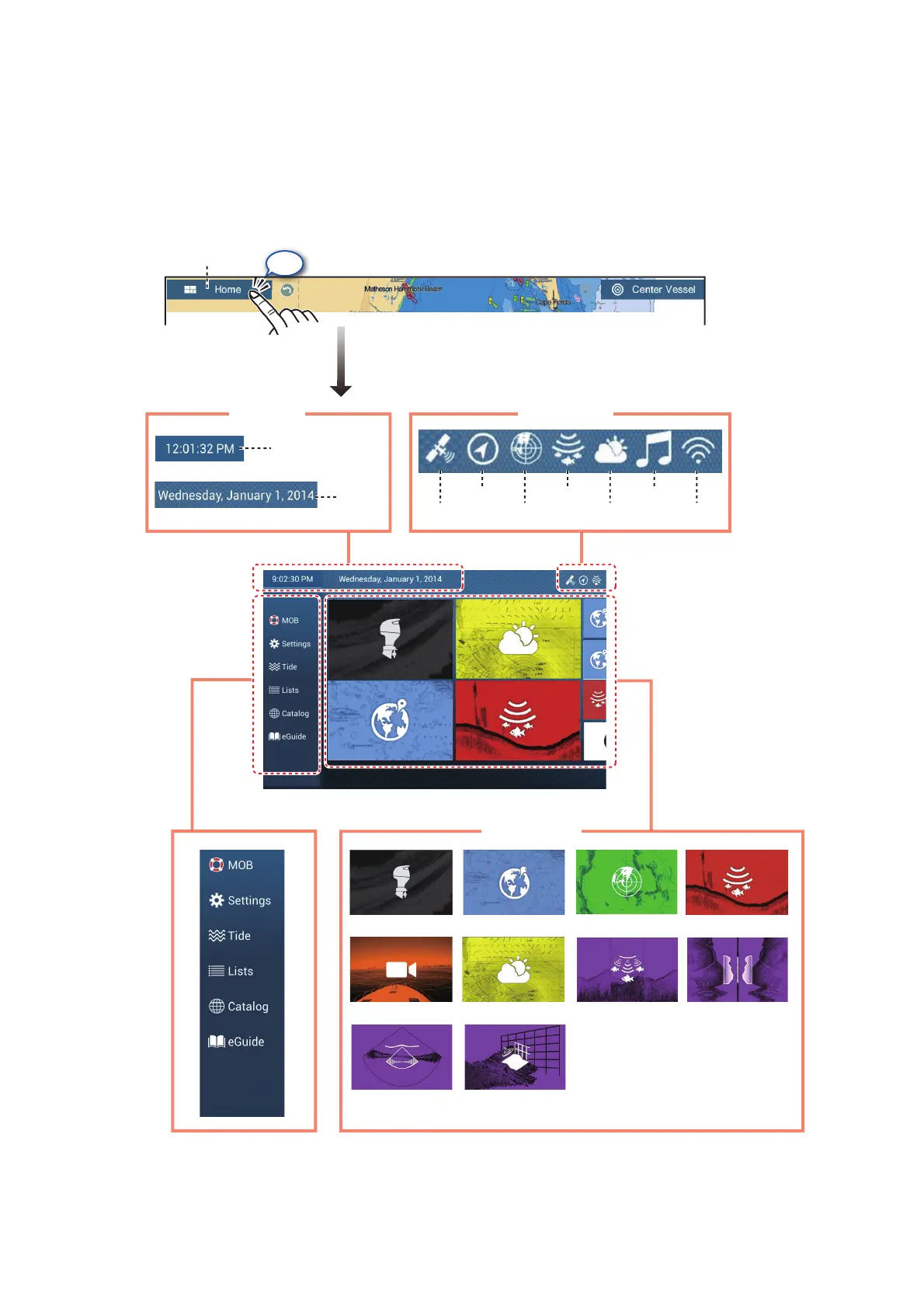
The home screen is where you access functions and menus, select displays and
check sensor status. Tap the [Home] icon at the top left corner to show the home
screen. The home screen is automatically closed, and the previous operation display
restored, when no operation is detected for approx. one minute.
The Sensor icons show the sensors connected in the system and their status, in the
following colors. White: Sensor normal; Red: Sensor error; Gray: Sensor inactive
(stopped).
Plotter Radar Sounder
Camera
Weather
Multi Sounder Side Scan
Cross Section 3D History
Time
Date
GPS
Heading
Radar
Sounder
Sirius
Fusion
WiFi
FunctionsFunctions
Tap
Home screenHome screen
Time, dateTime, date
Sensor iconsSensor icons
Display iconsPage icons
Home icon
Lists
Lists
Settings
Tide
Lists
Catalog
SUZUKI Engine



 To Next Page