28 A-96.250.871 / 120417
AMI CACE
Instrument Setup
4. Instrument Setup
After the analyzer is installed according to the previous instructions,
connect the power cord. Do not switch on power, yet!
4.1. Establish sample flow
1 Open the sample tap
2 Check inlet pressure
3 Wait until the system has been completely filled
4 Switch on power
5 Let the instrument run in for 1 h
4.2. Programming
Sensor
parameters
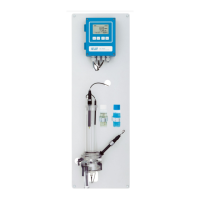
Program all sensor parameters in Menu Installation-Sensors:
menu 5.1.2.1.1 for sensor 1 and
menu 5.1.2.2.1 for sensor 2.
The sensor characteristics are printed on the label of each sensor.
Enter for each sensor separately the:
Cell constant [cm
-1
]
Temperature correction [°C]
Cable length. If the flow cell is installed on the monitor, set the
cable length to 0.0 m.
Temperature compensation: The default setting for sensor 1
(specific conductivity) is ammonia. For sensor 2 (cation
conductivity), the default setting is strong acids.
87-344.203 UP-Con1000SL Sensor type
SW-xx-xx-xx ZK = 0.0417 Cell constant
SWAN AG DT = 0.06 °C Temperature correction



 To Next Page