AMI CACE
Operation
A-96.250.871 / 120417 33
5.4. Changing Parameters and values
Changing
parameters
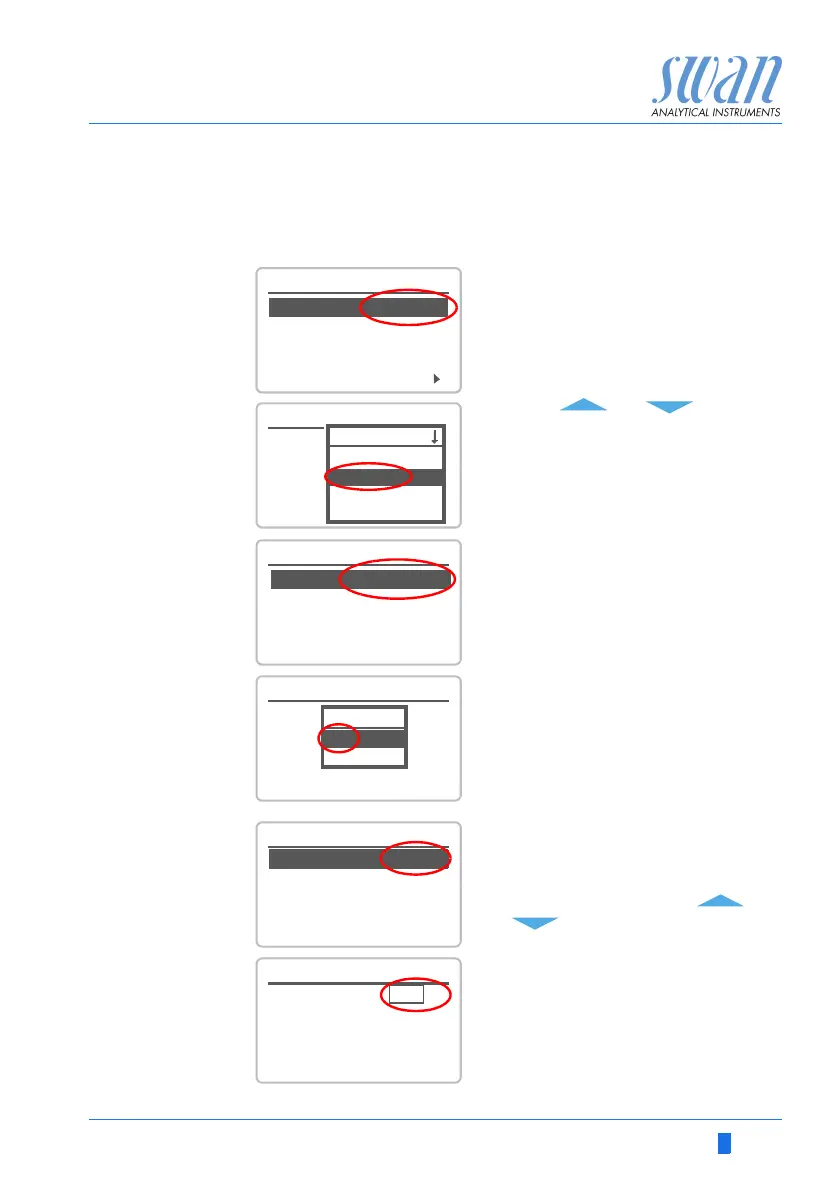
The following example shows how to change the logger interval:
Changing
values
1 Select the parameter you want to
change.
2 Press [Enter]
3 Press [ ] or [ ] key to
highlight the required parameter.
4 Press [Enter] to confirm the selec-
tion or [Exit] to keep the previous
parameter).
The selected parameter is
highlighted (but not saved yet).
5 Press [Exit].
Yes is highlighted.
6 Press [Enter] to save the new pa-
rameter.
The system reboots, the new
parameter is set.
5.1.2
Sensors
Sensor type FOME
Temperature NT5K
Standards
Disinf. Free chlorine
4.4.1
Logger
Log interval 30 min
Clear logger no
4.1.3
Logger
Clear logger no
Log interval 30min
1 Hour
Interval.
5 min
30 min
10 min
4.1.3
Logger
Log interval 10 min
Clear logger no
4.1.3
Logger
Log interval
Clear logger no
No
Save ?
Yes
1 Select the value you want to
change.
2 Press [Enter].
3 Set required value with [ ] or
[ ] key.
4 Press [Enter] to confirm the new
value.
5 Press [Exit].
Yes is highlighted.
6 Press [Enter] to save the new val-
ue.
5.3.1.1.1
Alarm High 3000 S
Cond. 1 (sc)
Alarm Low 0.000
S
Hysteresis 10.0
S
Delay 5 Sec
5.3.1.1.1
Cond. 1 (sc)
Alarm Low 0.000
S
Hysteresis 10.0
S
Delay 5 Sec
Alarm High 2500
S



 To Next Page