Chapter 6 Setting Up the System
CS-5100 LAS Instructions for Use
Revised October 2014
6-2
6.2 [Order Inquiry] screen
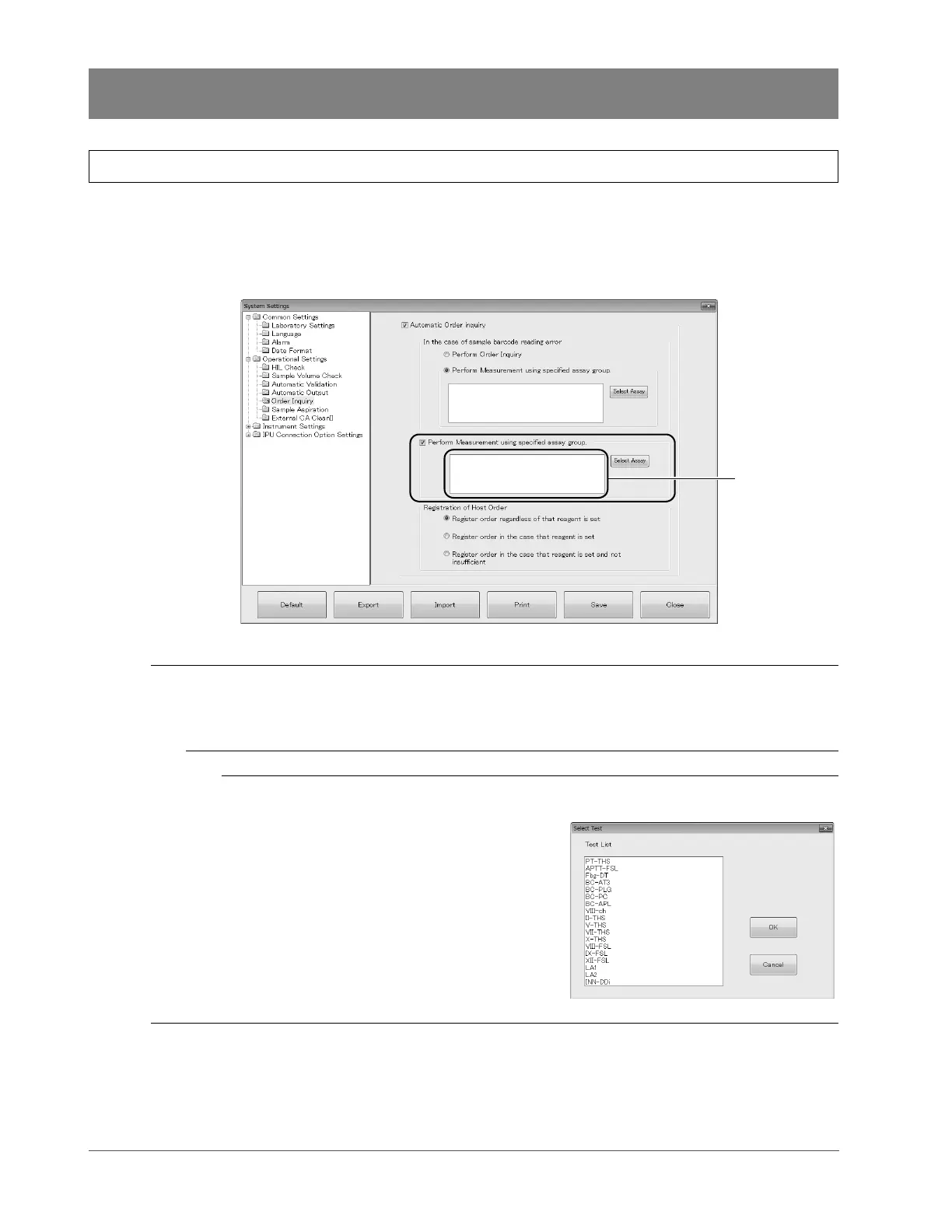
When the LAS is connected to the instrument, the following items are added to the [Order Inquiry] screen
([Operational Settings] → [Order Inquiry] in the [System Settings] dialog box).
See the CS-5100 Instructions for Use for more details on the [Order Inquiry] screen.
(➤ CS-5100 Instructions for Use “Chapter 4: 4.1.7.9 [Order Inquiry] screen”)
[Order Inquiry] screen
[Perform Measurement using
specified assay group.]
Tick this checkbox to analyze the sample on the tracks with a specified
assay group (fixed parameters) instead of inquiring to the host computer
when you cannot establish a connection to the host computer due to a
mechanical failure.
List of fixed parameters Displays the assay group set as fixed parameters.
[Select Assay] Sets fixed parameters.
The dialog box on the right
appears when this button is
pressed.
Select the assay group you
want to specify as fixed
parameters from [Test List] and
press [OK]. Multiple assay
groups can be selected.
The selected assay groups are
set as fixed parameters.



 To Next Page