Chapter 7 Customizing Screen Displays
CS-5100 LAS Instructions for Use
Revised October 2014
7-1
Chapter 7 Customizing Screen Displays
This chapter explains the customization feature that can be set for the screen display only when the CS-5100
is connected to the LAS.
See the CS-5100 Instructions for Use for more details on the customization feature for the other screen
display.
(➤ CS-5100 Instructions for Use “Chapter: 4: 4.7 Customizing screen displays”)
7.1 [Filter / Sort / View] dialog box (when the [Filter] tab is selected)
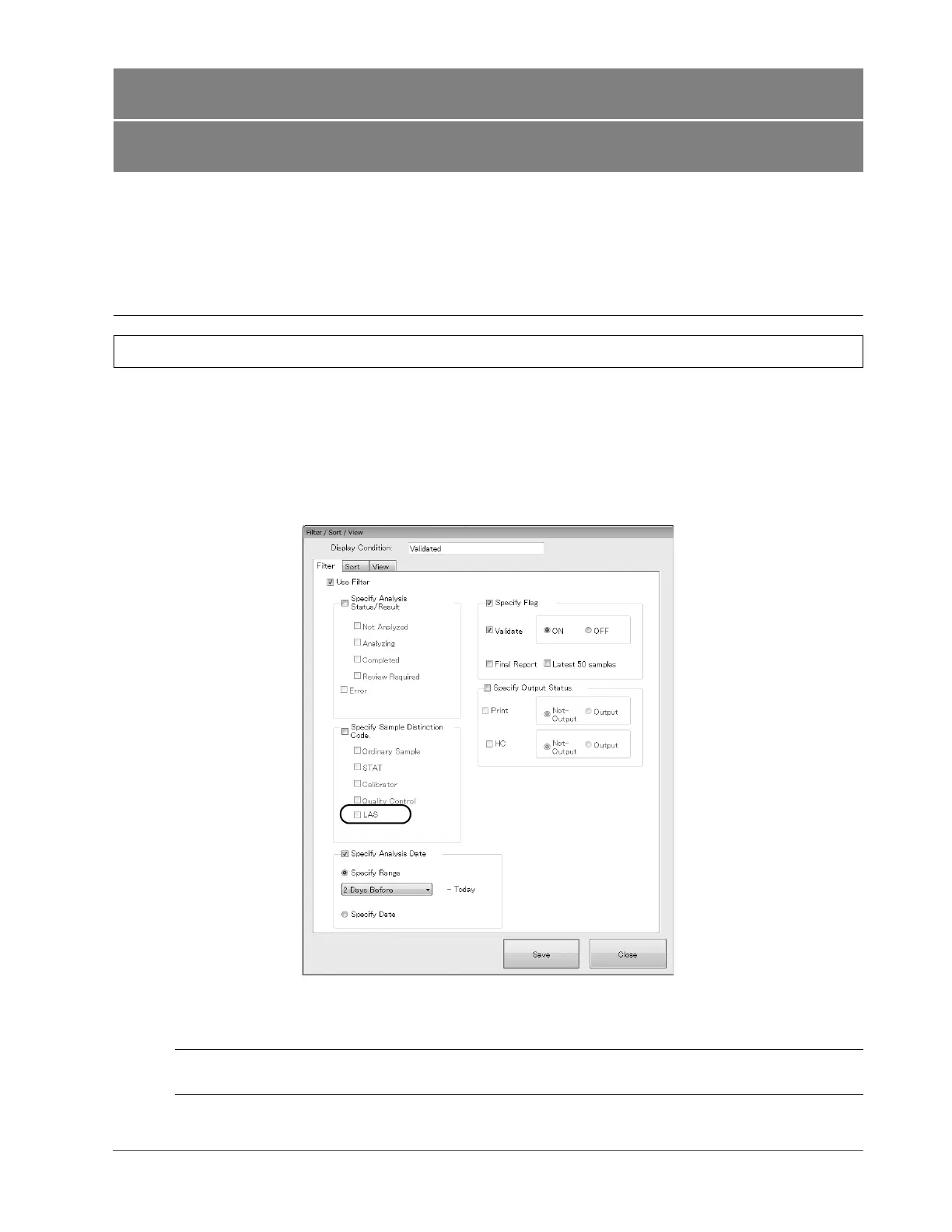
When the LAS is connected to the instrument, the following items are added to the [Filter / Sort / View] dialog box
(when the [Filter] tab is selected) where you can specify the display item for the [Joblist] screen.
See the CS-5100 Instruction for Use for more details on the [Filter / Sort / View] dialog box (when the [Filter] tab is
selected).
(➤ CS-5100 Instructions for Use “Chapter 4: 4.7.2.2 Setting the display conditions” to “Chapter 4: 4.7.2.2: 1) Setting
the type of the analysis results for display”)
[LAS] Tick this check box to display the data of the sample that was
analyzed on the tracks.
[Filter / Sort / View] dialog box
(when the [Filter] tab is selected)



 To Next Page