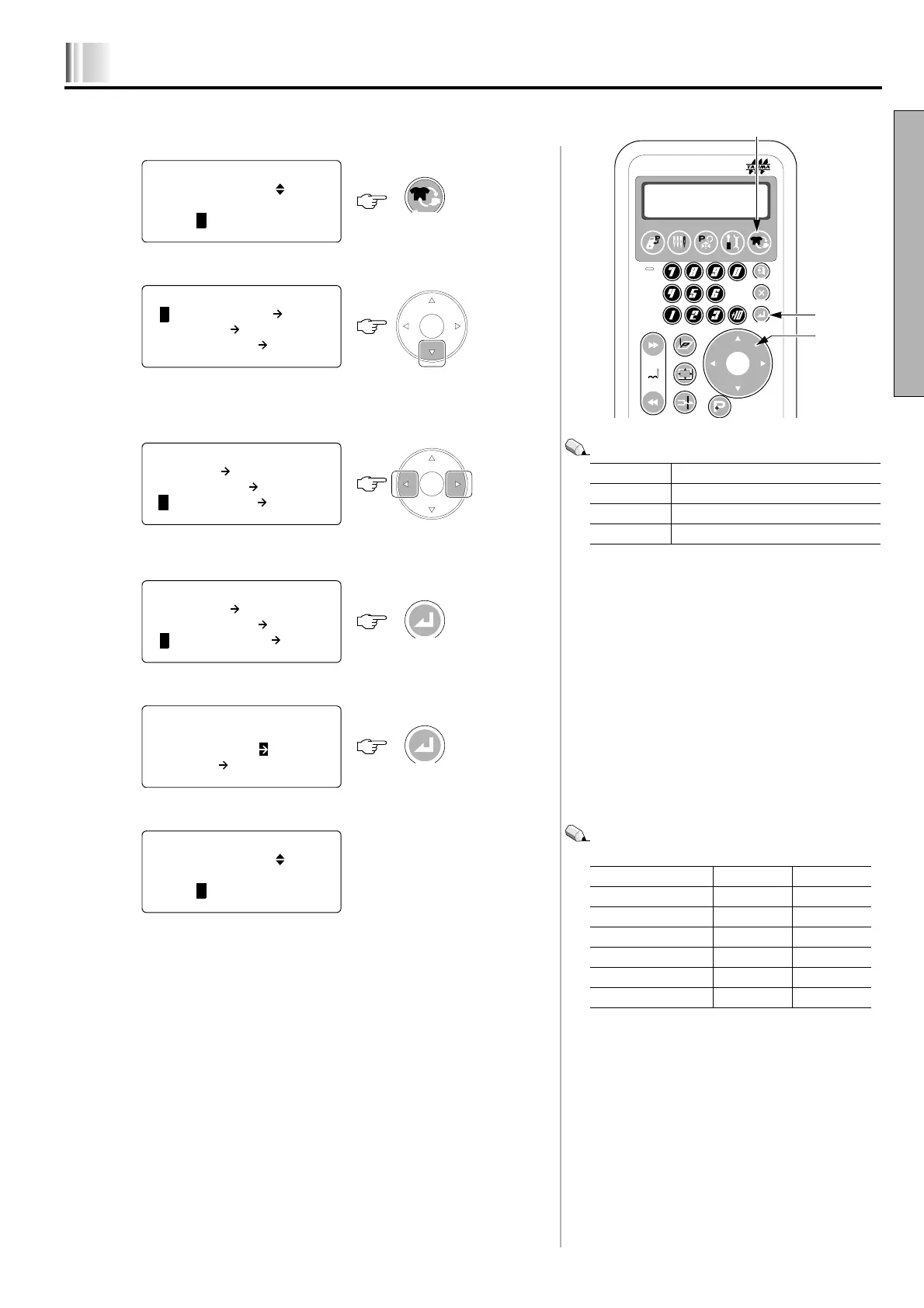
Changing procedure of the frame
1-21
1
In case of TEJTII-C .................................................................................
1. Switch to "FRAME SETTING"
2. Switching of item to be displayed
3. Select frame type
Setting value
4. Set
5. Initial
6. Completion
Embroidery space will switch automatically (The value
shows the maximum embroidery space).
This completes the working.
Flat Tubular goods frame, auto clamp frame
Cap Cap frame
Cylinder Cylindrical frame
Border Border frame
FRAME TYPE X-axis Y-axis
Tubular goods frame 500 mm 360 mm
A. Clamp-T 40 to 150 mm 80 to 180 mm
A. Clamp-B 280 mm 210 mm
Cap frame 360 mm 78 mm
Cylindrical frame 70 mm 180 mm
Border frame 500 mm 360 mm
Data
Ndl. Bar
Selection
Edit Machine
Setting
Frame
Setting
Esc
Clear
Set
Data
Frame
Position
Trace
Offset
ATH
Stitch
1
2
3
**** EMB START ****
TAJIMA12.DST 1
0/ 1027
01/15: 23456789AB<D>
*** FRAME SETTING **
1 MANUAL SPD 1
2. OFFSET MANUAL
3. ORIGIN RTN MANUAL
*** FRAME SETTING **
2. OFFSET MANUAL
3. ORIGIN RTN MANUAL
4 FRAME MODE FLAT
*** FRAME SETTING **
2. OFFSET MANUAL
3. ORIGIN RTN MANUAL
4 FRAME MODE CAP
*** TEJT-C series **
FRAME MODE CAP
SEARCH *ON <D>
Set
3
**** EMB START ****
TAJIMA12.DST 1
0/ 1027
01/15: 23456789AB<D>
KY01



 To Next Page