Setup Mode
USING SETUP MODE
User's Manual 5-55
Quick
Reference
Introduc-
tion
Setting Up
Paper
Handling
Printing
Setup Mode
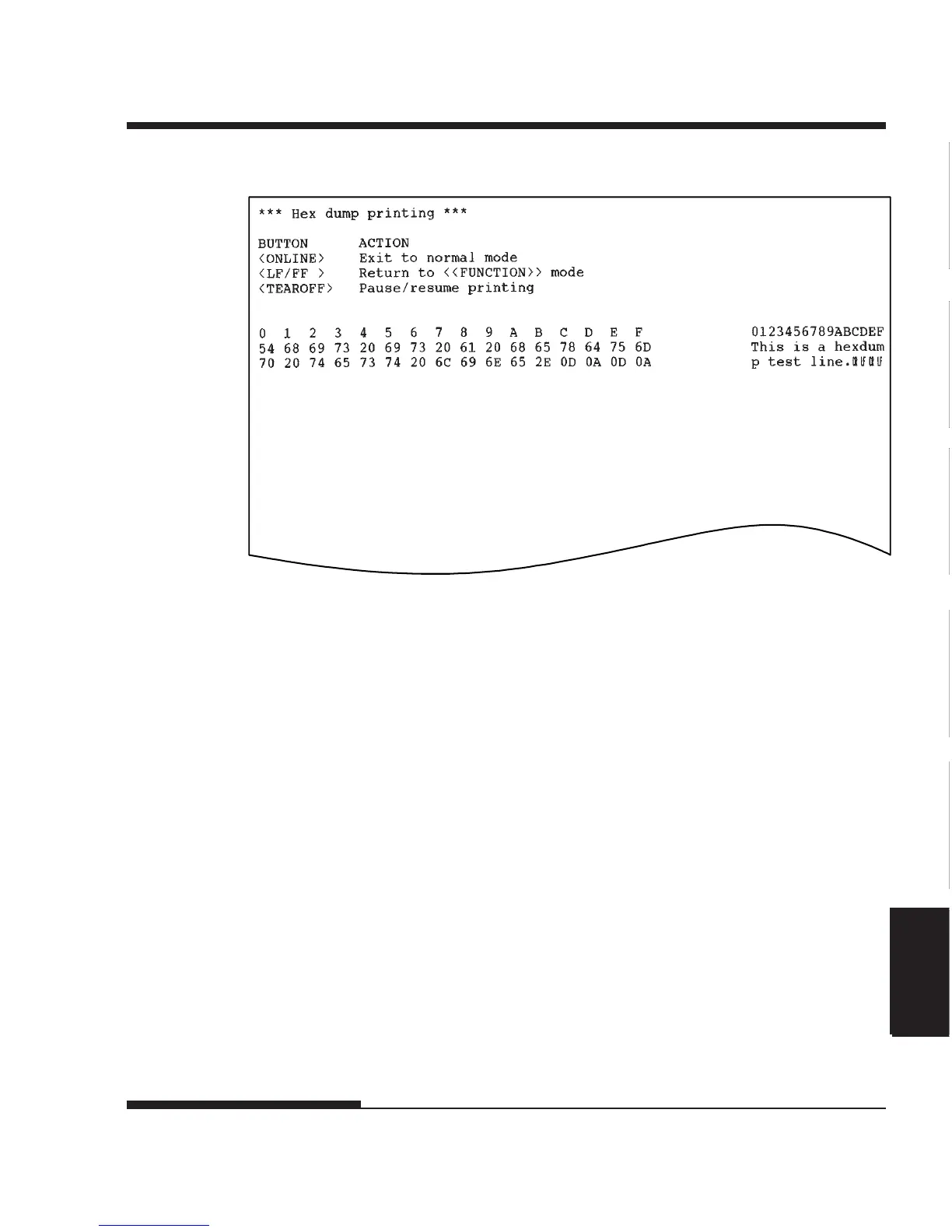
Sample hex dump
4. Exit the HEX-DUMP function.
Exit the HEX-DUMP function in either of the following ways:
• To remain in setup mode, press the LF/FF button. The
<<FUNCTION>> menu is then reprinted. For details on other
functions, see other sections in this chapter.
• To return to online normal mode, press the ONLINE button. If
you press the ONLINE button while the hex dump is printing,
The printer immediately switches to normal online mode. Any
data that was sent to the printer but not printed is discarded
(cleared).
You can also enter hex dump mode, by turning off the printer, and then
turning the printer back on while simultaneously pressing the ONLINE
button and the LF/FF button until the printer beeps.




 To Next Page