10
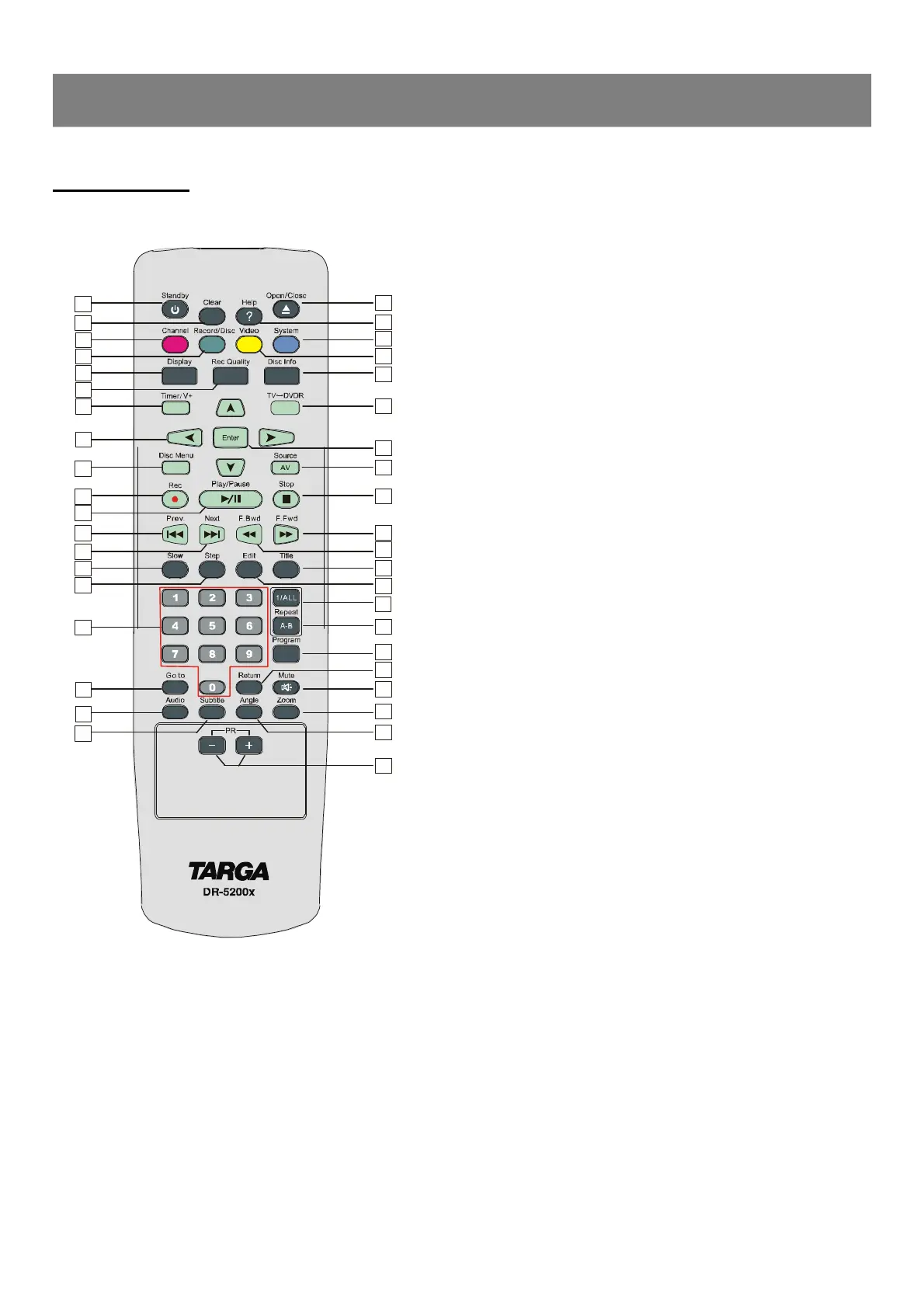
Remote control
1. Standby : switches the unit between standby and on.
2. Clear : press to clear what you select or input.
3. Channel: press to enter channel setup menu.
4. Record/Disc: press to enter Record/Disc setup menu.
5. Display: press to show the playing information about the disc.
6. Rec Quality: press to select the record quality before
recording.
7. Timer/V+ : press to start timer recording or enter video plus.
8. Directional arrow buttons : select the item you want.
9. Disc Menu : press to select the root menu and PBC ON/OFF.
10. Record : press to start record.
11. Play/Pause : press to start or pause playback.
12. Prev. : skip to previous chapter or track.
13. Next : skip to next chapter or track.
14. Slow : select the forward/backward slow speed playback.
15. Step : press to view playback frame by frame.
16. Number Keys : used in DVD menu and CD track selection.
17. Go to: go to the desired starting title, chapter, track or time.
18. Auido : changes the audio channels of a VCD or CD if availabl , or
selects stereo, left or right audio channel of a VCD disc.
19. Subtitle : access various subtitle language in DVD.
20. PR +/- : press to select upper/lower TV program channel.
21. Angle : access various camera angles on DVD.
22. Zoom : press to enlarge the picture.
23. Mute : press to shut off the sound or to restore the sound.
24. Return : return back to the menu (VCD only).
25. Program : program the tracks in your own order (only VCD and
CD)
26. A-B : repeat a certain segment betweeen A and B.
27. 1/ALL : allow you to repeat a title,a chapter, a song or all songs on
the disc(usally used on music discs).
28. Edit : press to edit what you record.
29. Title : displays the title menu if available (DVD only)
30. Fast Backward : press to do fast backward search.
31. Fast Forward : press to do fast forward search.
32. Stop : stops by momentarily or fully.
33. Source : press to select your desired source.
34. Enter : press to enter a command or confirm a selection.
35. TV<-->DVDR : press to transfer between TV and DVD mode.
36. Disc Info : press to show some informations of recorded disc.
37. Video : press to enter Video setup menu.
38. System : press to enter System setup menu.
39. Help : press to enter Help Information menu.
40. Open/Close: open or close the disc tray.
9
10
11
12
13
8
1
2
3
4
5
6
7
Function Overview



 To Next Page