22
2. Press Enter or4to enter sub menu.
3. Use number buttons to enter the password and press Enter.
Note : If you use this unit for first time, enter [3], [3], [0] and [8].
Because the initial password is set to “3308 ” before
shipping from the factory.
4. Press 6 repeatedly to select “OK ”.
5. Press Enter , the Parental screen appears. then press 3/4/
5/6 to select “Choose Rating ”or “Set Password ”.
Parental Control
MPAA (Motion Picture Association of America) Guideline is a ratin-
g system that provides advanced cautionary information to pare-
nt about the content of movie programs.
The parental lock level is equivalent to the following MPAA Rating
System.
1 G (General audiences)
3 PG (Parental guidance suggested)
4 PG-13 (Parents strongly cautioned)
6 PG-R (Restricted)
7 NC-17 (No one 17 and under admitted)
8 Adult
No Parental
Some DVD-Video discs contain a restriction level which enables
parents to prevent playback of discs by children. This unit is eq-
uipped with a password designed to prevent children changing
the level.
You cannot play DVD-Video discs rated higher than the level you
selected unless you cancel the parental lock function.
For example, when you select “5 ”level, the unit will not play di-
scs with ratings of “6 ” ,“7 ”,“8 ”.
Note:
DVD video discs may or may not respond to the parental lock se-
ttings. Make sure this function works with your DVD video discs.
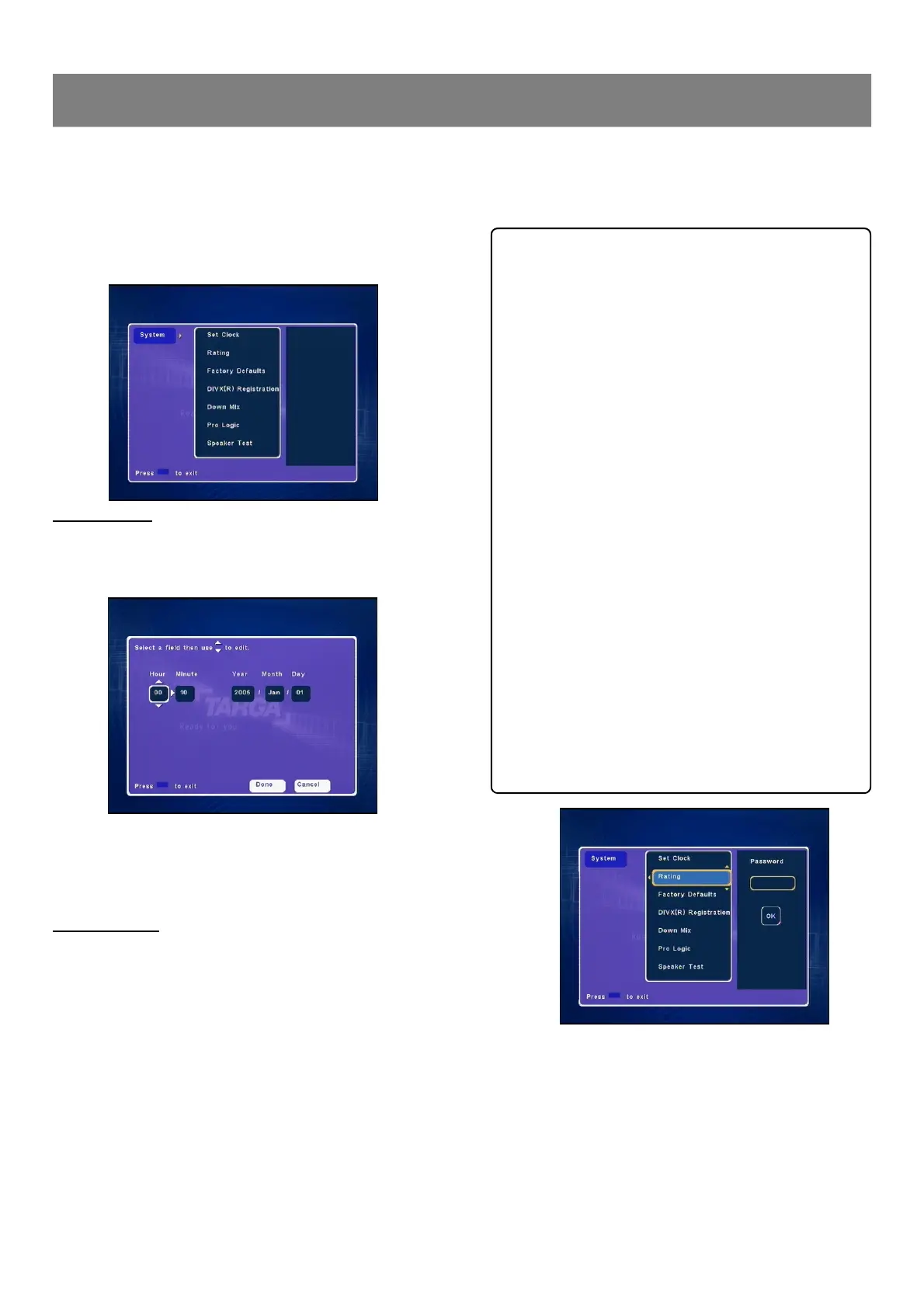
(System ---> Set Clock, Rating, Factory Defaults, DivX (R)
Registration, Down Mix, Pro Logic & Speaker Test)
1. Press System , “System ”screen appears on the TV screen.
2. Press Enter or4, “Set Clock ”is highlighted.
3. Press 5/6 repeatedly to select the item.
Clock Setting
1. Select “Set Clock ”.
2. Press Enter or4 to select “Manual ” and press Enter again,
“Set Clock Setup ”screen appears.
3. Press3/4/5/6 repeatedly (or number buttons) to set the
date and time.
4. Press4to select “Done”or “Cancel ”, and then press Enter ,
“Manual ”returns.
Rating Setting
A built-in viewer rating setting enables you to lock the videos that
you do not want children to view. For example, if you set it to PG-
13 then the recorder will not play the videos rated PG-R, NC-17 or
Adult unless the correct pass word is entered.
Notes :
n “Password ”is set to “3308 ” before shipping from the factory.
n You may need extra instructions during the setting. If a message
appears, please follow the instructions displayed on the TV
screen.
1. Select “Rating ”.
1-5 System Setup



 To Next Page