12
Basic Connection(continued)
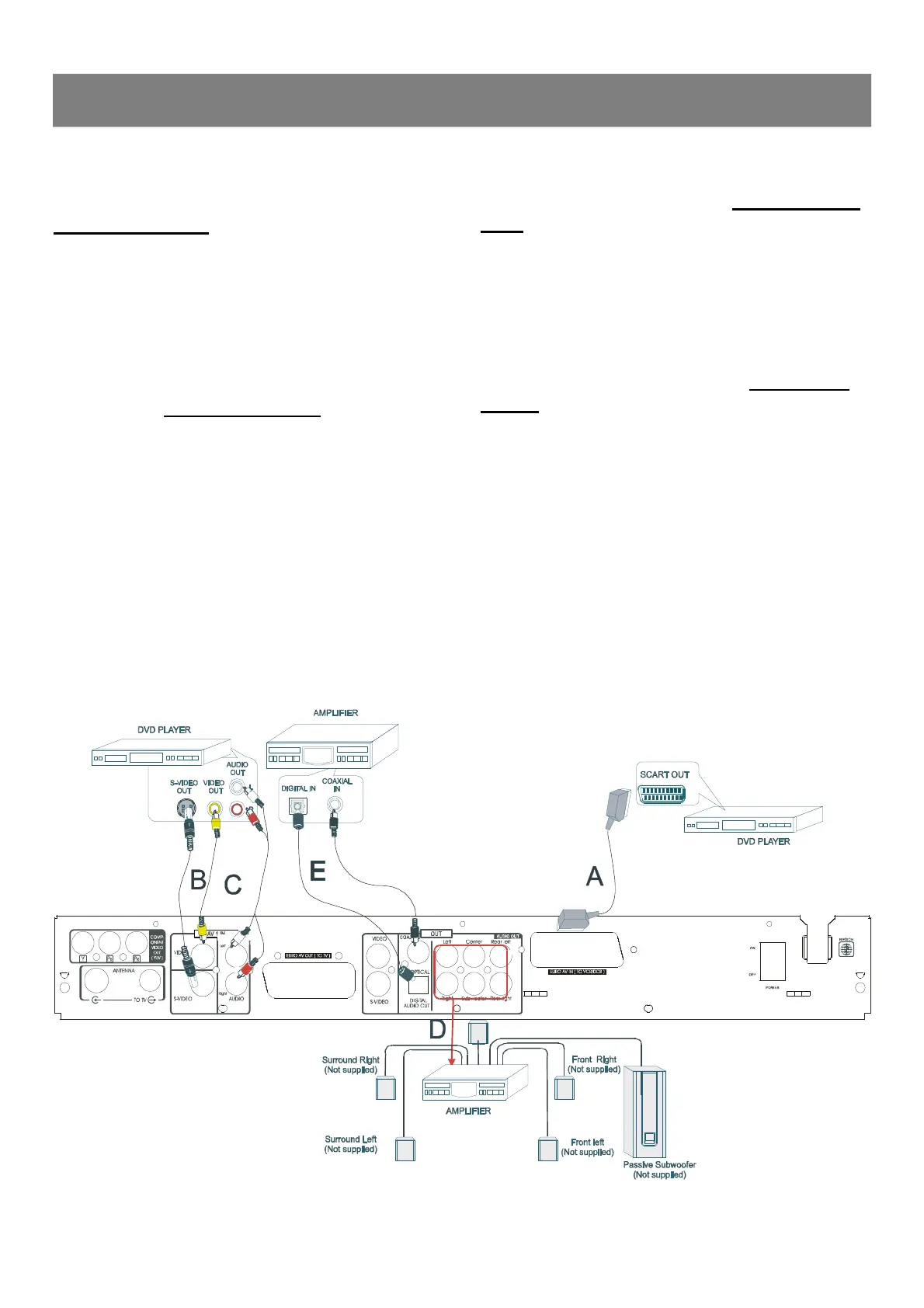
Connect your DVD recorder to addi-★
tional devices, using second Scart socket
(Configuration A )
You can connect additional devises such as decorders,DVD
player,etc. to the Scart In, then you can see the picture from the
additional device on your TV set. At same time, you can recorder
the program from the additional device.
Connect your DVD recorder to an Amp-★
lifier with 5.1 channels and surrounding
audio input. (Configuration D )
The analogue audio sockets AUDIO OUT are located at the back of
the DVD recorder.
These can be used connect the following:
1) a receiver with Dolby Surround Prologic
2) a recerver with two - channel analogue stereo
You can connect additioanl devises such as decorders,
camcorders,etc. to the S-video /Video and Audio in ,then you can see
the picture from the additional device on your TV set. At same time,
you can recorder the program from the additional device.
Connect your DVD recorder the digital★
audio socket to Audio devices (Configura-
tion E)
At the back of the DVD decorder there are digital output socket Digital
Connect your DVD recorder to additional★
devices, using Video socket (Configuration
B/C )
DVD recorder.
These can be used connect the following:
1)an A/V receiver or A/V amplifier with digital muti-channel sound
decorder
2) a recerver with two channel digital stereo



 To Next Page