- 14 -
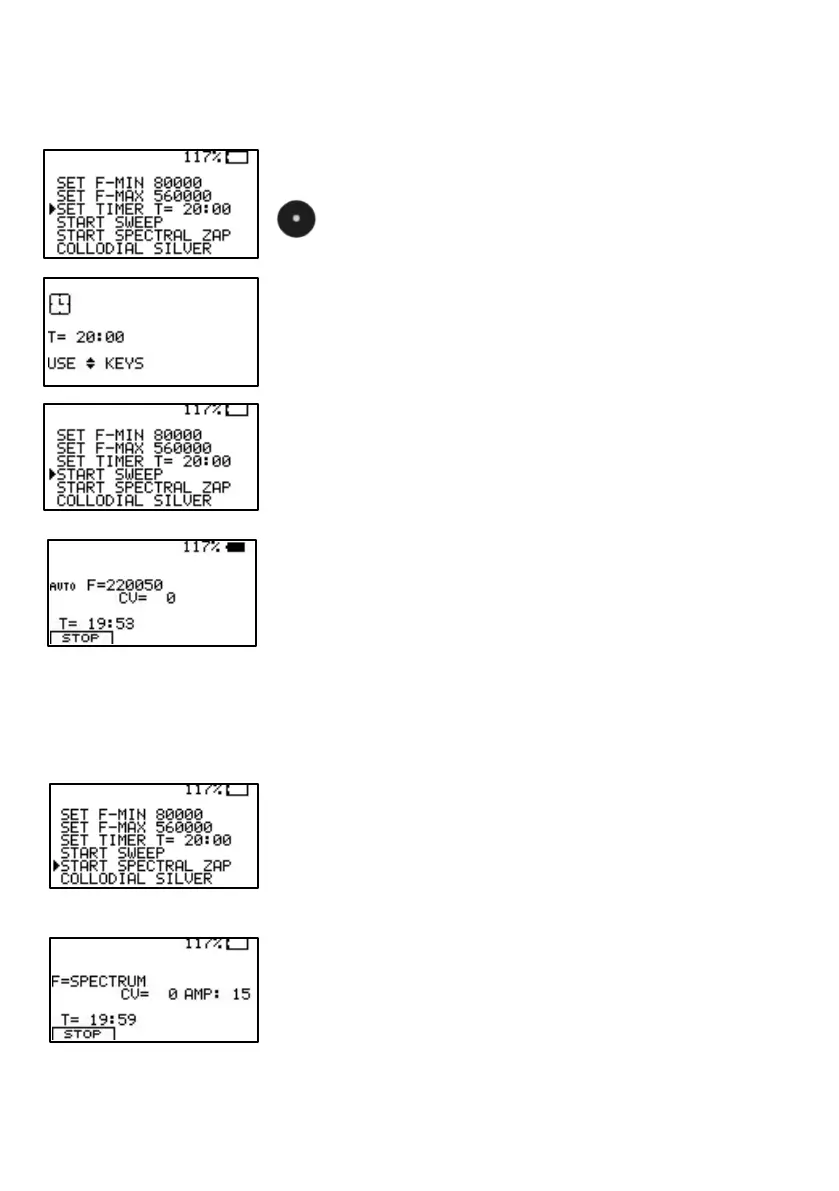
To change the runtime for the SWEEP, set the
cursor to the line SET TIMER and confirm.
Adjust the time w ith the up and dow n keys and
confirm w ith CENTER.
Adjust the time w ith KEY-UP and KEY-DOWN.
Leave the SET TIMER menu w ith KEY-LEFT.
To start the SWEEP, move the cursor to this line
and confirm.
The symbol
AUTO,
to the left of the frequency value
“F“, indicates, that the signal form w ill be assigned
automatically to the SWEEP based on the
frequency band selected. The step size betw een
frequencies is calculated by the processor in
relation to the band w idth. The conductivity value
(CV) registers if electrodes are attached. The time
remaining for the SWEEP show s 19 minutes : 53
seconds.
To start the SPECTRAL ZAP, move the cursor to
this line and confirm.
The application time is the same as set for
SWEEP. The signal form is square dc-offset as
long as the factory default
AUTO
is not changed.


 To Next Page