- 18 -
Memory banks for user defined applications
100 memory banks for user defined applications
F-SCAN COMPACT 100SP,
Firmware Version FSC V2.1x
see page 21
10 memory banks for user defined applications
F-SCAN COMPACT 10SP,
Firmware Version FSC V2.0x
The F-SCAN COMPACT offers memory banks of 50 positions each.
User can enter frequency sequences from the Internet or from other
sources. Entries w ill be saved until erased by the user. The procedure to
follow to either erase all user entries together, or on e sequence only, w ill be
described later in this document.
Example: how to enter frequency values of 100 Hz, 200 Hz and 1234 Hz in
memory location number #1:
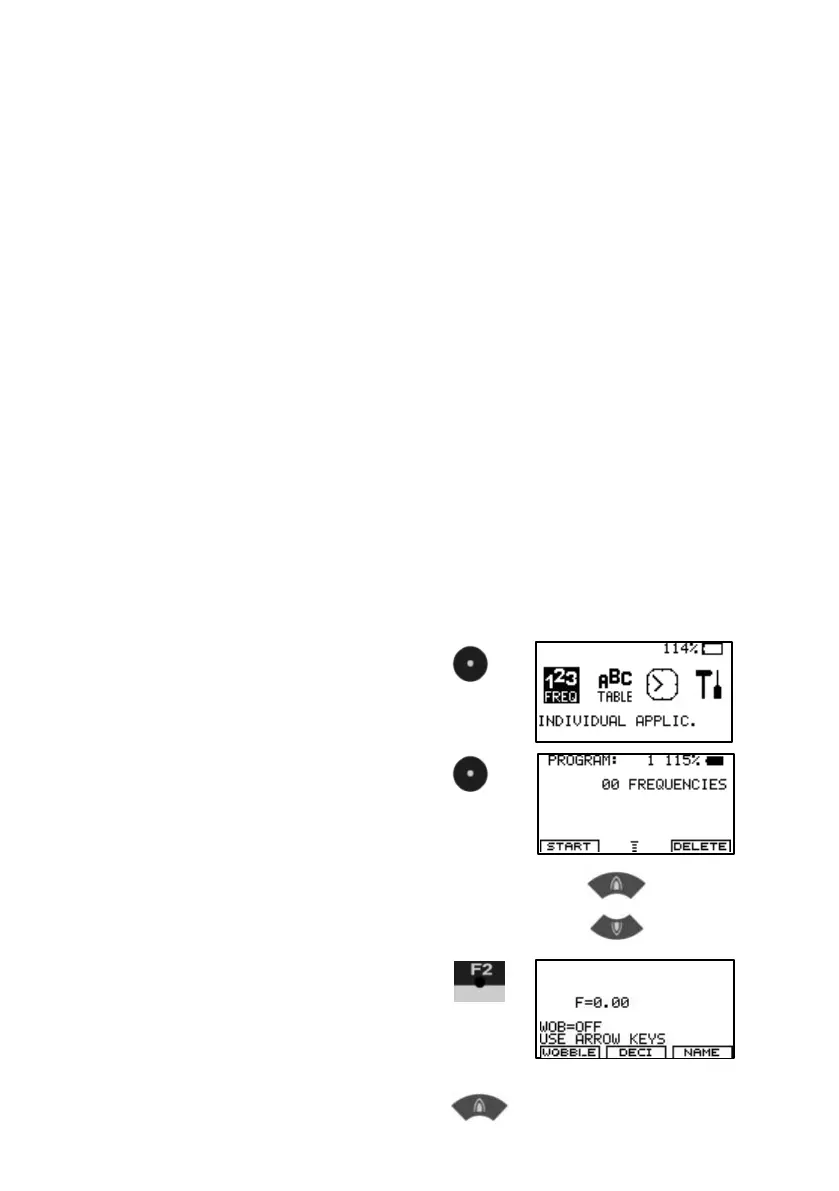
1.
Sw itch on w ith CENTER
2.
Select w ith CENTER.
‚00 FREQUENCIES’ in the
display indicates that no
frequencies are stored in bank #1.
Memory banks can be selected with
KEY-UP and KEY-DOWN
3.
Input of a frequency
F=0.00 indicates that the
actual value is 0 Hz.
4. Enter 100 Hz F=1


 To Next Page