EasyManua.ls Logo

TB-Electronics F-SCAN COMPACT - Device Controls and Interface; Soft Keys F1, F2, F3; Navigation and Control Keys; Connectors and Indicators

TB-Electronics F-SCAN COMPACT
40 pages
Print Icon
To Next Page IconTo Next Page
To Previous Page IconTo Previous Page
Loading...
- 7 -
Elements for operation
NOTE: The display lights up for a few seconds only to support input
activities. The device sw itches OFF if inactivity exceeds 2 minutes. Both
measures reduce the pow er drain on the battery.
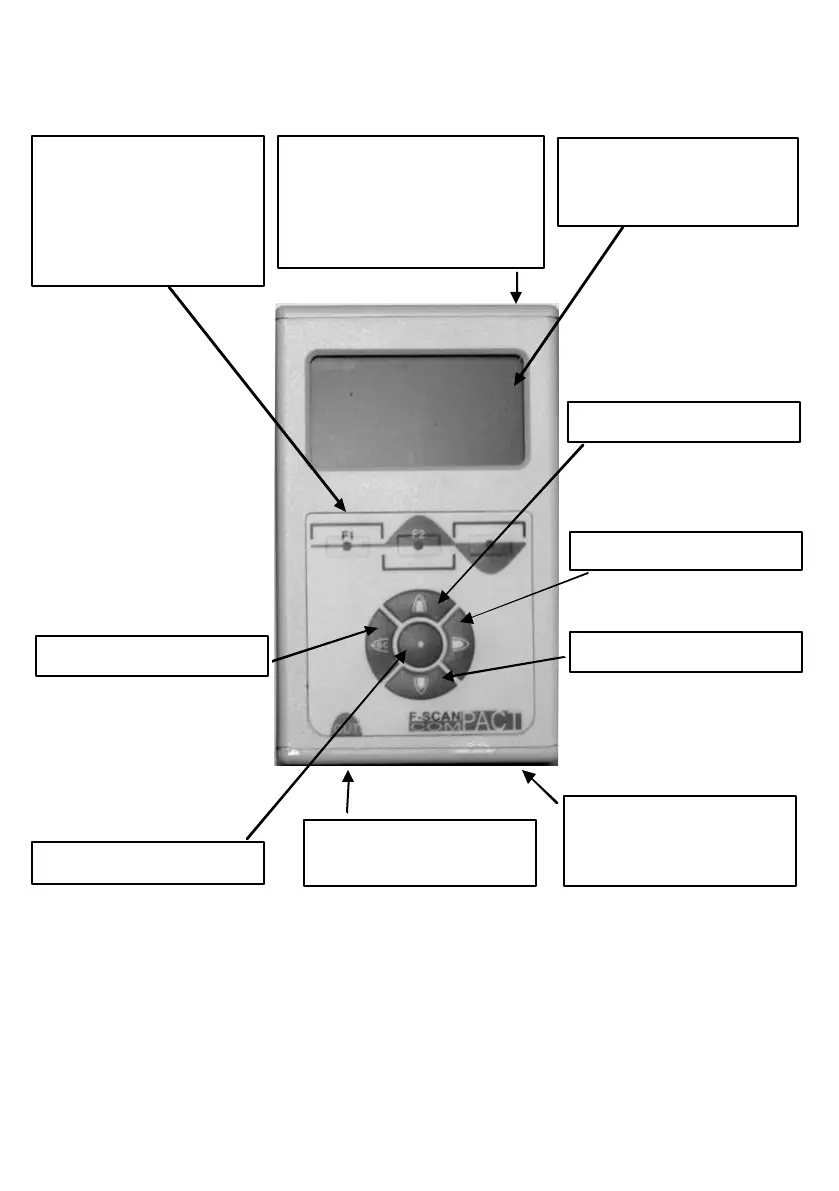
Mini-USB-Connector.
Connect to PC, Notebook
or power supply to charge
Li thium-Ion battery via
USB-cable
USB-Anschluss
Graphical
monochrome LCD-
di splay.
SOFT keys
F1, F2, F3.
Tasks for each key are
defined in the bottom line
of the di splay during
operation.
3.5mm jack connector
for application cable
Green LED as proof of
output signal during
operation
KEY-UP
KEY- RIGHT
KEY-DOWN
KEY-LEFT
KEY-CENTER