- 28 -
Reset to default settings
If the sw itch DEFAULT SETTINGS in the w indow DEVICE SETTINGS is
activated, the follow ing parameter w ill be reset:
Display language: English (2nd choice German)
Runtime per Frequency: 3:00 minutes
(range 0:30 to 60:00 minutes)
Amplitude of signals: 80% of maximum of 12Vpp
(adjustable in steps of +/- 1%)
Wave form: AUTO
(square DC-Offset)
Program-number 1 of table and
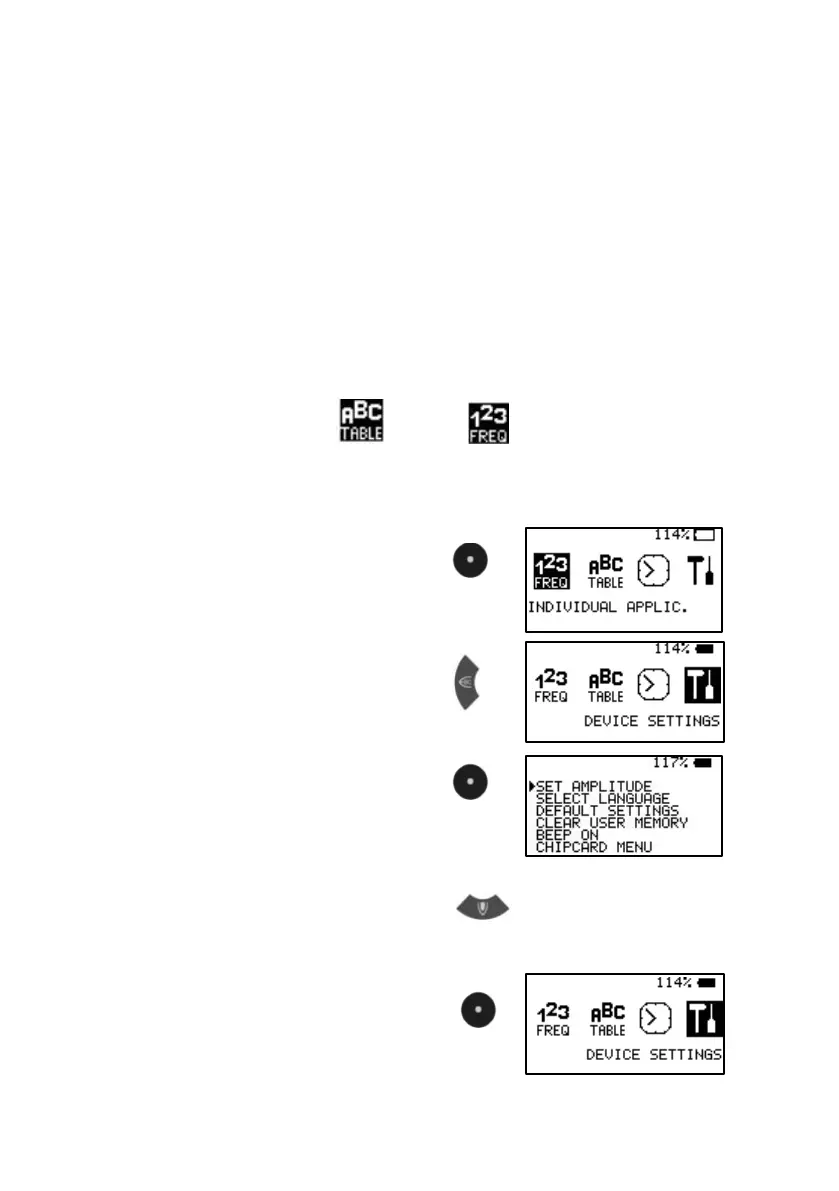
Example: how to reset to DEFAULT SETTINGS:
1. Sw itch on
2. Select DEVICE SETTINGS
3. Confirm w ith CENTER
4. Select DEFAULT SETTINGS
press KEY-DOWN 2 times.
5. Confirm w ith CENTER
Display shows activity and returns
to main menu.


 To Next Page