- 29 -
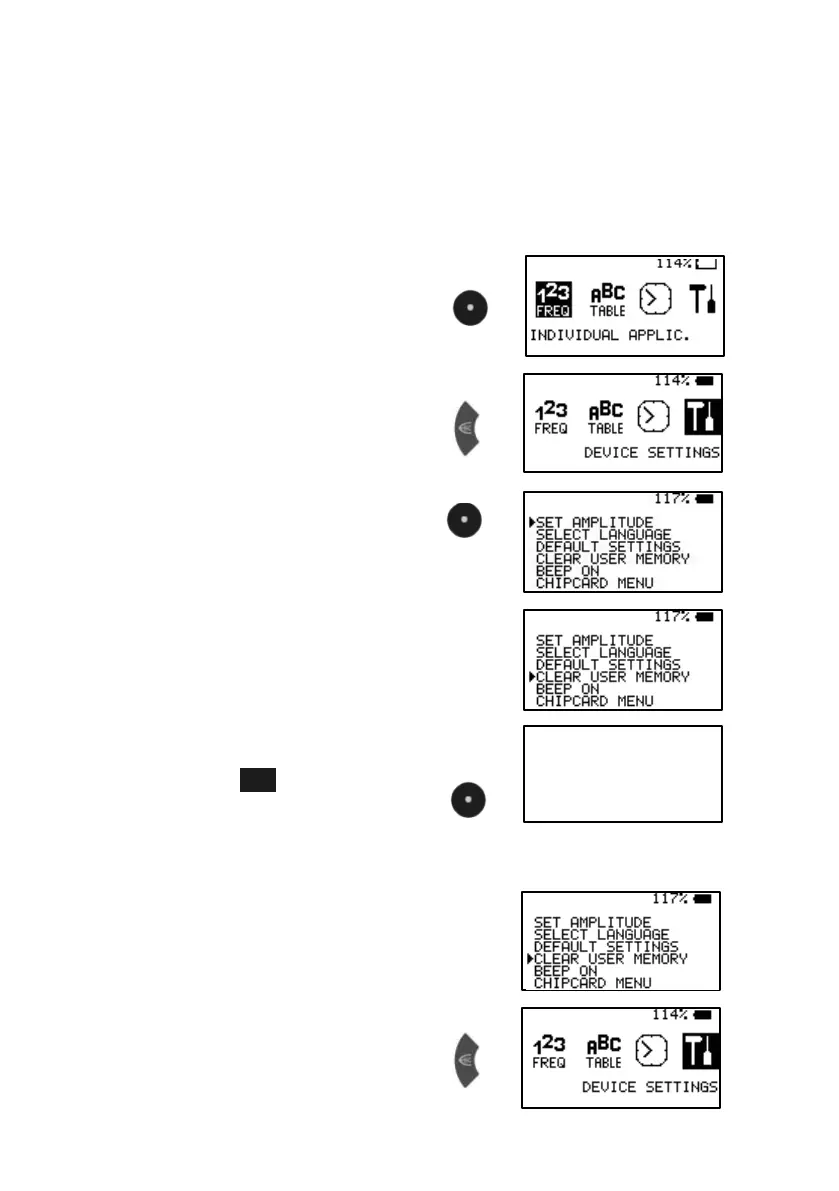
Clear ALL user memory banks
If the sw itch CLEAR USER MEMORY in the w indow DEVICE SETTINGS is
activated, all 10 memory banks w ill be cleared. They w ill be ready for new
input.
Example: how to clear all user memory banks:
1. Sw itch on
2. Select DEVICE SETTINGS
3. Confirm w ith CENTER
4. Select CLEAR USER MEMORY
press KEY-DOWN 3 times.
5. Now press F3 and keep it
pressed. Press CENTER for half
a second. When device beeps,
release keys. Display show s
activity and returns to main menu.
After finishing the procedure …
6. Ter minate DEVICE SETTINGS
CLEARIN G MEMORY !
PLEAS E WAIT


 To Next Page