- 15 -
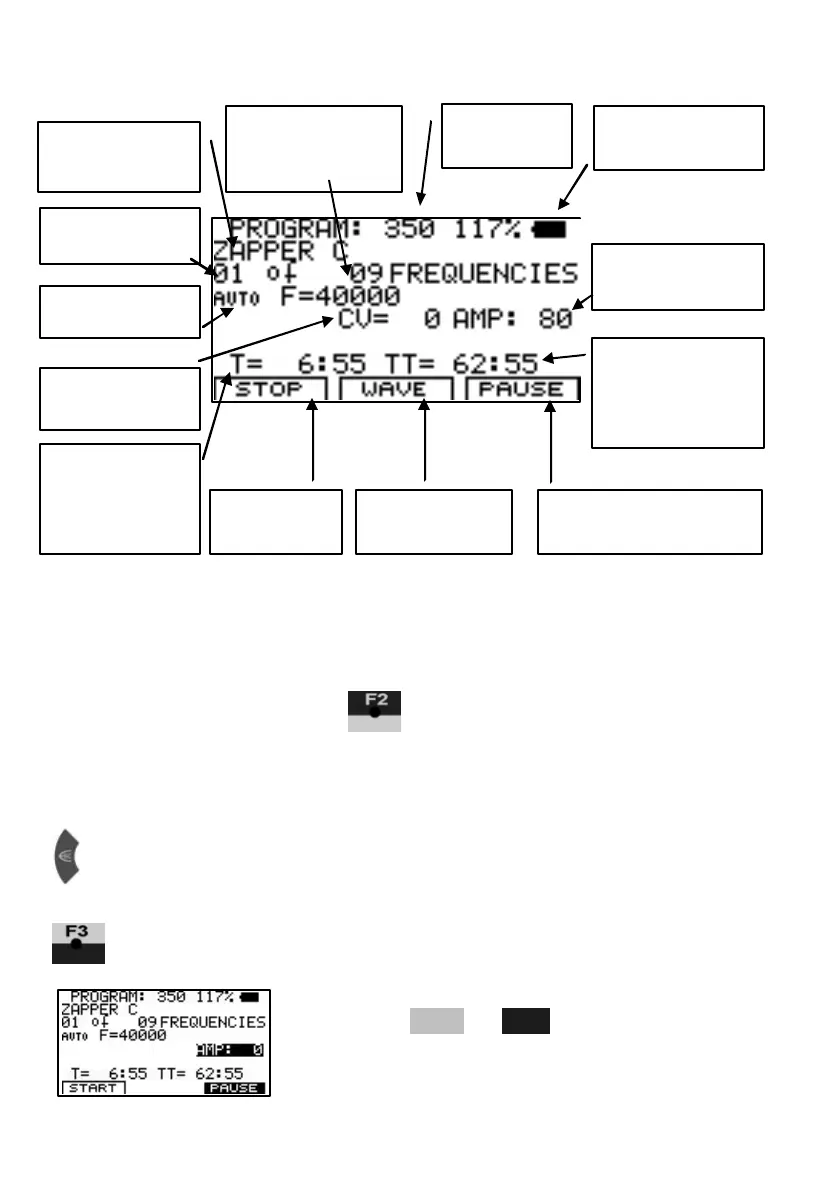
Display readings of an active application:
Soft keys F1, F2, F3
Their f unction changes in different program w indows. The actual task is
defined in the bottom line of the display during operation.
Whenever a frequency runs, acts like a serial switch to change the
wave form. A touch sw itches from AUTO to SINE. A
second touch to SQUA RE DC-OFFSET. A third touch to SQUARE FULL
WAVE and another sw itches back to AUTO. A user selection remains
active until it is either changed again, or until a reset to the default settings.
A brief touch stops the active frequency and starts the next one in line.
stops the application for a pause. PAUSE flashes and the signal
amplitude AMP show s “0”:
To restart from the point of interruption,
press F1 or F3 .
number
application
frequency
indi cator
frequencies of
application
output
value (CV)
remaining for
the active
frequency
remaining for
the whole
application
amplitude in %
application
wave form
for a pause


 To Next Page