EasyManua.ls Logo

TB-Electronics F-SCAN COMPACT - Memory Banks: Entering Frequency Sequences; Entering Frequency Sequences (Part 3); Entering Frequency Sequences (Part 4)

TB-Electronics F-SCAN COMPACT
40 pages
Print Icon
To Next Page IconTo Next Page
To Previous Page IconTo Previous Page
Loading...
- 22 -
frequencies are stored in bank #1.
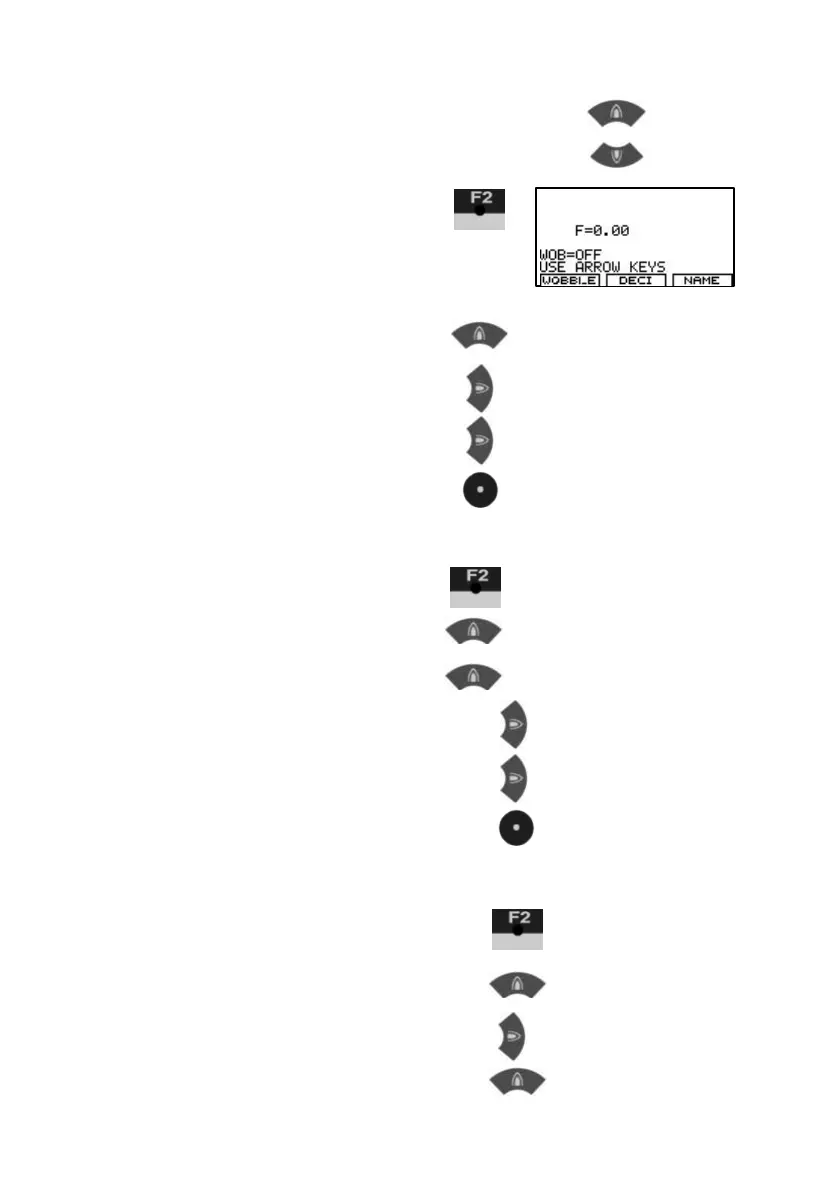
Memory banks can be selected with
KEY-UP and KEY-DOWN
3.
Input of a frequency
F=0 indicates that the
actual value is 0 Hz.
4. Enter 100 Hz F=1
times 10 F=10
times 10 F=100
Confirm w ith CENTER
Now the first value F=100 Hz
is memorized in bank #1
5. Input of a frequency
6. Enter 200 Hz F=1
Plus 1 F=2
times 10 F=20
times 10 F=200
Confirm w ith CENTER
Now the second value F=200 Hz
is memorized in bank #1.
7. Input of a frequency
8. enter 1234 Hz F=1
times 10 F=10
Plus 1 F=11