9
3.3
MODBUS TCP Interface Option Rear Panel View
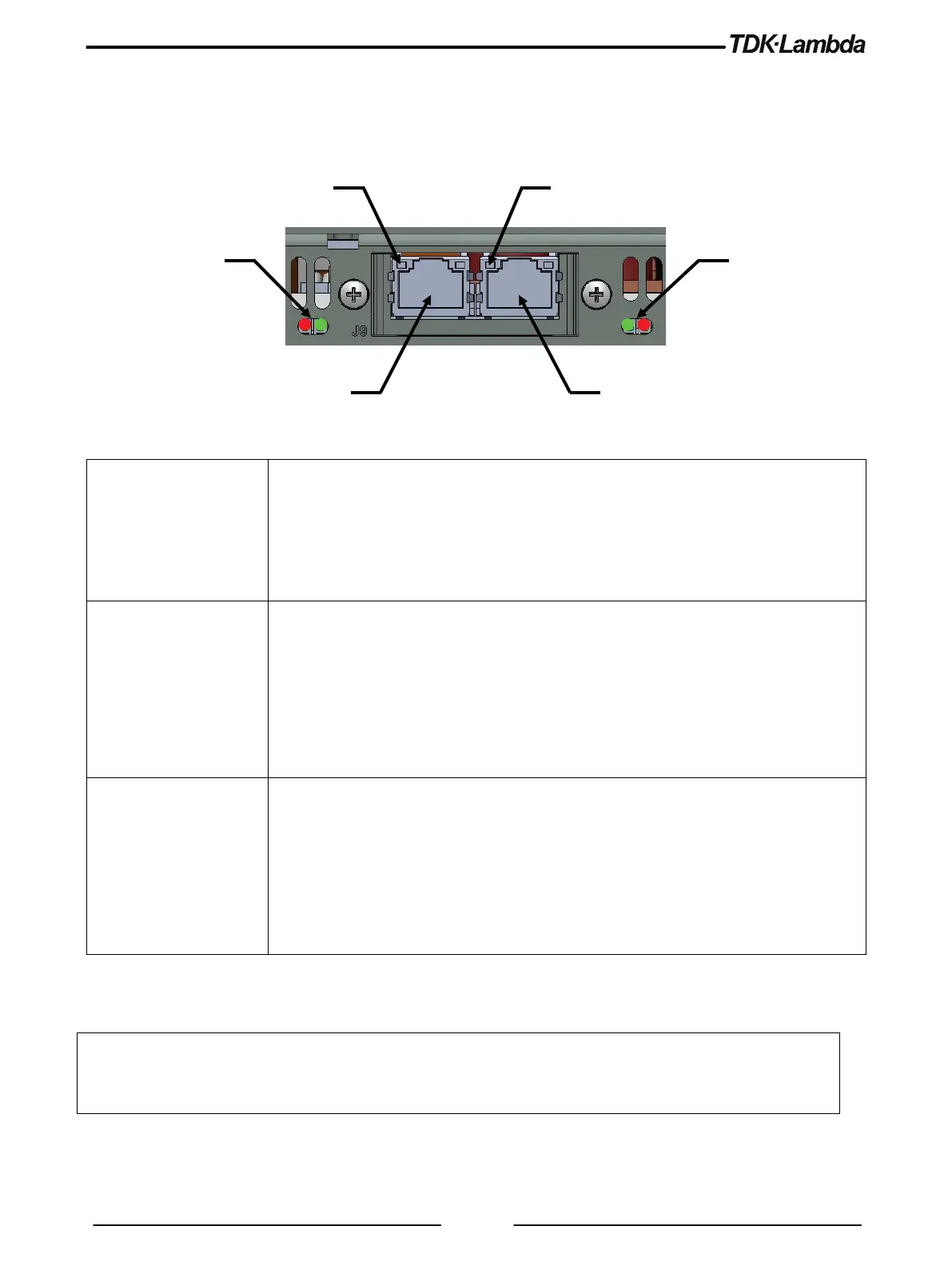
The power supply rear panel, with the MODBUS TCP option installed, is shown below:
Figure 3–1: Rear Panel MODBUS TCP View
Off – No IP address or in an EXCEPTION state
Green – At least one MODBUS TCP message received
Green, flashing – Waiting for first MODBUS TCP message
Red – Duplicate IP
Off – No power
Green – Normal operation
Red – Major fault (including Anybus exception)
Red, flashing – Minor fault
Alternating Red / Green – Firmware update from file system in progress
Off – No link, no activity
Green – Link (100 Mbps) established
Green, flickering – Activity (100Mbps)
Yellow – Link (10 Mbps) established
Yellow, flickering – Activity (10 Mbps)
NOTE
MODBUS TCP interface supply is ready for communication as soon as Network Status LEDs turn Green or
flashing Green. If communication is established prior the interface is ready, communication interruptions may
occur.
Link/Activity LED
(Port 1)
Link/Activity LED
(Port 2)














 To Next Page