3
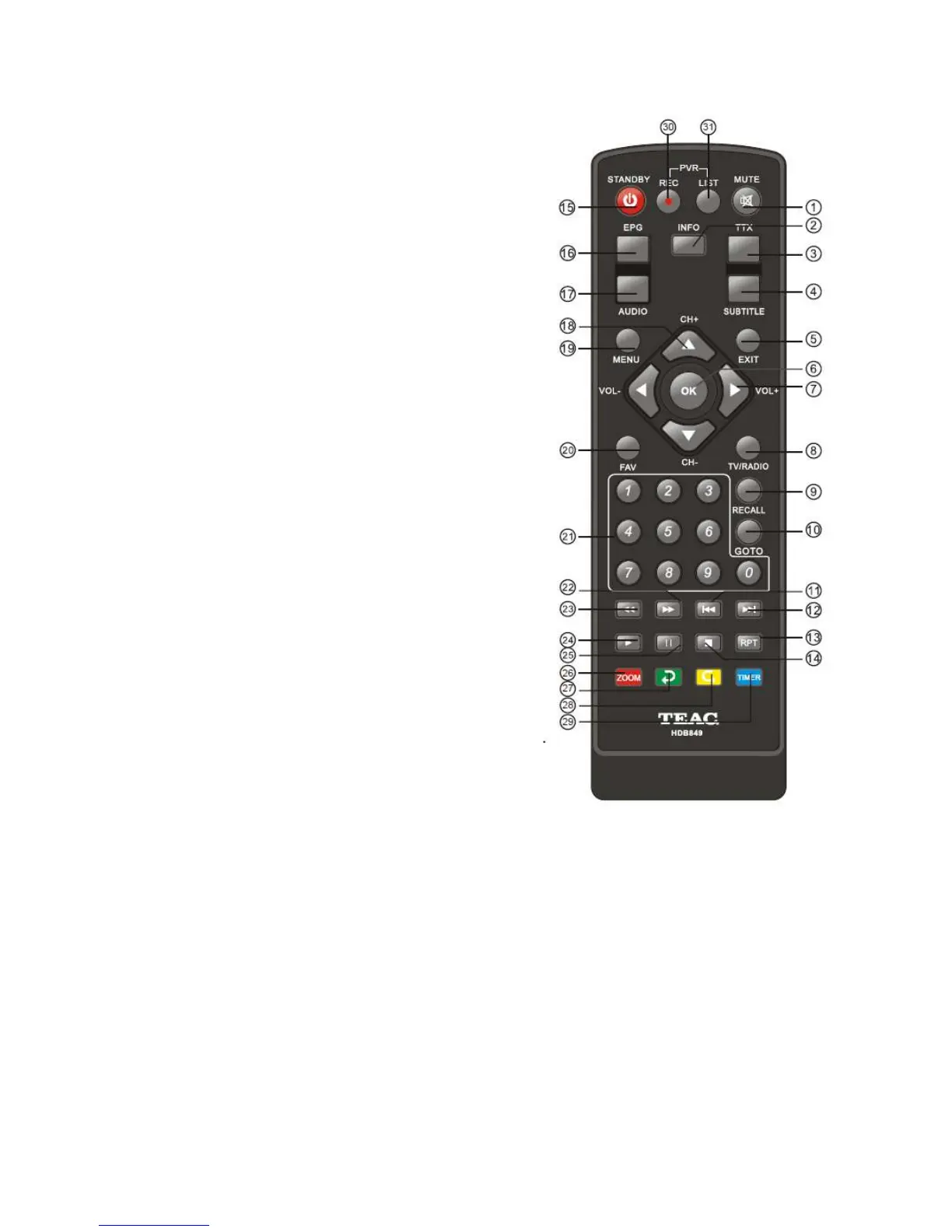
1.3 Remote Control Unit (RCU)
1.
MUTE: Mute or restore audio output.
2. INFO: Displays additional channel information, also
reveals information banner during Time Shift and
Recording.
3. TTX: Displays Teletex Information.
4. SUBTITLE: Displays subtitle language options.
5. EXIT: Exits the current Menu or returns to the previous
Menu
6. OK: Confirms an entry or selection. Displays the list of
channels.
7. RIGHT/LEFT: Navigates through the program menu,
increases or decreases volume.
8.
TV/RADIO: Switches from TV function to Radio, and
f
rom Radio to TV.
9. RECALL: Used to switch between the last two channels
that have been viewed.
10. GOTO: Enter a specific time to skip during playback.
11. PREV: Skips to the previous track during media
playback.
12. NEXT: Skips to the next track during media playback.
13. REPEAT: Selects Repeat or turn off Repeat mode.
14. STOP: Stops media play.
15. STANDBY: Switches the unit in and out of Standby
mode.
16. EPG: (Electronic Program Guide) Displays the EPG.
17. AUDIO: Shows options for selecting an Audio
Language or Audio Mode.
18. UP / DOWN: Navigates through the Menus. Selects
the next or previous Channel.
19. MENU: Turns on Main Menu.
20. FAVOURITE: Turns on Favourite Menu.
21. 0-9 (Numeric Buttons): Selects a channel or setting.
22. FWD: Fast forwards during media play.
23. REV: rewind during media play.
24. PLAY: Starts or resumes media play.
25. PAUSE: Pauses media play.
26. Red button: In picture viewing mode, press to zoom in picture. In Teletext mode, it is
the teletext colour button.
27. Green button: In DTV mode, press to toggle through different Resolution options. In
Music playback mode, press to toggle through different repeat settings. In Teletext
mode, it is the teletext colour button.
28. Yellow button: In DTV mode, press to change to different Aspect Ratios. Teletext mode,
it is the teletext colour button.
29. Blue button: In normal viewing mode, press to see record list. In Teletext mode, it is the
teletext colour button.
30. REC: Press to record the program on demand.
31. LIST: Used to show the record program list on the current disk.



 To Next Page