10
Setting Key Codes 3
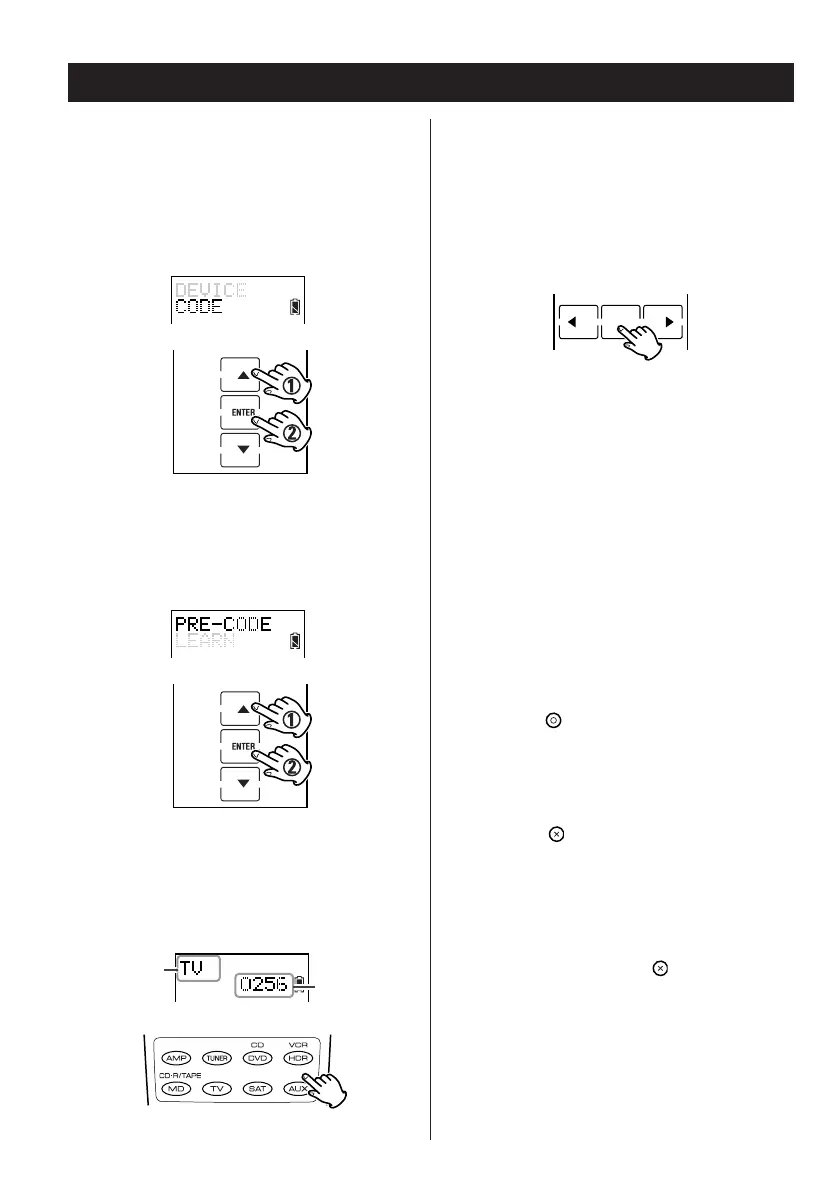
5. Once the target component is on, point the
unit towards the target component and press
the key between the
g and t keys. AUTO
displays and the remote control sends a off
signal to the target component for each 4-
digit device code. When the target
component turns off, press the POWER
button.
Point the unit towards the target component
again and press the POWER button to verify
that the code is correct. If the target component
responds to the POWER button, the device 4-
digit code has been entered successfully.
Note:
If the target component does not respond to the
POWER button the 4-digit code may be incorrect.
Return to step 1 to find the correct 4-digit code.
6. Press the button to complete the setting.
7. Press the button repeatedly to exit from
Auto setup and return to the previously
displayed screen layout.
Note:
If at any point during setup you wish to exit from
the setup screens, press the button to go back
through the displayed screens one by one.
Auto
1. Enter the setup mode.
2. Press
5 or b to select CODE and press
ENTER.
3. Press
5 or b to select PRE-CODE and press
ENTER.
4. Press a device button to select the device.


 To Next Page