11
Setting Key Codes 4
ENGLISH FRANÇAIS ESPAÑOL
Learning a Device
If you have a target component that is not included
in the list of pre-codes, you can still use RC-
L800/RC-L2 to control the component by using your
RC-L800/RC-L2 remote control to learn the control
codes from the remote control of the target
component.
Note:
Learning a device will overwrite key codes and
macros already in the RC-L800/RC-L2. If you don’t
want to overwrite key codes or macros, create a
new device in the RC-L800/RC-L2 before starting to
learn a device. See page 25, Creating a New
Device, for more information.
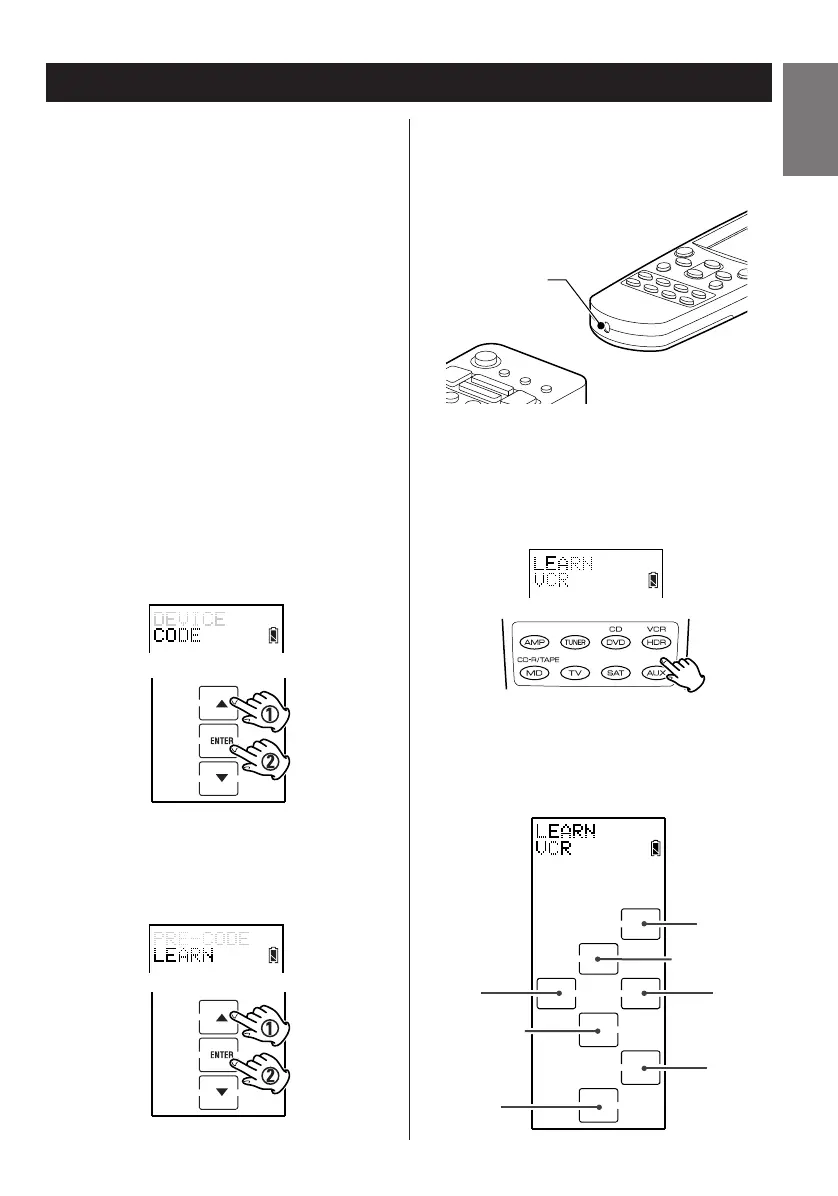
1. Enter the setup mode.
2. Press
5 or b to select CODE and press
ENTER.
3. Press
5 or b to select LEARN and press
ENTER.
4. Point your target component’s remote
control at the RC-L800/RC-L2’s learning eye,
which is located at the bottom of the unit.
5. Press a device button to select the same
type of device.
The screen shows a hard button layout of the
device. The buttons are now ready to be
assigned a function.


 To Next Page