Channel Assignment 3
22
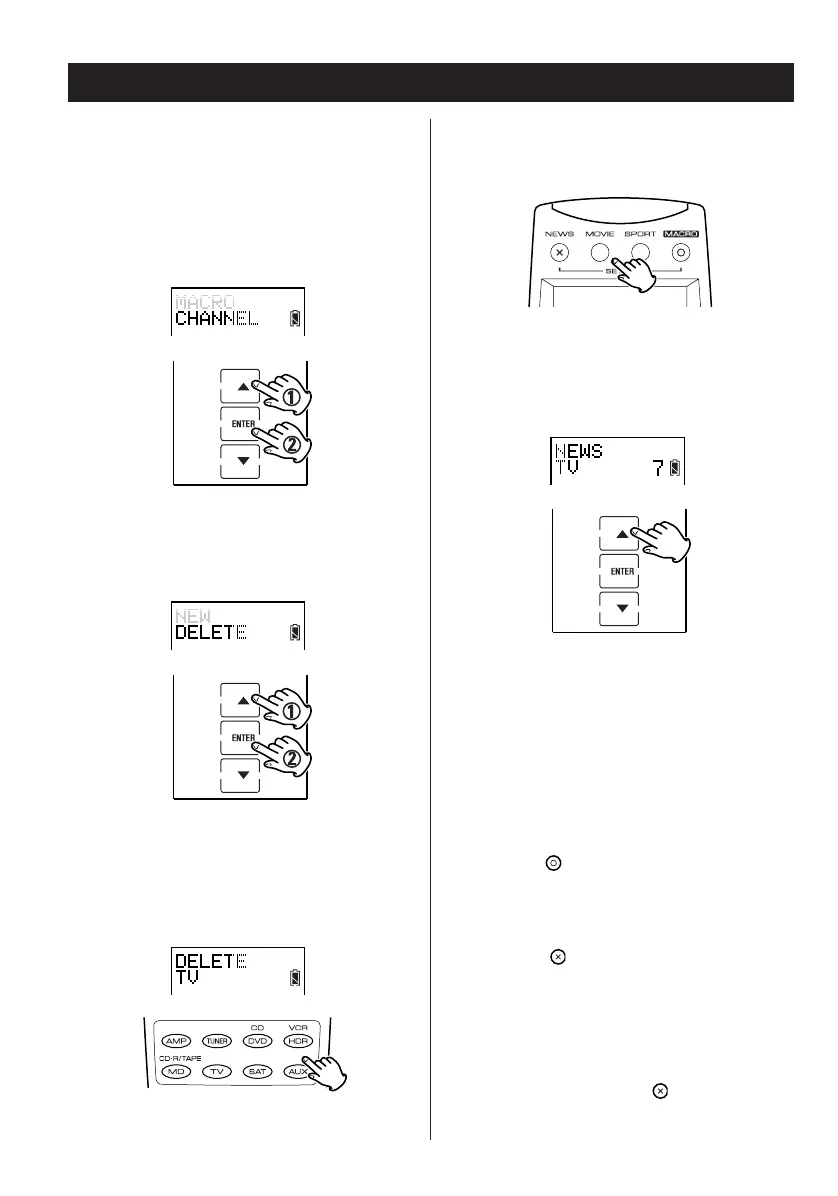
5. Select and press the channel classification
button including the channel you wish to
delete.
6. Press
5 or b to select the channel you
want to delete.
7. Press ENTER to delete the channel.
Repeat steps 5 – 7 to delete other channels.
8. Press the button to complete deleting.
9. Press the button repeatedly to exit and
return to the previously displayed screen
layout.
Note:
If at any point during setup you wish to exit from
the setup screens, press the button to go back
through the displayed screens one by one.
Deleting a Channel Assignment
1. Enter the setup mode.
2. Press
5 or b to select CHANNEL and press
ENTER.
3. Press
5 or b to select DELETE and press
ENTER.
4. Press the TV or SAT device button to select
the TV or SAT device.


 To Next Page