ENGLISH FRANÇAIS ESPAÑOL
33
Data Transmission 2
Loading Data from Another RC-
L800/RC-L2
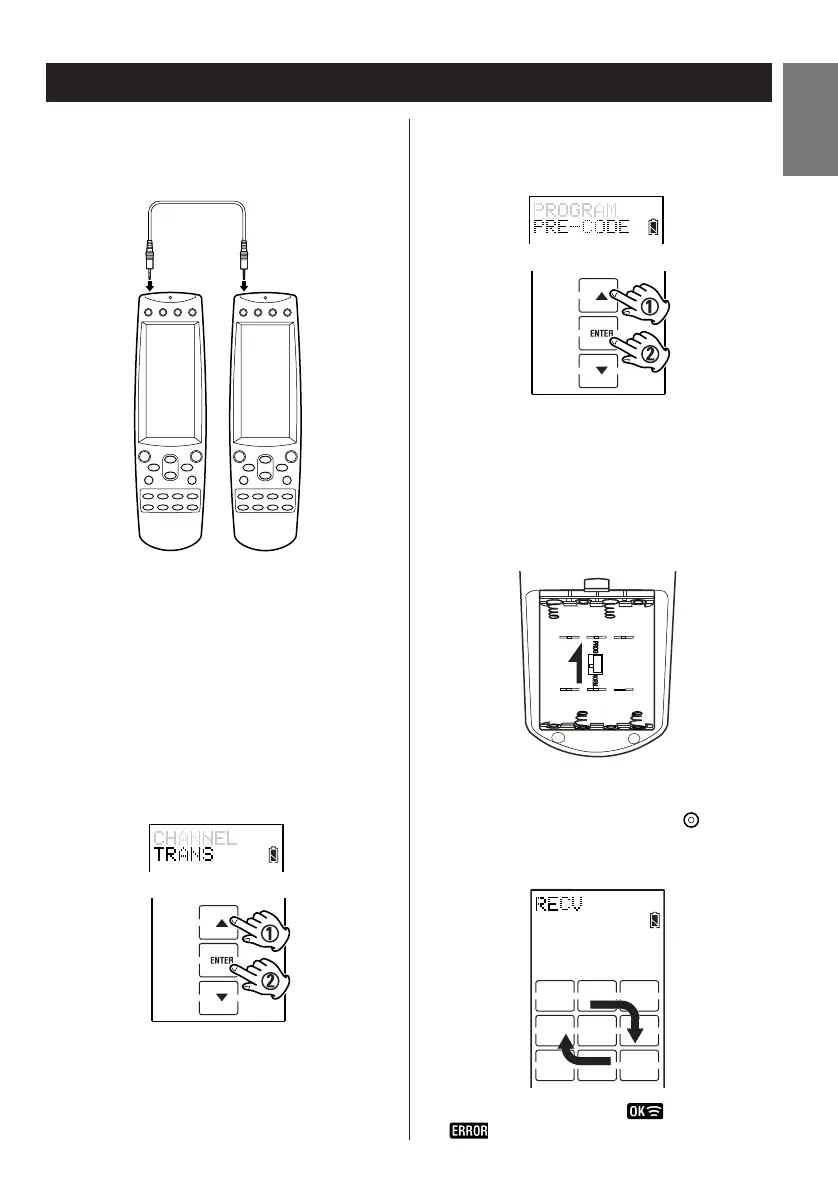
Prior to loading data, connect your receiving RC-
L800/RC-L2 to transmitting RC-L800/RC-L2 with a
mini-plug cable.
When using Setup Mode accomplish the following
steps on the transmitting RC-L800/RC-L2.
1. Enter the setup mode.
2. Press
5 or b to select TRANS and press
ENTER.
3. Press 5 or b to select an item from
PROGRAM, PRE-CODE, or MEMORY to be
loaded.
Note:
To program a RC-L800/RC-L2 put the receiving RC-
L800/RC-L2 in the program mode by removing the
batteries and switching the program switch to
PROGRAM. Then reinsert the batteries. After
programming is finished return the switch to the
NORMAL position.
4. Press ENTER to transmit the data.
< If you wish quit loading, press the button.
< During loading, the session is shown as
illustrated.
< Results are indicated by for success or
for failure.


 To Next Page