13
Deleting Key Code 1
ENGLISH FRANÇAIS ESPAÑOL
Deleting an Individual Key Code
The code assigned to a key or a MACRO can be
deleted from keys individually.
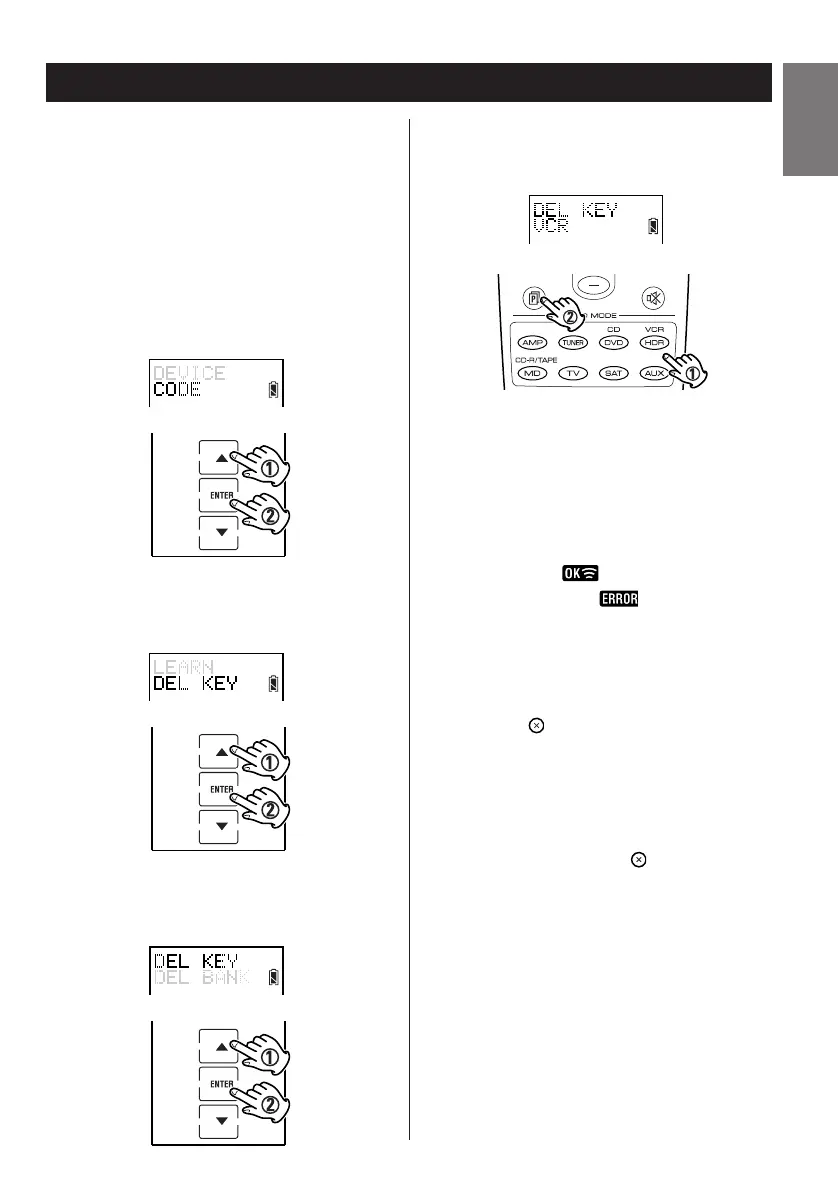
1. Enter the setup mode.
2. Press
5 or b to select CODE and press
ENTER.
3. Press
5 or b to select DEL KEY and press
ENTER.
4. Press 5 or b to select DEL KEY again and
press ENTER.
5. By pressing the device and page buttons,
select the screen page from which you wish
to delete a key.
6. Touch the key you wish to delete the key
code or MACRO.
< When deleted, flashes briefly. If a key
previously was blank, flashes briefly.
< You may continue to delete other keys.
7. Press the button repeatedly to exit and
return to the previously displayed screen
layout.
Note:
If at any point during setup you wish to exit from
the setup screens, press the button to go back
through the displayed screens one by one.


 To Next Page