4. PROGRAMMING OPERATIONS EO1-11154
4.9 Store Name Message Programming
4-25
3) Example
To program the following Store Message.
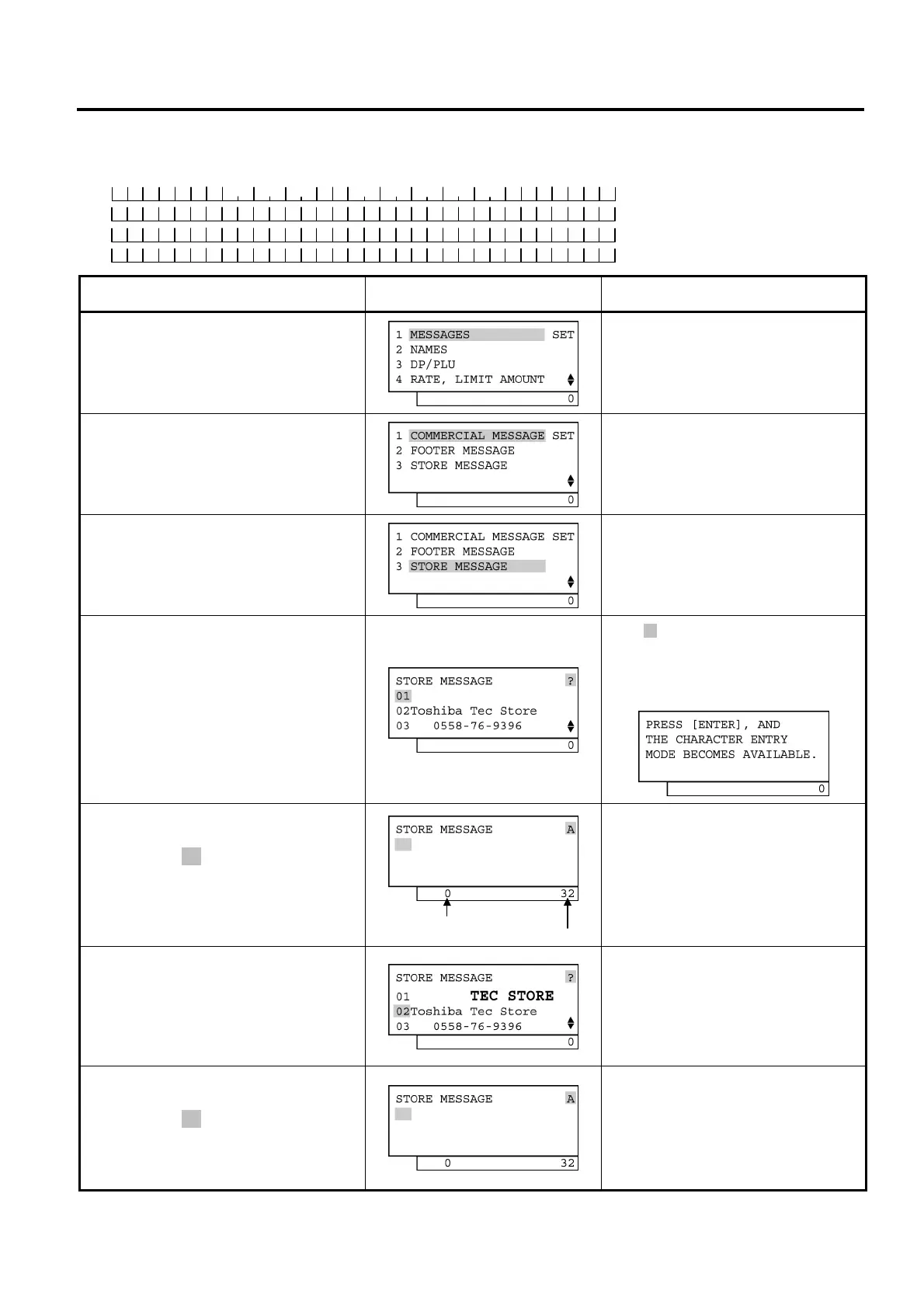
Operation LCD Display Remarks
When the ECR is being outside a sale
and in SET mode, depress the [1] or
[Enter] key.
Depress the [↓] key twice.
The cursor is moved on to “3 STORE
MESSAGE”.
Depress the [3] or [Enter] key.
The message already programmed is
displayed.
While ? is shown on the upper-right corner
of the LCD display screen, the [?] key
depression results in that the following
guidance message appears on the LCD
display.
The [Enter] key depression allows the
ECR to enter the 1st line message
input mode. ( A is shown on the
upper-right corner of the LCD display
screen.) The 1st line message is input.
To program a message in a desired line,
move the cursor there with the [↓] key then
depress the [Enter] key.
Numbers of programmed characters and of
programmable characters are displayed on
the 7-segment numeric display.
The [Enter] key depression results in
that the input message is entered and
displayed.
When the [Enter] key is depressed, the
message programmed in the 1st line is
printed.
Example of key operation)
[→] [→] [→] [→] [→] [→][→] [Dbl] [T] [E]
[C] [→] [S] [T] [O] [R] [E] [Enter]
The [Enter] key depression allows the
ECR to enter the 2nd line message
input mode. ( A is shown on the
upper-right corner of the LCD display
screen.) The 2nd line message is
input.
Numbers of programmed characters and of
programmable characters are displayed on
the 7-segment numeric display.
(continued on the next page)
Number of programmed characters
Number of programmable characters
T E C S T O R E
1 3 4 3 P E A C H D R I V E
P H O N E : 8 7 - 6 4 3 7
Line No. 1
Line No. 2
Line No. 3
Line No. 4


 To Next Page
 Loading...







