Chapter 6 Vehicle/customer data
In This Chapter
Add a new vehicle to the database 20
Add a new customer 22
Assign a customer to a vehicle 22
Add a vehicle to the test queue 22
Remove vehicle or customer data 23
Select a vehicle from the test queue 23
Add a new vehicle to the database
❺ ❻ ❼ ❽ ❾
⓿
❶
❷
❸
❹
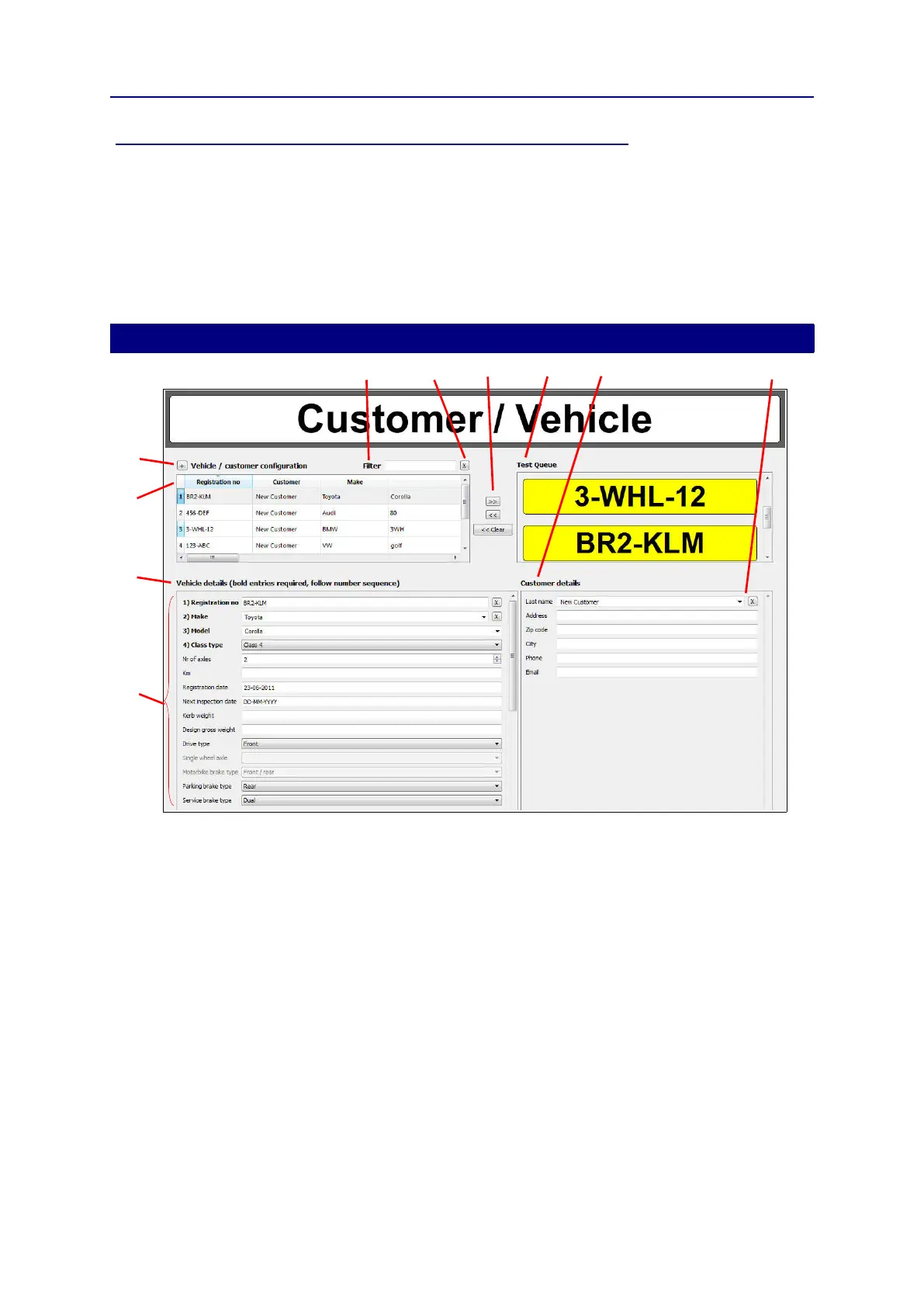
❶ + button: Add a new vehicle to the vehicle
list
❷ Vehicle list
❸ Details of the vehicle you selected in the
vehicle list
❹ Required fields
❺ Filter box
❻ X button: remove the filter and show all vehicles
in the list
❼ >> and << buttons: add or remove the selected
vehicle to or from the Test Queue. << Clear:
remove all vehicles from the Test Queue
❽ Test Queue
❾ Details of the customer selected in the
Customer list
⓿ Customer list
The system uses fixed limits to determine if a vehicle passes or fails the tests. The limits are
automatically linked to the selected vehicle. See “General settings Limits Tab” on page 45.
The following information
❹
is mandatory for all vehicle classes:
Registration no. (number plate/license plate)
Make
Model
20


 To Next Page