EasyManua.ls Logo

Technics RS-TR575M2 - Page 13

Technics RS-TR575M2
20 pages
Print Icon
To Next Page IconTo Next Page
To Previous Page IconTo Previous Page
Loading...
Recording
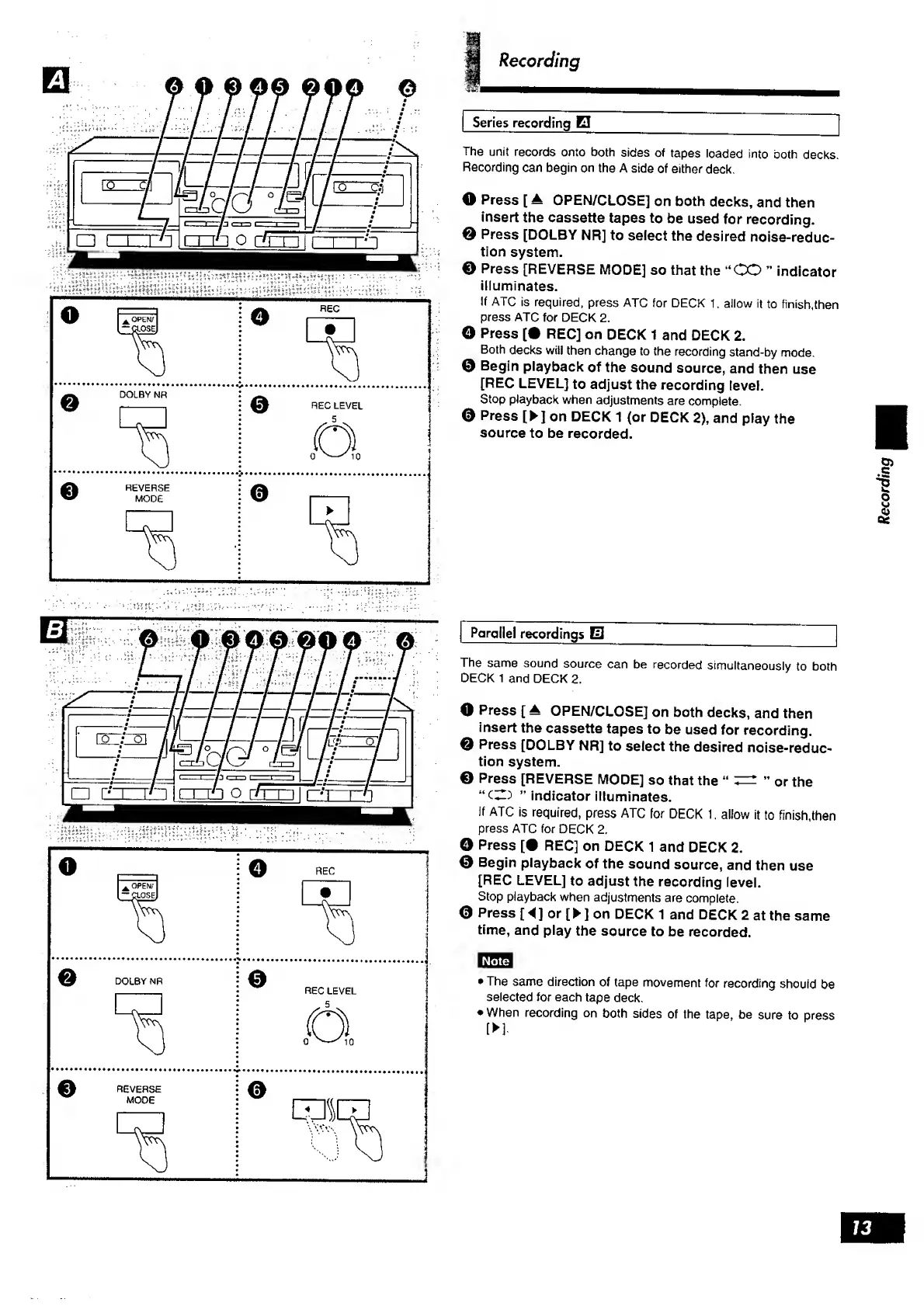
Series
recording
B
_
The
unit
records
onto
both
sides
of
tapes
loaded
into
ooth
decks.
Recording
can
begin
on
the
A
side
of
either
deck.
O
Press
[
A
OPEN/CLOSE]
on
both
decks,
and
then
insert
the
cassette
tapes
to
be
used
for
recording.
0
Press
[DOLBY
NR]
to
select
the
desired
noise-reduc¬
tion
system.
©
Press
[REVERSE
MODE]
so
that
the
“CO
indicator
illuminates.
If
ATC
is
required,
press
ATC
for
DECK
1,
allow
it
to
finish,then
press
ATC
for
DECK
2.
©
Press
[•
REC]
on
DECK
1
and
DECK
2.
Both
decks
will
then
change
to
the
recording
stand-by
mode.
0
Begin
playback
of
the
sound
source,
and
then
use
[REC
LEVEL]
to
adjust
the
recording
level.
Stop
playback
when
adjustments
are
complete.
0
Press
[
]
on
DECK
1
(or
DECK
2),
and
play
the
source
to
be
recorded.
Parallel
recordings
E
_
The
same
sound
source
can
be
recorded
simultaneously
to
both
DECK
1
and
DECK
2.
O
Press
[
±
OPEN/CLOSE]
on
both
decks,
and
then
insert
the
cassette
tapes
to
be
used
for
recording.
0
Press
[DOLBY
NR]
to
select
the
desired
noise-reduc¬
tion
system.
0
Press
[REVERSE
MODE]
so
that
the
0
r
the
indicator
illuminates.
if
ATC
is
required,
press
ATC
for
DECK
1.
allow
it
to
finish,then
press
ATC
for
DECK
2.
O
Press
[•
REC]
on
DECK
1
and
DECK
2.
0
Begin
playback
of
the
sound
source,
and
then
use
[REC
LEVEL]
to
adjust
the
recording
level.
Stop
playback
when
adjustments
are
complete.
0
Press
[
A
]
or
[
]
on
DECK
1
and
DECK
2
at
the
same
time,
and
play
the
source
to
be
recorded.
The
same
direction
of
tape
movement
for
recording
should
be
selected
for
each
tape
deck.
When
recording
on
both
sides
of
the
tape,
be
sure
to
press
[
]
73
Recording

Related product manuals