7
Call: 1-631-648-7481 or Visit: support.technocnc.com
Titan Series WinCNC Manual
WinCNC
L1
L2
L3
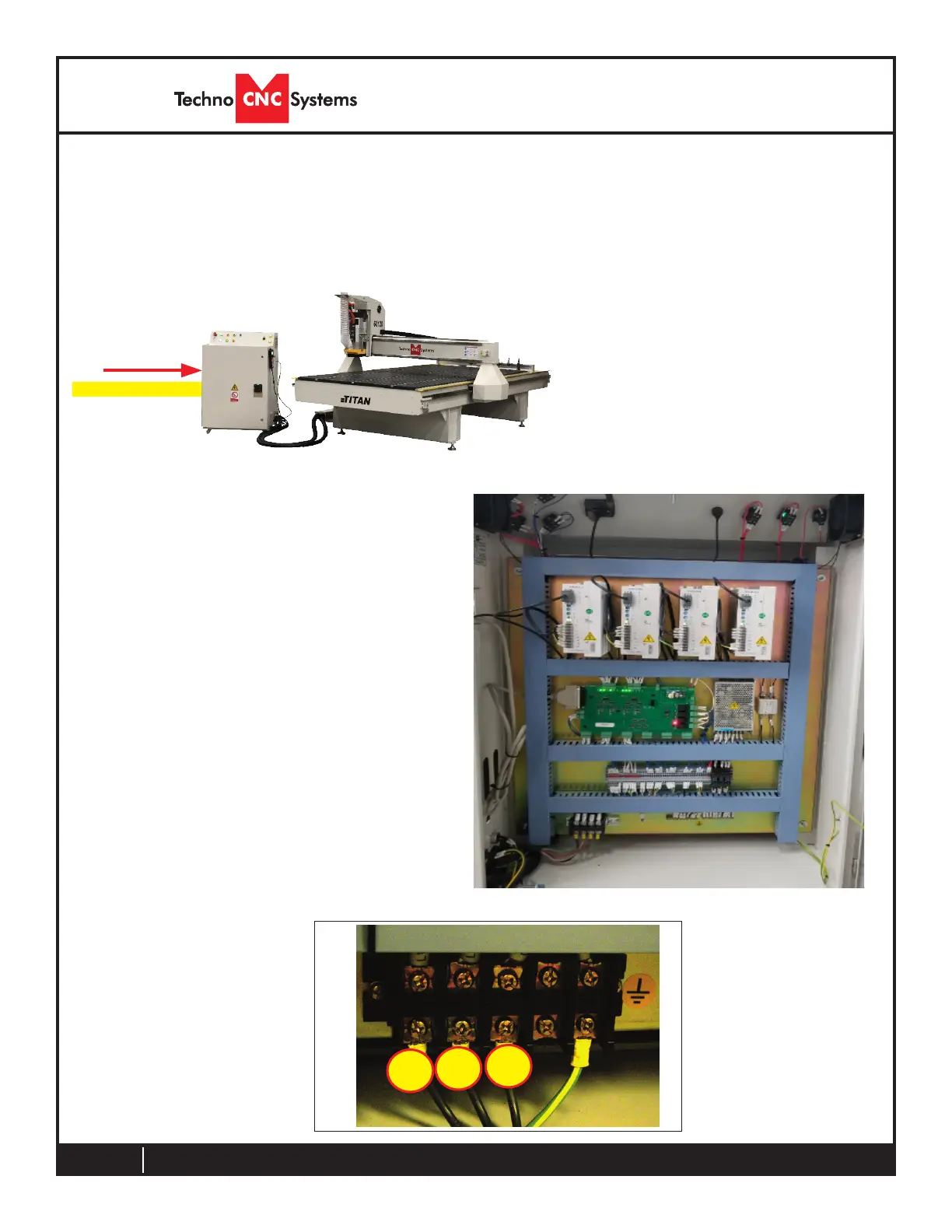
Fig. 1.2a
Enclosure
The Electronics are housed in the large NEMA enclosure
as shown in Fig. 1..2a. When unpacking the machine avoid
twisting the cable carrier that guides the cables to the
motors.
Have a suitably qualied
person connect the 220V
to the shown terminals.
Make sure that all local
electrical codes are obeyed.
For single phase machine,
connect power to L1 and L3
only.
Fig. 1.2c
Open the rear of the controller
using the provided key located
around the emergency stop
button or inside of the tool box.
You will now have access to the
electronics that drive the CNC.
They will be identical or like
depending on the model issued.
(shown in Fig. 1..2b).
The terminals for the
220 volt connection are located
at the bottom of the box
(shown in Fig. 1..2c)
Fig. 1.2b
A- Controller Board.
B- 24Volt PSU.
C- Stepper Driver.
D- 220Volt In.
A B
C
D



 To Next Page