IPCAM User Manual
47
Ø
Send E-mail alarm informatio
Ø
Transmit pictures to the FTP server, and can set the time interval of sending pictures;
2) Alarm time Settings
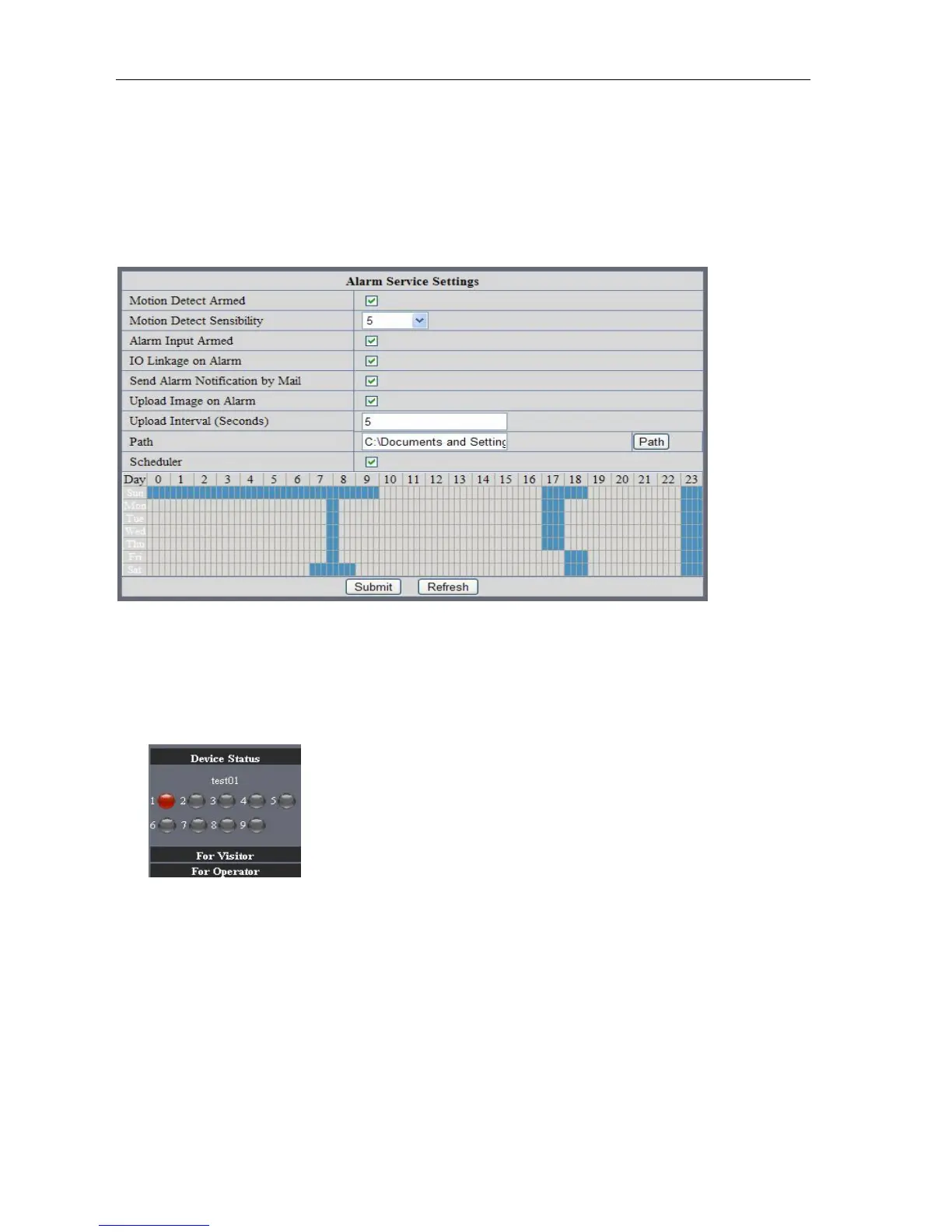
Only in the alarm period, detection device to alarm will only have alarm action. All the time (not check the
schedule) also can alarm within specified time. For the specified time alarm, firstly need to set up the system
time, time zone, and then to choose period of alarm in the state of alarm setting, as shown in Picture 19.
Picture88
Alarm of time Settings interface
Motion Detect Armed
When you enable motion detect armed, the camera can be triggered to send email alerts
and record images. In the camera monitoring page, the green icon turn to red and an
alert sound you will hear,
Motion Detect Sensibility
You can choose from low to high 10 level alarm sensitivity. The greater the number, the higher the
sensitivity
!
Send Mail on Alarm
Sent picture and mail inform to customer‟s e-mail after alarmed.(firstly you should finish
the Mail Service Settings.)



 To Next Page