All the parameters you set are available only when you click [Apply] and after system are
User need to change MAC address when there are multiple DVRs at the same local area network.
The Subnet Mask, gateway and DNS server should be consistent with your router’s configurations.
6. Input DNS address. Please check router firstly. The setting should be consistent with
Now you could remotely visit the
http: // public net IP: HTTP
http: //intranet IP: HTTP
Under the above four net mode,
The DVR is currently compatible with mobile
networks.
Please follow below steps:
1、
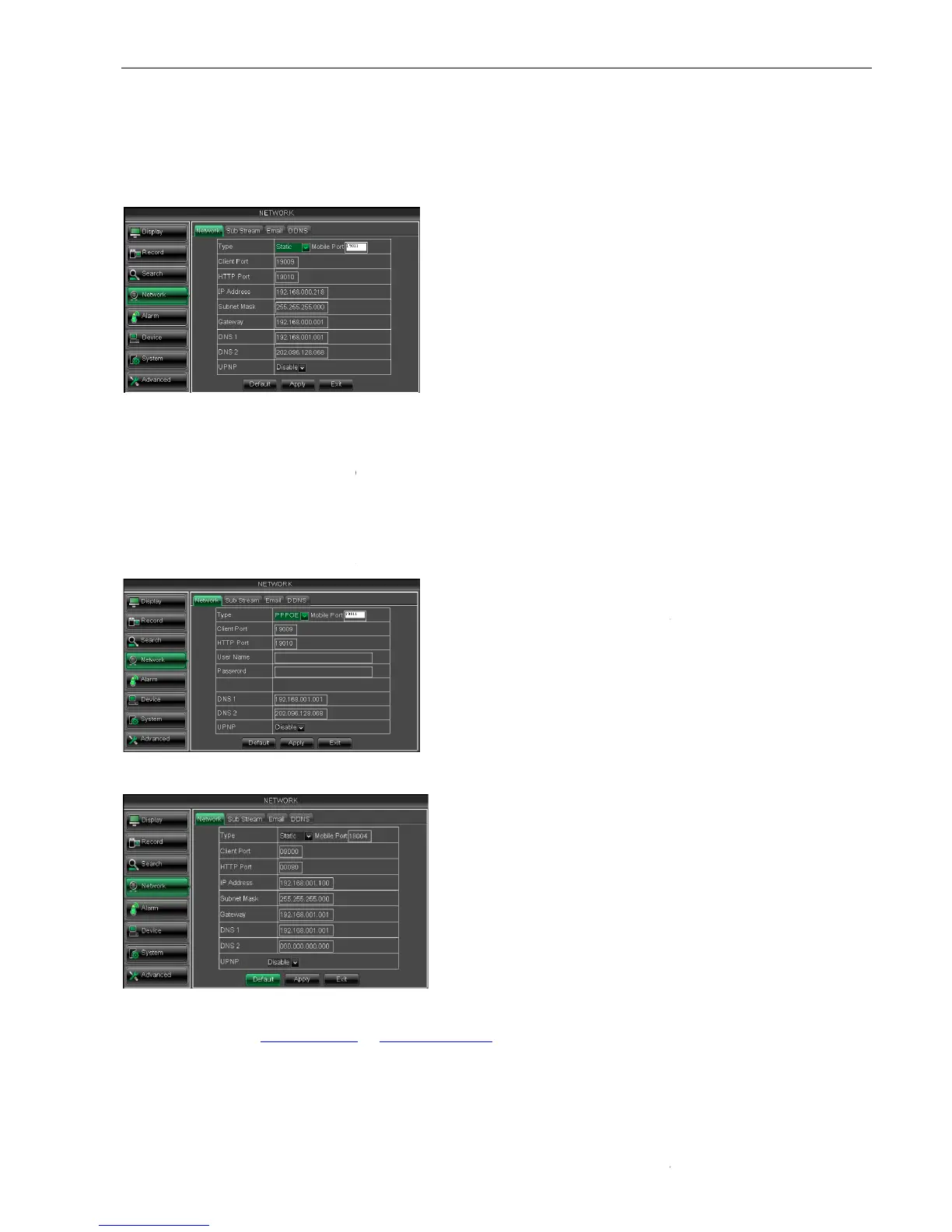
Configure network parameters, details please refer to section 5.2.4.1.
2、 Configure mobile port no (s
Picture 5-33
Picture 5-34
15
All the parameters you set are available only when you click [Apply] and after system are
User need to change MAC address when there are multiple DVRs at the same local area network.
The Subnet Mask, gateway and DNS server should be consistent with your router’s configurations.
6. Input DNS address. Please check router firstly. The setting should be consistent with
Now you could remotely visit the
19010 - only use for Intranet)
(4)
When selecting 3G from the Type. Details please follow
Input Mobile Port(China Telecom:#777;Others: *99#)
Click <Apply>. System will automatically capture IP.
Enter IP address:web port to visit DVR remotely.
can visit your remote DVR via DDNS and apply for free DDNS account
The DVR is currently compatible with mobile
Andriod, Iphone and Black berry
Configure network parameters, details please refer to section 5.2.4.1.
and the port need forward to router. Details please re
can input user name and password provided by
can visit your remote DVR by using the IP
address captured after registering a domain
rt and connect to your DVR
When selecting Static from the Type, user can directly input
IP address, Subnet Mask, Gateway and
picture 5-32.
1. Set your net type to Static;
ed to be forwarded to a router.
need to be forwarded to a router;
Input a specified IP address
All the parameters you set are available only when you click [Apply] and after system are
User need to change MAC address when there are multiple DVRs at the same local area network.
The Subnet Mask, gateway and DNS server should be consistent with your router’s configurations.
6. Input DNS address. Please check router firstly. The setting should be consistent with
When selecting 3G from the Type. Details please follow
Input Mobile Port(China Telecom:#777;Others: *99#)
Click <Apply>. System will automatically capture IP.
Enter IP address:web port to visit DVR remotely.
can visit your remote DVR via DDNS and apply for free DDNS account
Andriod, Iphone and Black berry
and the port need forward to router. Details please re
can input user name and password provided by
can visit your remote DVR by using the IP
address captured after registering a domain
rt and connect to your DVR
When selecting Static from the Type, user can directly input
IP address, Subnet Mask, Gateway and
ed to be forwarded to a router.
need to be forwarded to a router;
Input a specified IP address



 To Next Page