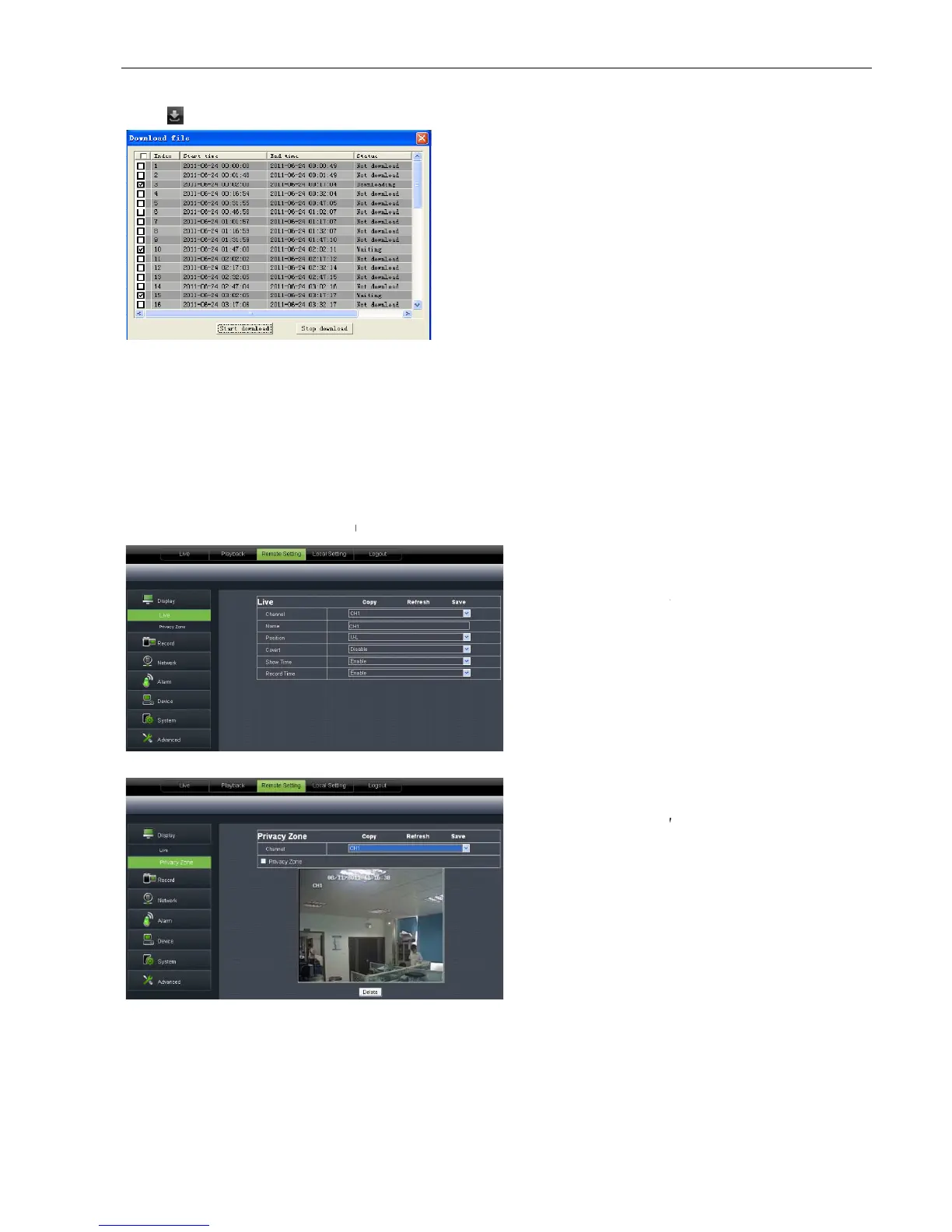
Record file download
Click [ ] icon to enter
into the below interface shown as Picture 6
select the record file you want to download and click [Start download]
System will download the record file in turn and save to local PC.
6.3.3 Configuration
6.3.3.1
Unfold [Display] option to find its sub
Picture 6-13
Picture 6-14
Picture 6-12
into the below interface shown as Picture 6
select the record file you want to download and click [Start download]
System will download the record file in turn and save to local PC.
Unfold [Display] option to find its sub
-options: Live and Privacy zone
1 、 Live:
Allow you modify channel name,
Position, Show time and Record time. If show
not appear on the screen on Live mode; and if
record time is set to <off>, system time can’t be
found in the record file.
2、Privacy zone:
Each channel could set up to
four privacy zones shown as Picture 6
parameters please refer to section 5.3.1.3. If you
want to delete one privacy zone, please firstly
select one zone, and then click <Clear> button
and click <Save> on the right
Allow you modify channel name,
Position, Show time and Record time. If show
, current system time will
not appear on the screen on Live mode; and if
record time is set to <off>, system time can’t be
Each channel could set up to
four privacy zones shown as Picture 6
parameters please refer to section 5.3.1.3. If you
want to delete one privacy zone, please firstly
select one zone, and then click <Clear> button
and click <Save> on the right



 To Next Page