EasyManua.ls Logo

TECHVIEW QV-3049 - 4 Ch Remote Controller

TECHVIEW QV-3049
40 pages
Print Icon
To Next Page IconTo Next Page
To Previous Page IconTo Previous Page
Loading...
User Manual
3
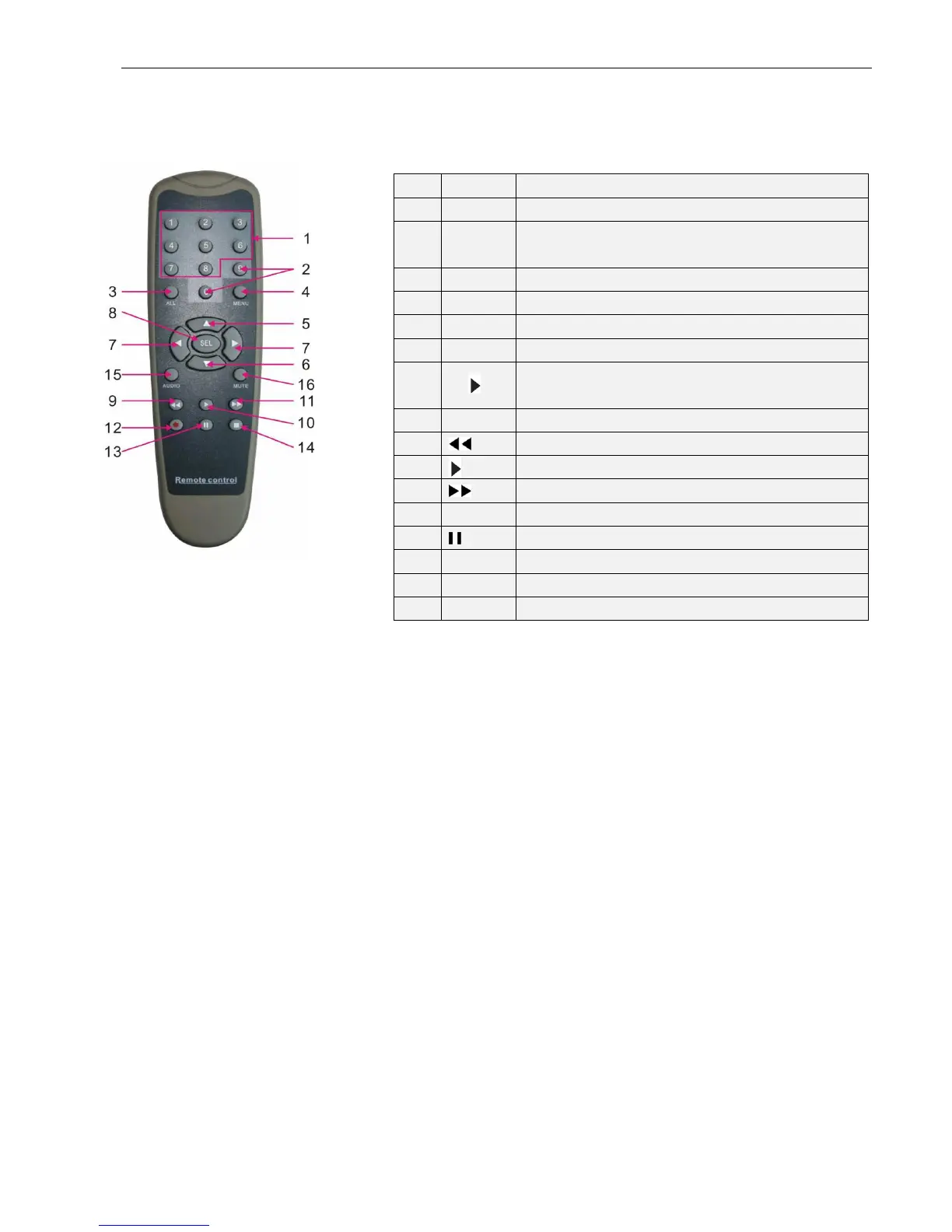
2.3 4CH Remote Controller
Item
Key title
Key function
1 1-8 Channel select 1-8; Numeric key
2
90
Numeric key; Clicking numeric “0” allow you
switch to output device
3 ALL Multiple display mode
4 Menu Enter into Main menu/Exit
5 Up arrow key, Volume adjust
6 Down arrow key, Volume adjust
7
◄/
Left/Down key,
Decrease/increase parameter value of control bar

8 SEL Select key/Edit key; selected operation.
9
Rewind key
10
Enter into record search menu; Play key
11
Forward key
12 Record key
13
Pause/Sequence key
14 Stop manual record; stop playing
15 Audio Testing
16 Mute Mute on/off

Related product manuals