User Manual
2
Chapter 2: Overview
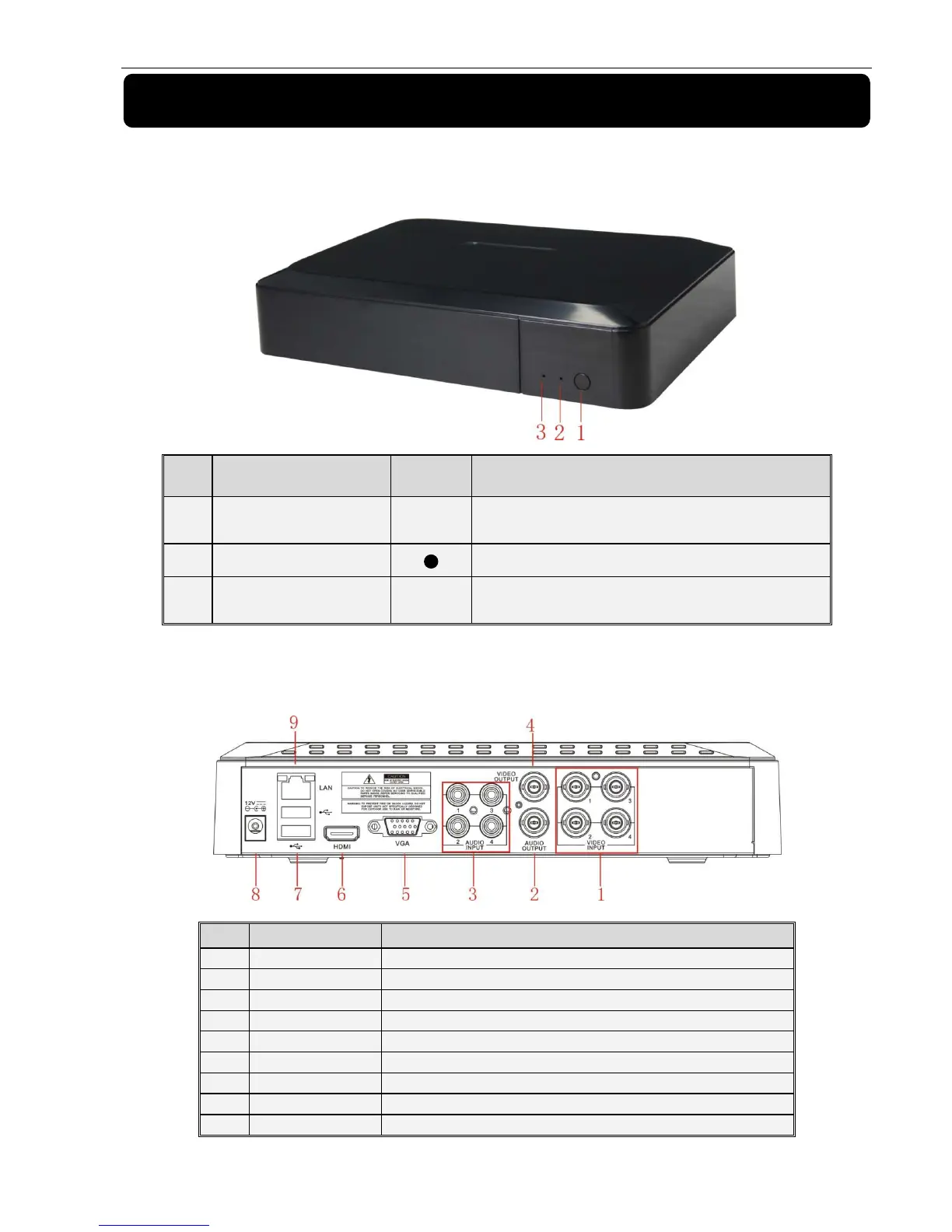
2.1 Front Panel
Reminder: DVR is the abbreviation of Digital Video Recorder Equipment.
2.1、
、、
、4-CH DVR Front Panel
2.2Rear Panel
2.2、
、、
、4-CH DVR Rear Panel
Item
Physical port Connection method
Video input
Connect CH1-4 (Virtual) video input device(BNC interface)
Audio Output Audio output (RCA interface);
Audio Input audio input (RCA interface);
Video output Connect monitor output(BNC interface)
VGA Port Connect to VGA monitor, such as PC monitor (Optional)
HDMI Port Connect to HDMI monitor
USB Port Connect USB device (Flash Drive, Hard Drive and Recorder etc)
Power Port Connect power supply - DC12V 2A
Ethernet: Port Connect LAN, Ethernet (RJ45 interface)
Item
Remark Function & Description
1 IR Receiver PWR
If the “Green” indicator is on the system is getting
power normally.
2 Power Indicator
Receives IR signal from Remote Controller
3 HDD Indicator HDD
When the “Red” indicator flashes it means the hard
drive is being read or written to.



 To Next Page