EasyManua.ls Logo

Tecnar Rotoweld 3.0 - Remote Pendant; Figure 2 Remote Pendant of the Rotoweld; Figure 3 Power Switch (Key) of the Machine; Figure 4 the Key that Enables or Disables the Welding Parameters Adjustment

Default Icon
48 pages
Print Icon
To Next Page IconTo Next Page
To Previous Page IconTo Previous Page
Loading...
This document contains information considered proprietary and confidential to Tecnar Automation Ltd
40101-00020-00Rev 1.2
Revision date: 2017-07-31
Page 13 of 48
!
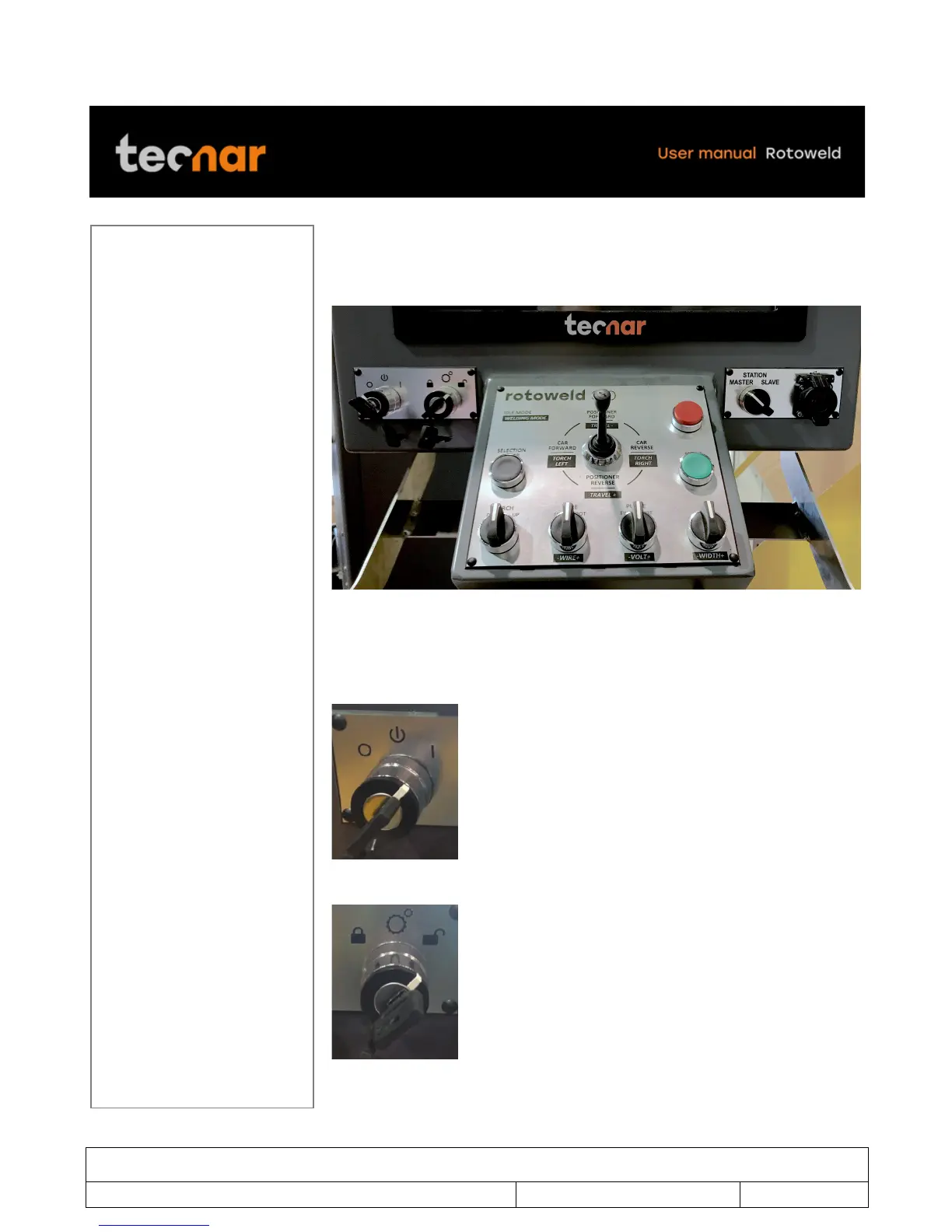
4.2 REMOTE PENDANT
Below is the typical remote pendant of the Rotoweld (figure 2) and its
controls.
FIGURE 2 REMOTE PENDANT OF THE ROTOWELD
On the left-hand side of the pendant, you will find both the power switch (key)
of the machine (Figure 3) and the key that enables or disables the welding
parameters adjustment (Figure 4).
FIGURE 3 POWER SWITCH (KEY) OF THE MACHINE
FIGURE 4 THE KEY THAT ENABLES OR DISABLES THE WELDING PARAMETERS
ADJUSTMENT

Table of Contents

Other manuals for Tecnar Rotoweld 3.0