- 20-
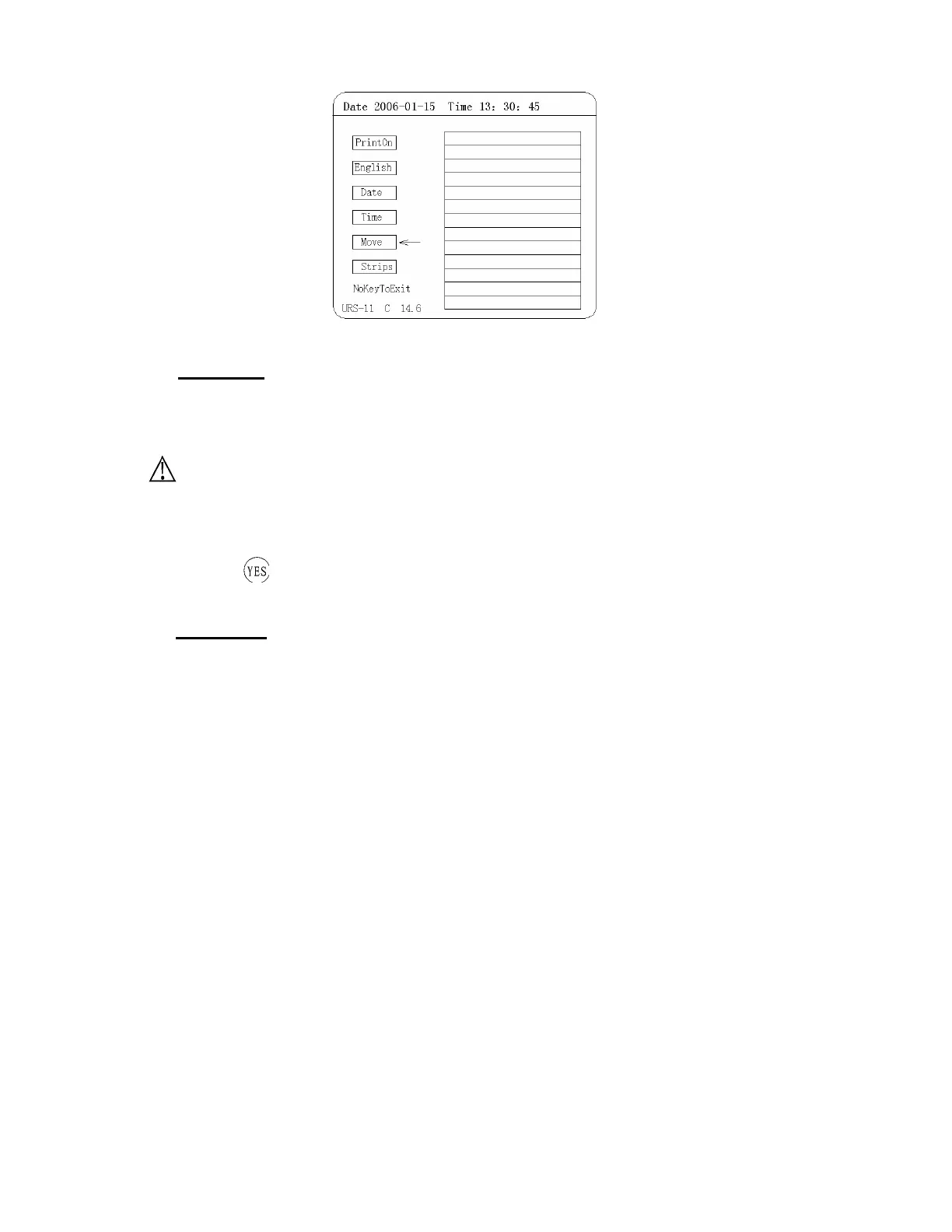
Figure 13: Parameter Menu
(
Ⅰ
) Print on
The default printer setting for the TC-720 plus is printing through the internal thermal printer. The 720 plus can also
print using an external stylus printer. These settings can be changed using the “Print on” in the “Parameter” menu.
When using an external printer the status of that printer cannot be controlled using the 720 plus. Make sure the
external printer is on and working properly when being used in conjunction with the 720 plus.
“Print on” Settings can only turn the internal thermal printer on and off. When using an external
printer those settings are not controlled by the 720 plus
The default status of the internal thermal printer is ”Print On”. This setting basically means that the printer
will automatically print out every test result. In order to turn off the printer select “Print On” in the “Parameter”
menu and press
. This will turn off the printer and the setting will say “Print Off”.
(
Ⅱ
) English
The default language setting for the apparatus is English. The Print format is as follows:
No 0001
Date 2003-06-02
Time 17:25
GLU - 0 mmol/L
NIT -
BLD +- 1.0 mg/L
PRO - 0 g/L
KET - 0 mg/L
SG >
=1.030
PH 5.0
BIL - 0 μmol/L
URO +- 3.4 μmol/L
LEU - 0 Leu/μL
VC >
=6.0 mmol/L


 To Next Page