- 13-
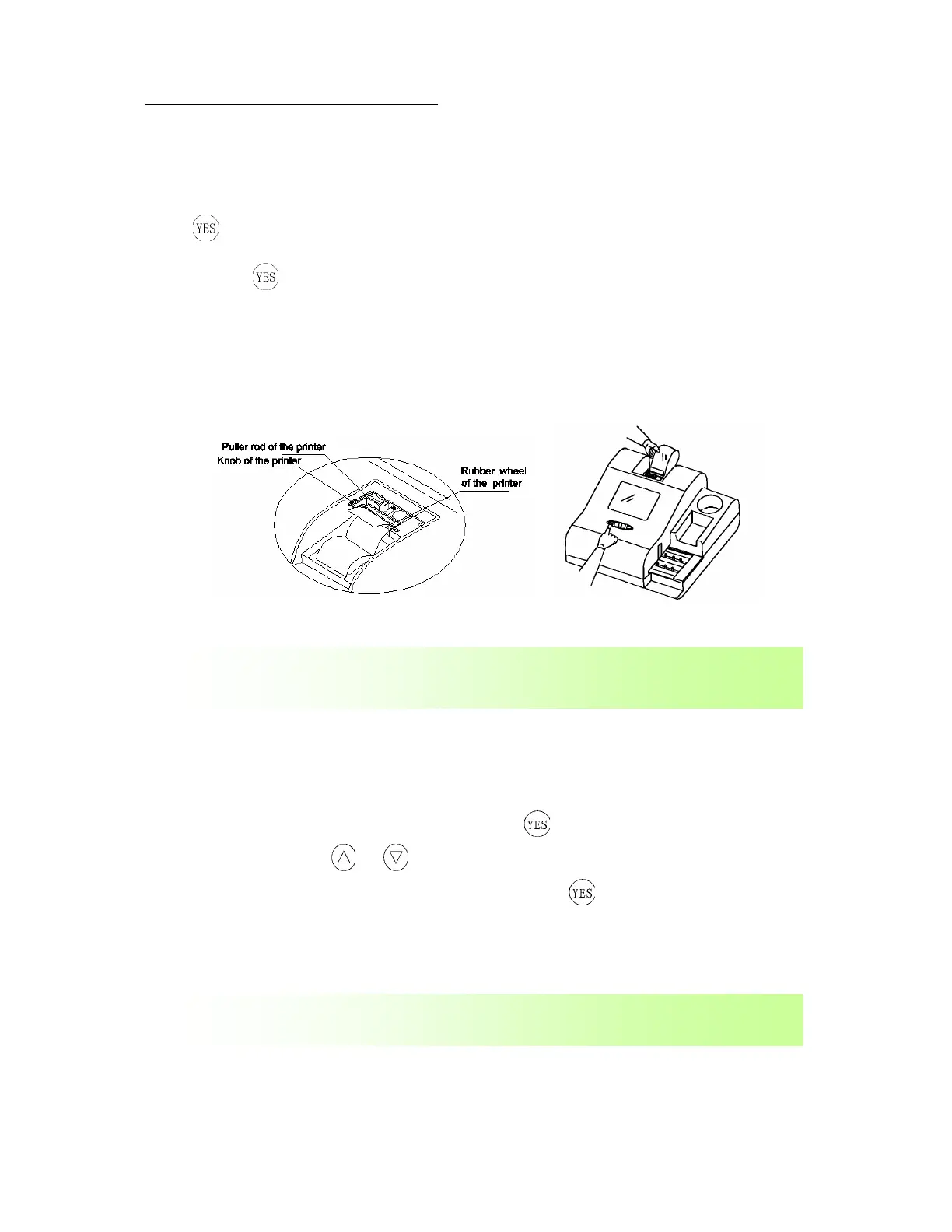
Instructions for changing printer paper:
Turn on the apparatus; remove the printer cover by applying a steady upward force on the cover
and pressing down on the arrow on the top of the cover. Take out the printer rod and place
through the paper. Secure the printer paper in the printer bed and place one end of the paper
under the rubber wheel. The instrument will automatically detect the paper and advance it 2-3 cm.
Press
to enter main menu screen. On the menu screen toggle (using arrows) to Paper
Feed and press
, this will advance the paper. Make sure paper is advancing properly. Replace
the cover making sure that the printer paper is placed through the slit on the cover.
After changing paper make sure that the printer is working correctly by running a calibrator strip.
If not printing correctly the paper may have been installed with the wrong side facing the printer.
Make sure values printed correlate with those on the calibrator kit.
Figure 6: Paper Setting
3.3 Selection of strip models
Select Strip Type in the operational main menu, press to enter into its operational interface
(as in Figure 12),press
or keys respectively, you can make a selection among four
strip models: URS-8, URS-9, URS-10, and URS-11. Press
key to return to the previous
menu while saving changes.
When a printing paper is used up, install a new one according to the methods
in the above “Installation of printing paper”.
Replacement of strip: The strip is a disposable product. Strips cannot be used
more than once!


 To Next Page