- 12-
If malfunction 9 appears during the instruments initial set up, it is possible that the test board
has shifted during transportation. The strip rack may have been blocked so that it is not working
properly. The following procedure could be used in order to fix this issue.
Press
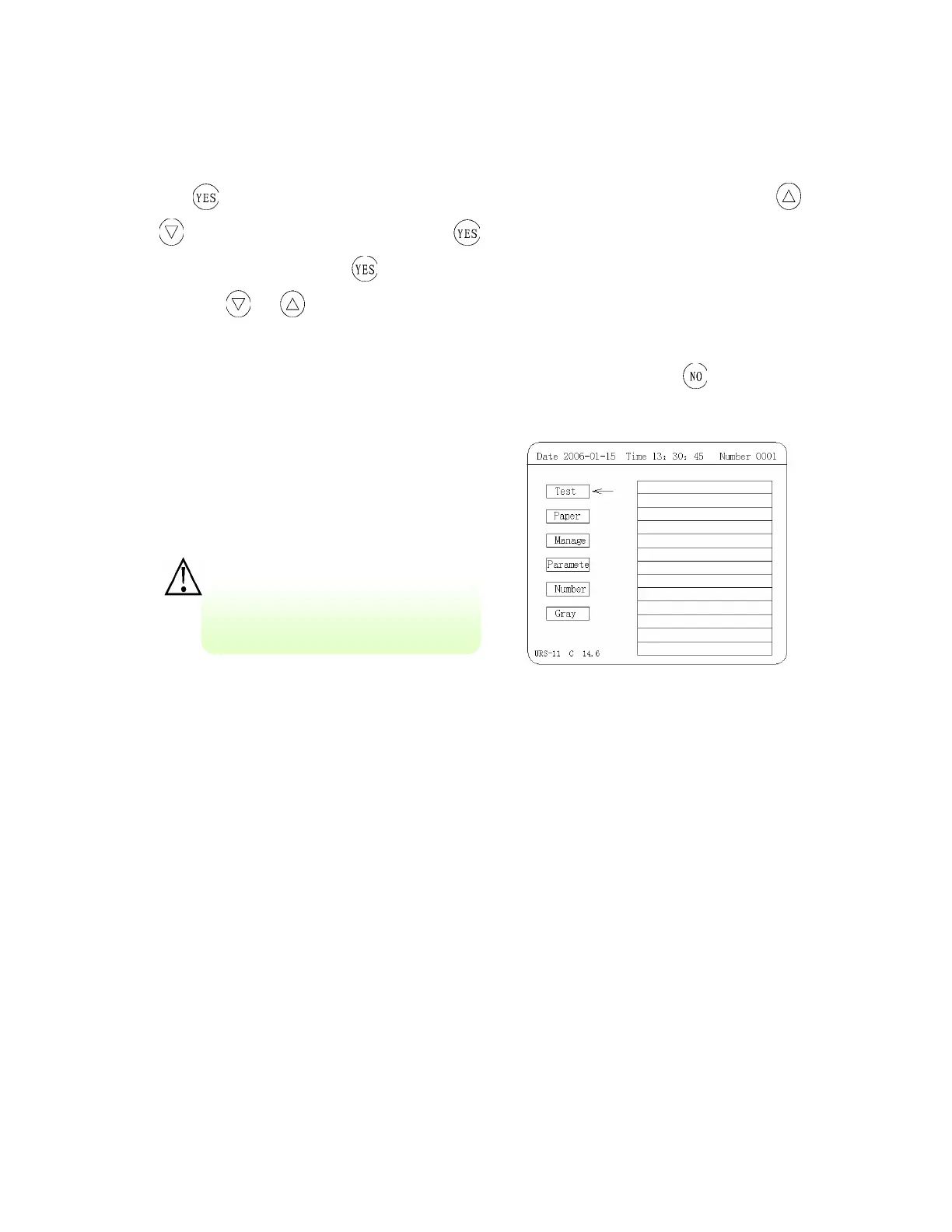
and you will enter into the main operational menu (see Figure 5), then press
or
to choose Parameter Setting, press to enter into the menu (see Figure 7), then
choose Motor Driving, press
to enter into its operational interface (as in Figure 14); and
then press
or to move the rack still to make strip sending rack to send reagent strip
in single-step or send reagent strip continuously; if the strip sending rack runs smoothly it
indicates that the mechanical performance of the apparatus is normal. Press
still to return
to main operational menu.
Figure 5: Operational menu
(II) Changing Printer Paper
CAUTION:
• Make sure the thermal paper is dry before installation. If the paper is moist
the printer will jam.
• Thermal paper for the TC-101 is only coated on one side. If installed facing
incorrectly printer will not print
• Do not run the printer without printing paper installed, the printer heads
may be damaged
Do not disassemble the instrument
while it is on, the instrument may be
dama
ed.


 To Next Page