- 21-
(
Ⅲ
) Date
Choose “Date” in the menu of “Parameter” and press , now the date of “Parameter” menu
flashes, press
to shift among year, month, date; After the desired items is chosen press
or to adjust the number.
(
Ⅳ
) Time
Adjust hour, minute and second in “Time” menu.
(
Ⅴ
) Move
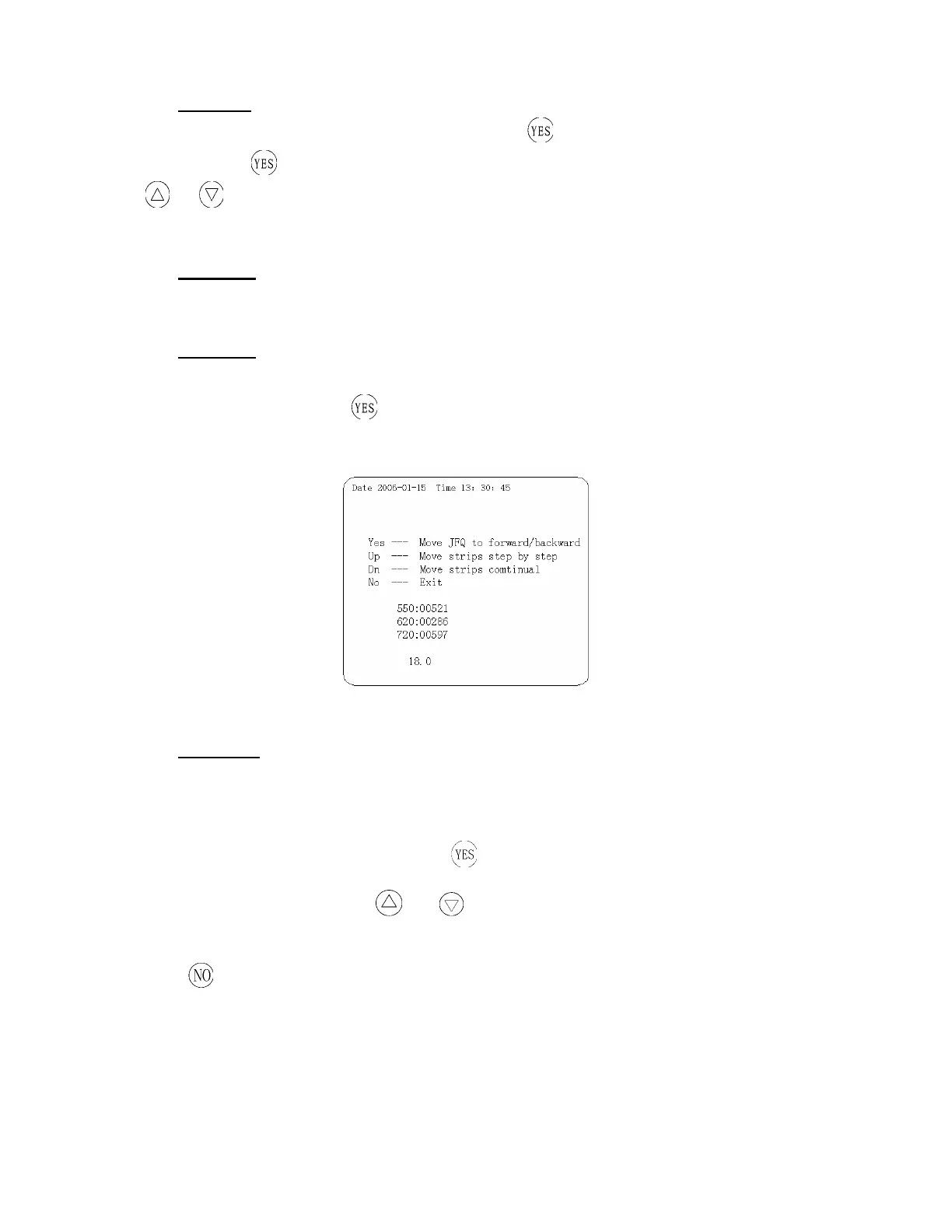
The “Move” item in the apparatus menu is used in apparatus maintenance. Choose “Move” in
“Parameter” menu and press
and enter into its operational menu (Figure 14), and you can
control the running conditions of each motor using the keyboard.
Figure 14: Operational Interface in Motor drive
(vi) Strips
The TC-720 plus keeps a record of what number a test is. This number is printed out on the top
of the report and is displayed on the screen in the bottom right corner. You can set this number to
start at any point from 1-0999. From the main menu choose “Parameter” by scrolling the
selection arrow to “Parameter” and pressing
. Choose “Strips” in this menu. You will see the
number setting flash. Using the
or arrows change the number flashing. Holding the
arrows will make the numbers increase or decrease in increments of 10.
Press
to return to the Main menu. The first test will start at the number set by the user. Each test
after this will increase by one from the set point.


 To Next Page