Channel reference and enabling
CH1-CH2-CH3 and CH4
Enabling of FAILSAFE FUNCTION
Relay: ALARM-TRIP-FAULT
Channel FAN 1 Enabling
CH1-CH2-CH3
FAN 1 limit programming boxes
On and Off (from 0°C to 240°C)
Enabling FAN 2 channel CH4
FAN 2 limit programming boxes
On and Off (from 0°C to 240°C)
INTELLIFAN FUNCTION enabling
CH1-CH2-CH3
ALARM limit programming box
(from 0°C to 239°C)
TRIP limit programming box
(from 1°C to 240°C)
HFN setting box (from 0h to 200 h)
0=function disabled
FCD setting box (from 0°C to 30°C)
0=function disabled
Voting setting box: (0-NO) (1-YES)
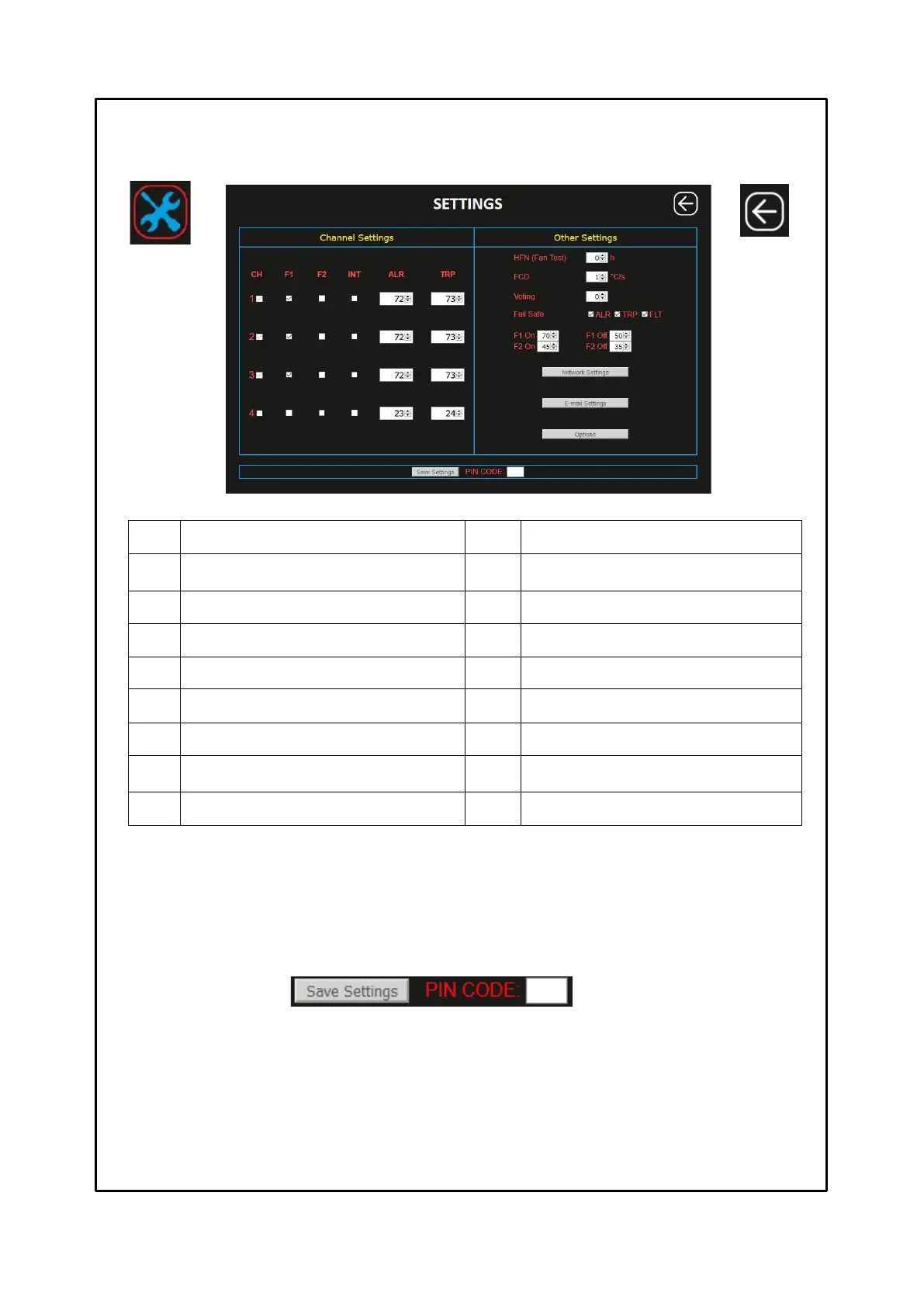
SETTINGS SCREEN
In the settings screen it is possible to modify the programming of the NT935 WS EVO control unit.
As for the panel programming also for programming through WEB SERVER it is necessary to follow these rules:
ALL. = ALARM ≥ TRIP
FAN = FAN-OFF ≥ FAN-ON. (FAN1 OR FAN2)
INT = INT FAN-OFF ≥ FAN-ON (FAN1) DELTA <10°C
The cells of the editable values are accessible in white, the grey cells are not accessible. The programming limits of the
monitored parameters are shown in the table above.
After entering the PIN CODE, default 00000, by pressing the SAVE SETTINGS key the user updates the programming data
of the NT935 WS EVO device. The control unit will lose the connection for a few seconds, the device will reset after which the
new values will be available on the updated screen.
Incorrect programming of the device will result in the display of an error POP UP window with the relative signalling; the data
update will not be processed.
(*) Note: PIN CODE settings and operation on page 29
Key: BACK
Return to the
HOME screen



 To Next Page