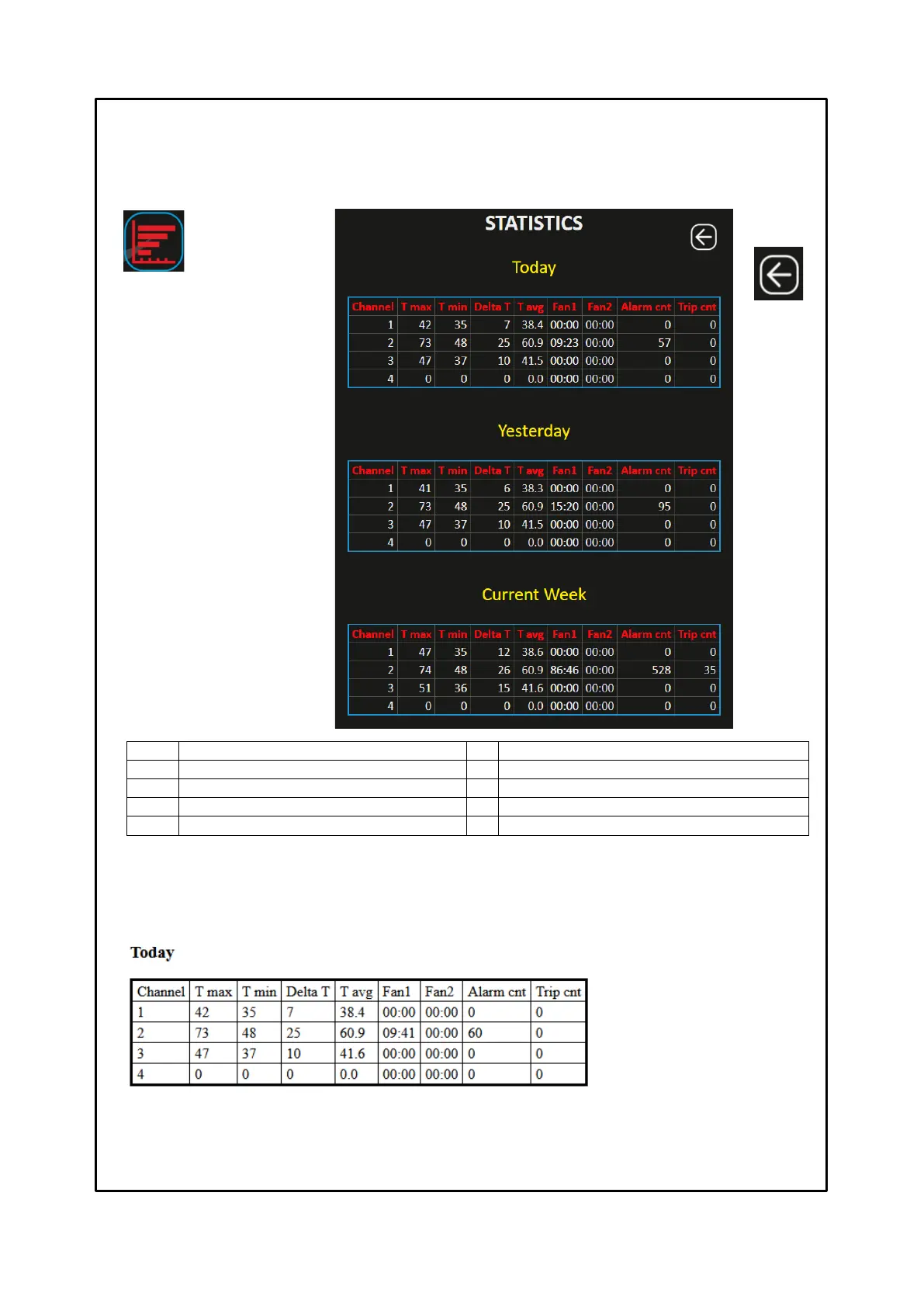
STATISTICS SCREEN
The STATISTICS screen allows the user to view a statistical summary of the enabled channels CH1-CH2…. CH4, on the
performance of the individual channel. Information (data) available for the user: max CH temperature, minimum CH
temperature, delta T (MAX-MIN), average temperature, number of hours on FAN1 activation, number of hours on FAN 2
activation, ALARM threshold exceeded count, TRIP threshold exceeded count.
PERIODIC REPORT
By configuring the e-mail settings, e-mail setting on page 26, it will be possible to receive a periodic report on the operation of
each channel.
The data contained in the report will be those displayed on the statistics page, see the example below:
What is the periodic report for?
It can be used to automatically receive an update on the operation of the monitored electric machine, without wasting any
time. By analysing the periodic reports received, directly on their own e-mail, the maintenance technicians will be able to
identify any anomalies and plan in advance the interventions on the systems
Report sending selection:
Disabled
Daily
Weekly
Monthly
Number of hours activation FAN 1
Number of hours activation FAN 2
ALARM threshold exceeded count
TRIP threshold exceeded count
Data available in the time periods:
Today
Yesterday
Current week
Last week
Current Month
Last Month
Key: BACK
Return to the
HOME screen



 To Next Page