TREND CHART SCREEN
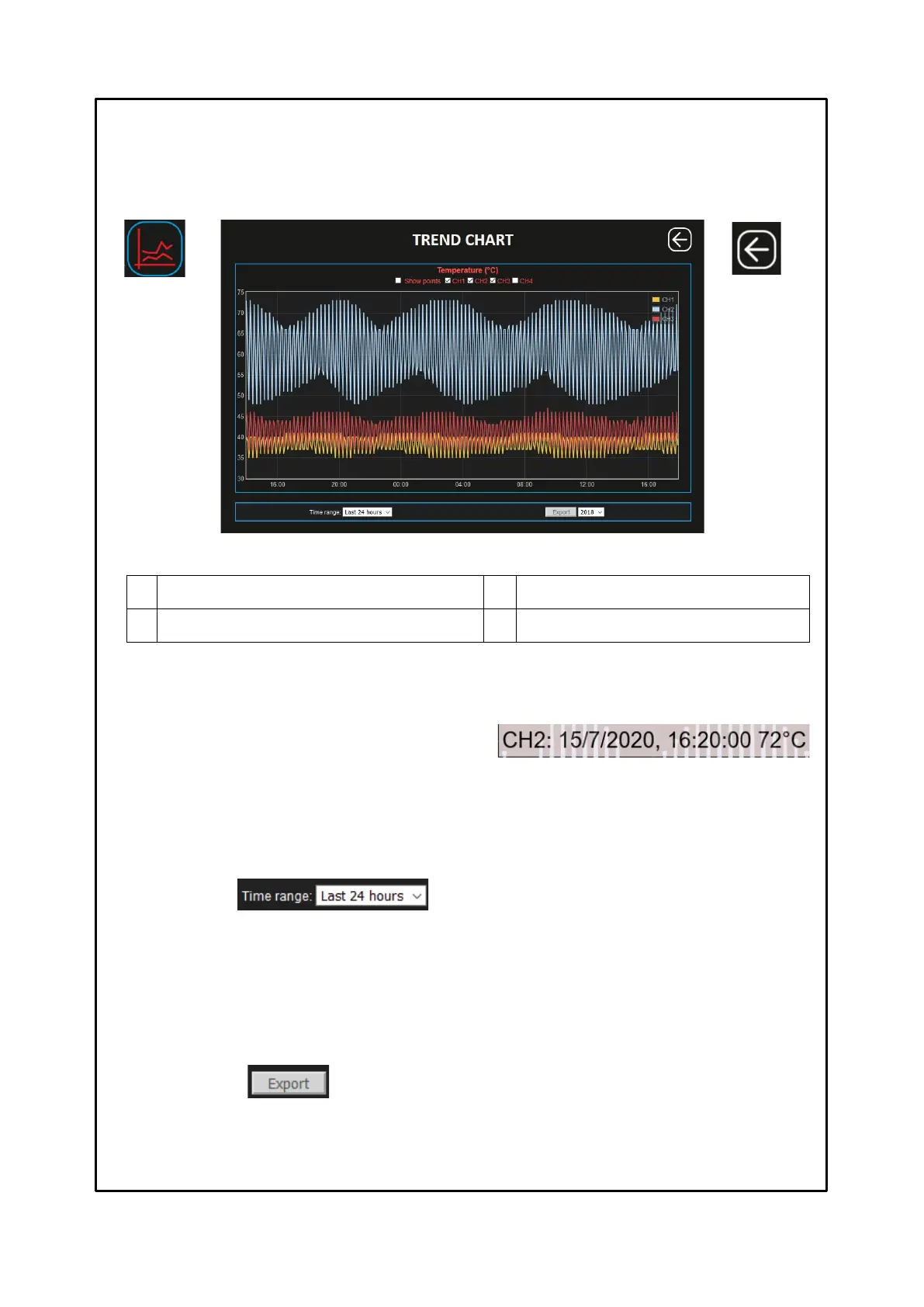
The trend chart screen allows the user to view the temperature trends of the enabled channels CH1-CH2-CH3-CH4, and it
is also possible to export the values recorded on the CSV file.
By pressing the EXPORT key it is possible to download all the recorded temperature values in CSV format (text file).
Before pressing the export button, select the year you want to export. CSV file export notes on page 29.
Recording points display flag
CHn channel enabling flag
CH channel selection flag
Enable / disable the graphic display of the individual CHn channel.
Recording points display flag
Enabling the recording points display flag it will be possible to
identify each recording in the graph. Clicking on the individual point
will show the information of: channel, date, time and recorded
temperature value.
Key: BACK
Return to the
HOME screen
Allows the user to set the graphic display period available in the following selections:
• Last 24 hours
• Last 7 days
• Last 30 days
The trend display, channel temperatures, will be updated according to the selection of the chosen period and the enabled
channels.



 To Next Page