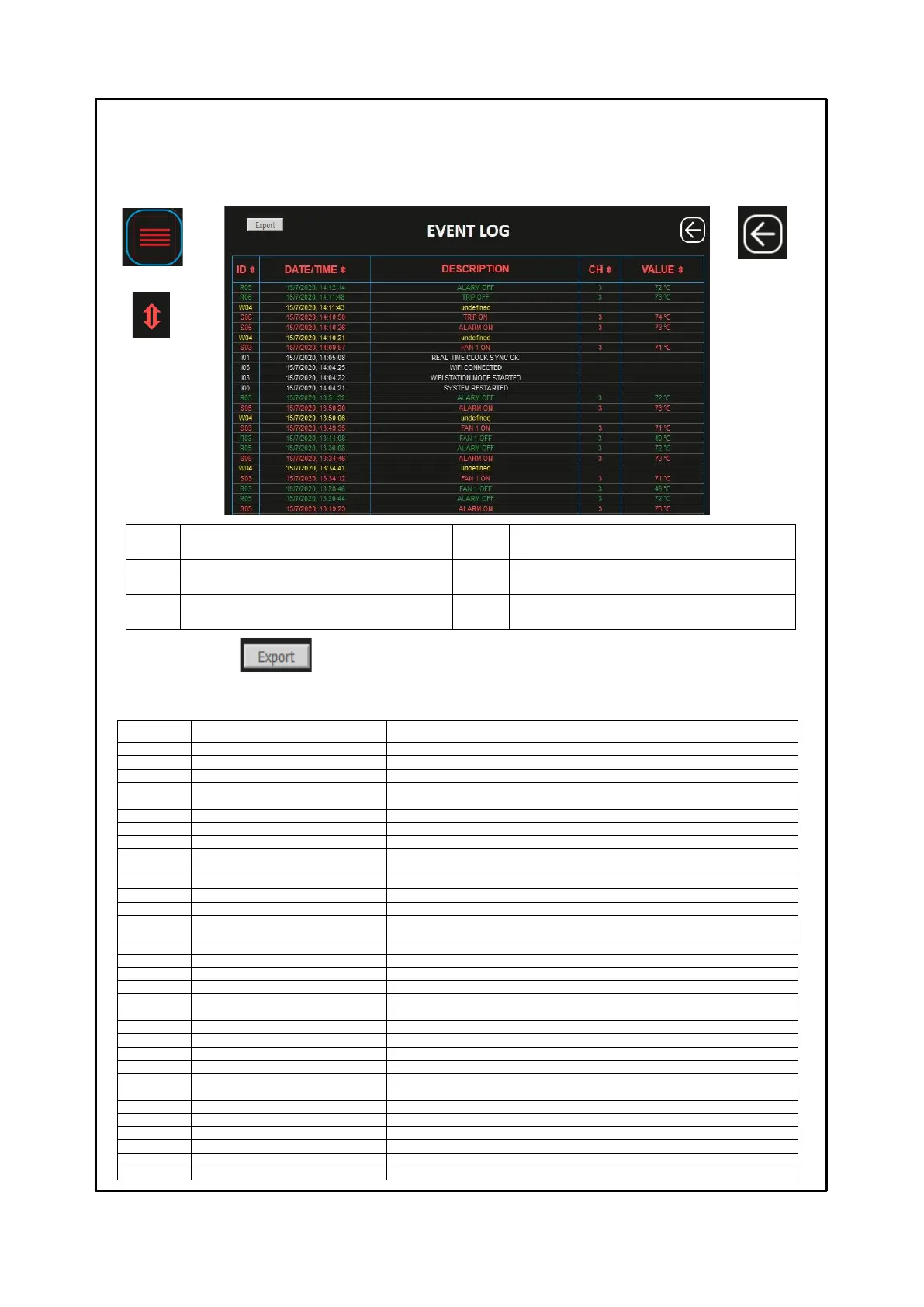
EVENT LOG SCREEN
The Event log screen is used to quickly obtain an immediate overview of the events recorded by the control unit. Each event
is identified with ID code, see event ID table.
By pressing the EXPORT key it is possible to download all the recorded events in CSV format (text file) see notes on page
28.
Temperature value recorded
Automatic setting date and time via sync server
web server in STATION mode start
Start mode web server in STATION
Wi-Fi Access point started
web server in ACCESS POINT mode start
Web server connected to the Wi-Fi network
Control unit parameters saving (PRG)
Temperature log saved to csv
Saving of temperature csv file
Saving of log events csv file
Wi-Fi disconnected from the network
Real time clock set to last saved
Resetting of date and time, automatic, since the last saving
Real time clock manually set
Manual date and time setting
Diagnostic button pressed
The access point button has been pressed
Achievement of the TRIP threshold on the identified CHn
(option screen enabling flag)
FCC OFF fault signal on CHn channel identified
FOC OFF fault signal on CHn channel identified
FCD OFF fault signal on CHn channel identified
FAN1 OFF switch off signal on CHn channel identified
FAN2 OFF switch off signal on CHn channel identified
ALARM OFF switch off signal on CHn channel identified
TRIP OFF switch off signal on CHn channel identified
FCC ON fault signal on CHn channel identified
FCD ON fault signal on CHn channel identified
FCD ON fault signal on CHn channel identified
FAN1 ON activation signal on CHn channel identified
FAN2 ON activation signal on CHn channel identified
ALARM ON activation signal on CHn channel identified
TRIP ON activation signal on CHn channel identified
Signal internal web server error
Signalling of events log indices reset
Report deletion of events log indices
Key: BACK
Return to the
HOME screen
Key: ORDER
It is used to
organise the
order of events
according to the
display
requirements.



 To Next Page