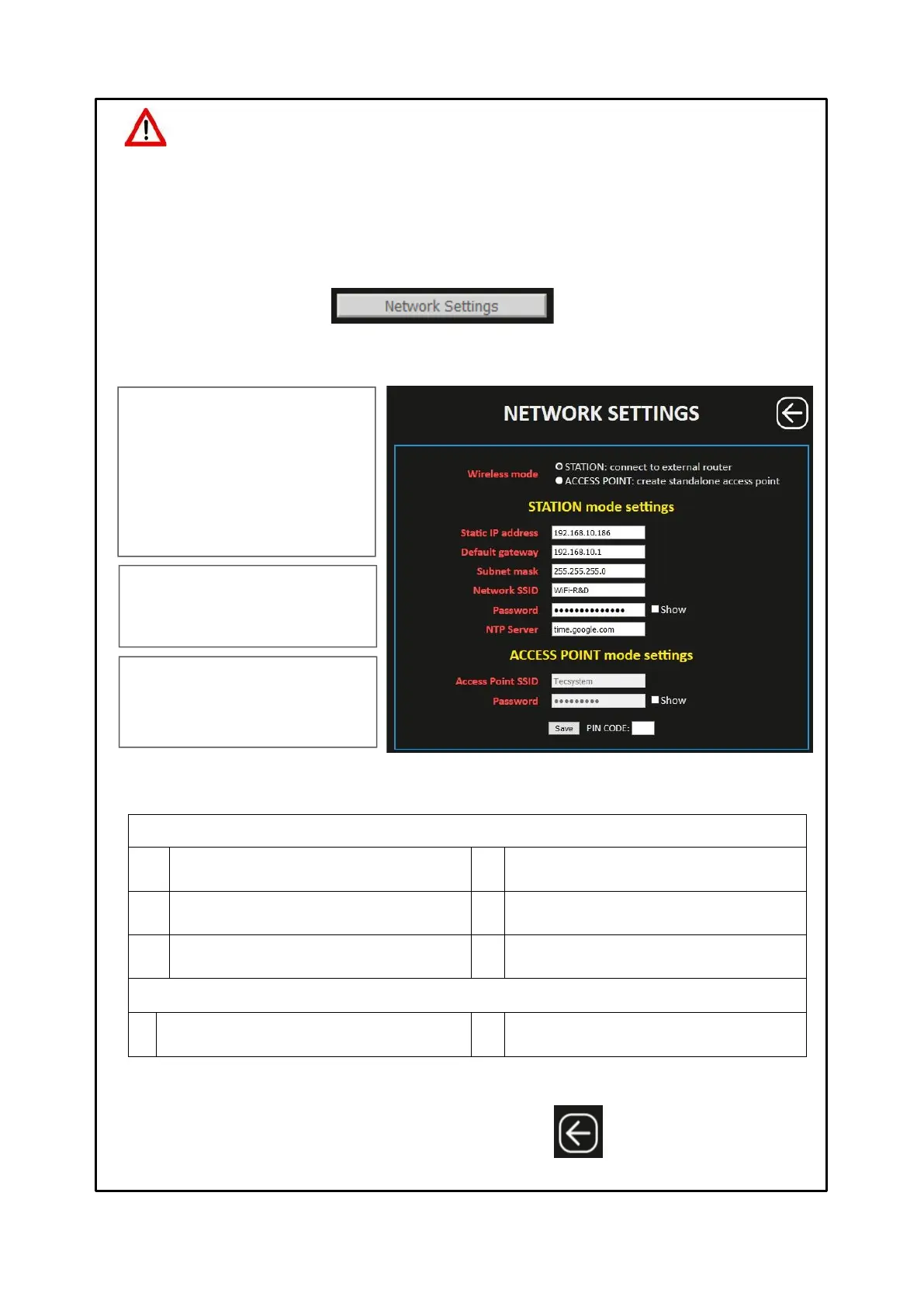
Pressing the NETWORK SETTINGS key the user accesses the Wireless network setting screen. In this screen the user can
select the STATION or ACCESS POINT operating mode and set the network parameters.
ATTENTION:
We recommend you check the device's programming before starting the device.
The default parameters set by TECSYSTEM might not match your requirements.
Programming the device is the end user's responsibility. The settings of the alarm thresholds and enabling of the
functions described in this manual must be checked (by a specialist engineer) according to the application and
features of the system the control unit is installed on.
1 Selection STATION mode settings
Wi-Fi network name
(Wi-Fi network on which to connect the device)
Wi-Fi network password
(SHOW to view the password)
Server NTP address
(automatic time and date update)
1 Selection ACCESS POINT mode settings
Access Point SSID (default TECSYSTEM)
(network name modification)
SSID password (TECSYSTEM default)
(SHOW to view the password)
After entering the PIN CODE, default 00000, press SAVE to save the set values. A POP UP window will confirm the correct
saving of data.
Note: PIN CODE settings and operation on page 29.
WIRELESS MODE
it allows the user to select the operating
mode.
STATION: the web server is connected via
WI-FI to a pre-established network.
ACCESS POINT: the device works in the
indicated mode, creating its own independent
Wi-Fi network.
STATION MODE SETTINGS
Setting of the defined network parameters to
which the control unit is connected.
ACCESS POINT MODE SETTINGS
Setting of network parameters: SSID network
name) and Password of the network to which
the control unit is connected.
NOTE: For information / clarifications regarding the Wi-Fi
network connection, contact your IT MANAGER.
Press BACK to return
to the previous screen



 To Next Page