EasyManua.ls Logo

Teknatool NOVA DVR XP - Human Machine Interface (HMI) Description; Keyboard Operation

Teknatool NOVA DVR XP
50 pages
Print Icon
To Next Page IconTo Next Page
To Previous Page IconTo Previous Page
Loading...
115-0214-004 26
3.0 HUMAN MACHINE INTERFACE DESCRIPTION
The Human Machine Interface (HMI) provides a flexible choice of the drive parameters: run/stop, motor
speed, direction of rotation, PI speed controller coefficients. HMI contains 2-lines, 16-position LCD
display and keyboard. The drive parameters can be set by decreasing/increasing values incrementally.
Some parameter values can be stored in the EEPROM of HMI.

UP
RPM
DOWN
RPM
I
ON
0
OFF
PROGRAM
P
MODE
M
SELECTOR
E
FWD
REV
D V R
D R I V E
N O V A
F U T U R E T E C H
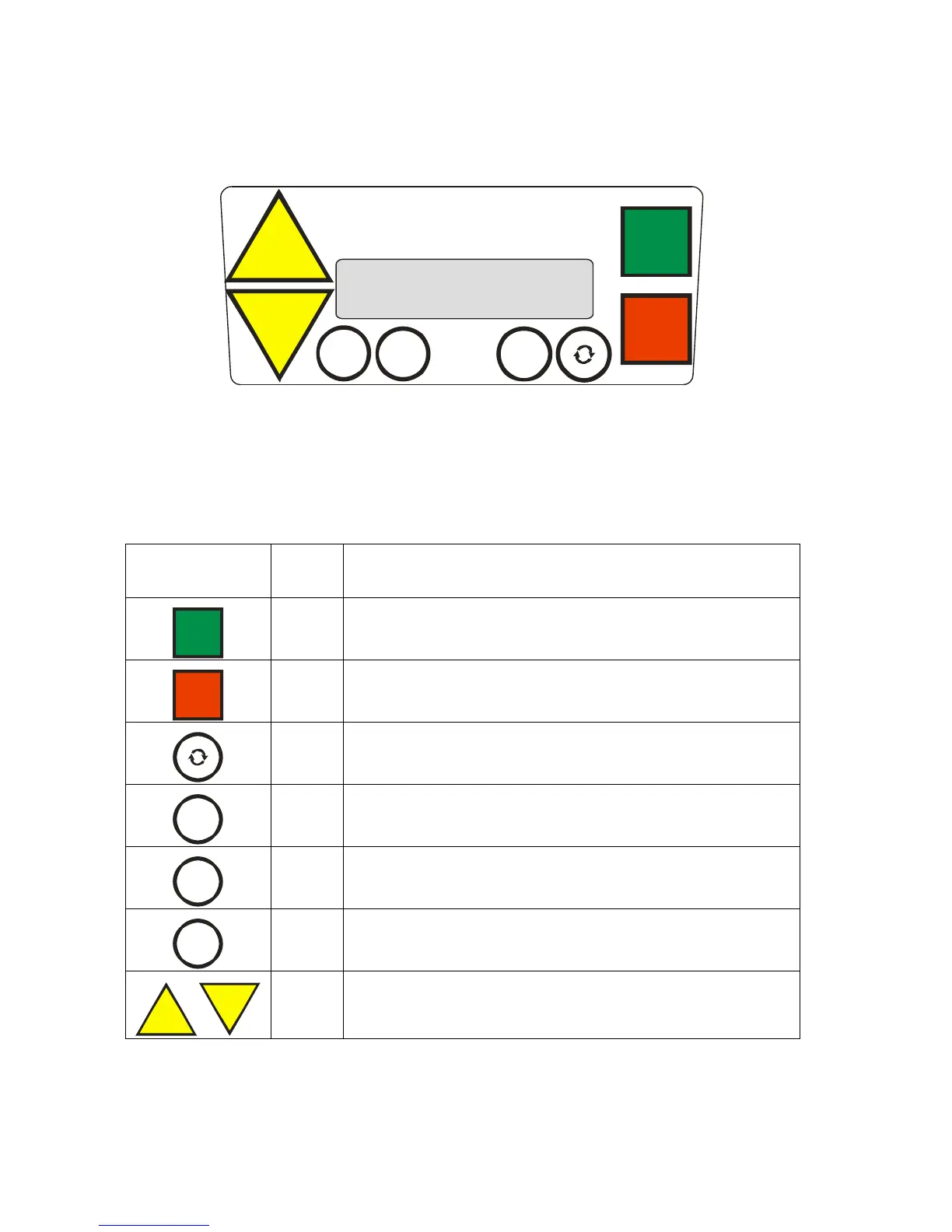
Figure 1: Keyboard view
3.1 Keyboard Description
The keys description:
Key view
Legend
Short Description
I
ON
I
- START KEY -
- run the motor -
0
OFF
O
- STOP KEY -
- stop the motor and reset system -
FWD
REV
R
- REVERSE KEY -
- change the direction of motor rotation -
PROGRAM
P
P
- PROGRAM KEY -
SELECTOR
E
E
- SELECTOR KEY -
MODE
M
M
- MODE KEY -
UP
RPM
DOWN
RPM
S
- UP KEY and DOWN KEY-
- Increase/Decrease and set the parameter incrementally -

Related product manuals