User Manual CXE85X
59300464 Rev.005
9.12.2013 18(44)
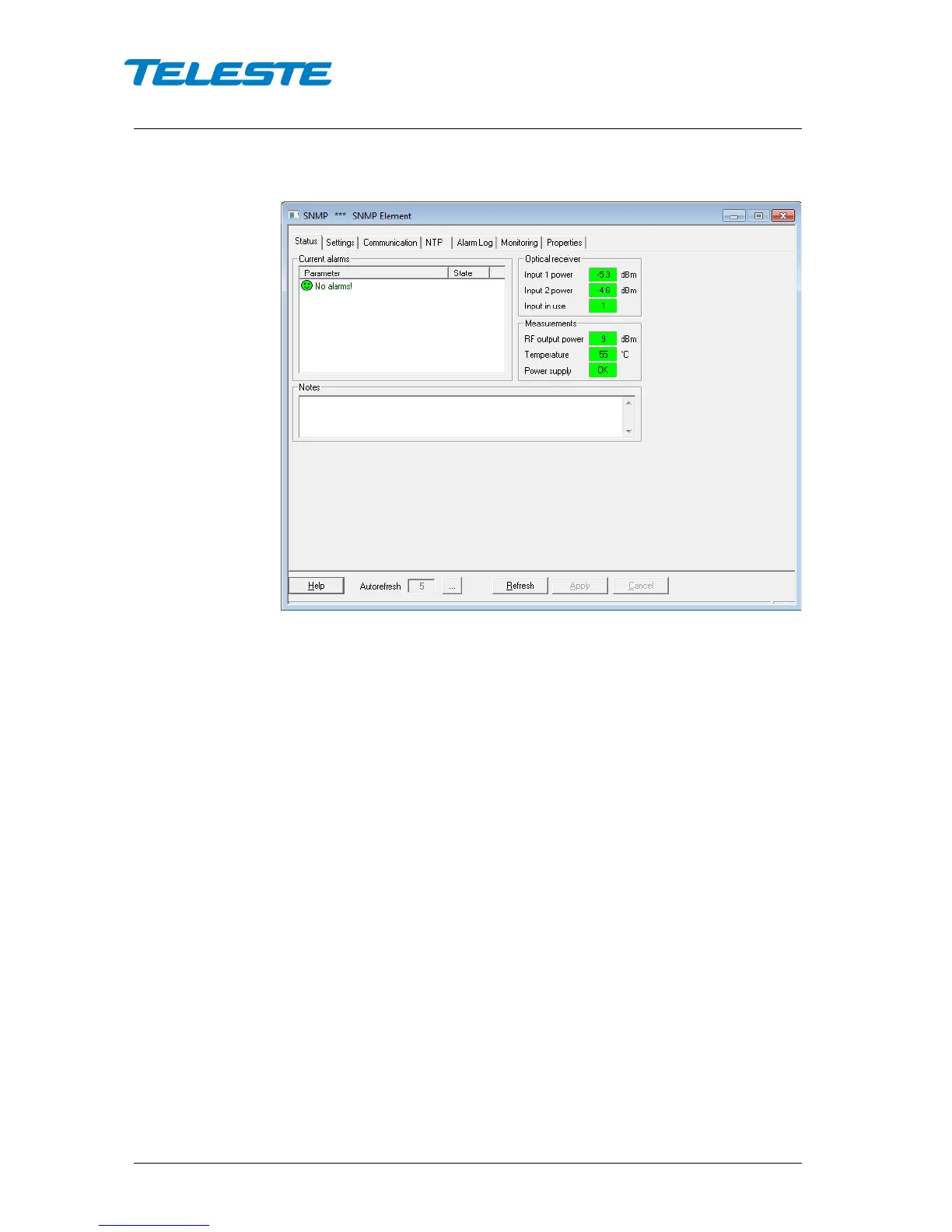
Status viewer page
Figure 6. CXE852 Status page
Current alarms
The Status page shows unit's present status and possible alarms. Each alarm is
colour coded according to its severity. The severities can be configured through
"Monitoring" viewer page. For additional information about alarms, see table of
module alarm descriptions in the "Alarms" chapter.
Optical receiver
Measured optical input levels are displayed in the “Optical receiver” frame. The
background colour of the “Input power” data field changes to indicate alarms.
The ”Input 2 power” and “Input in use” data fields are not visible with CXE851.
Measurements
The measurement frame shows read-only information about the CXE85x. The
background colour of each field shows the parameter's alarm status. Alarm
limits and severities can be configured through "Monitoring" page.
Notes
The “Notes” field allows storing up to 100 character message into CXE85x non-
volatile memory. It can be used for example as a reminder for the next service
technician.


 To Next Page