User Manual CXE85X
59300464 Rev.005
9.12.2013 21(44)
Communication viewer page
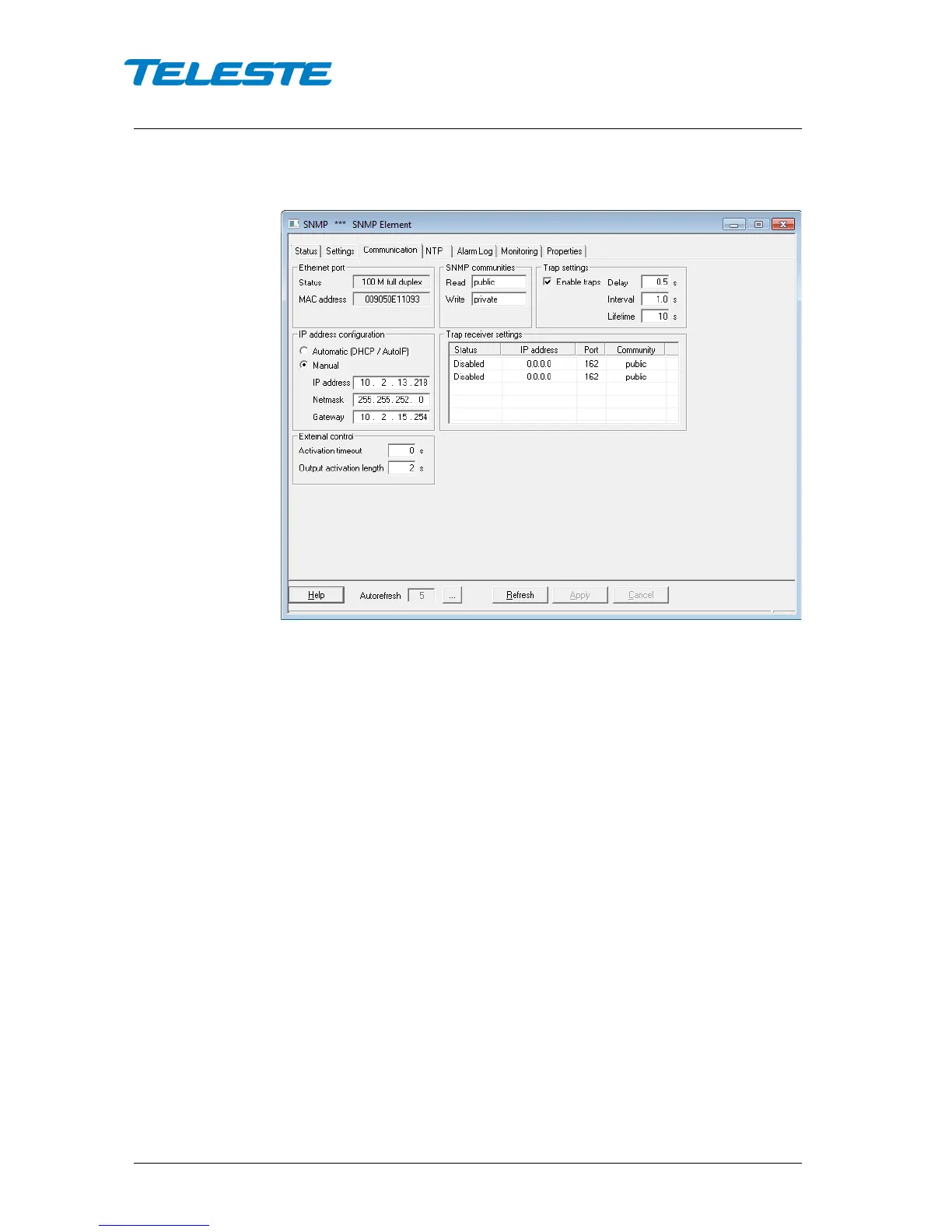
Figure 8. CXE85x Communication page
Ethernet port
Status: Shows the Ethernet port’s connection speed and duplex mode.
MAC address: Shows the Ethernet port’s globally unique MAC address.
SNMP communities
Community names are the security method of SNMPv1 to limit access to the
manageable objects. These should be matched with the community names
used by the SNMP manager and should therefore be based on a network plan.
Trap settings
Enable traps: Enables/disables sending of SNMP traps.
Delay: The time to wait before sending an alarm trap once an alarm is detected.
Interval: The minimum time between successive traps.
Lifetime: The time trap stays in the transmit queue, if it cannot be sent.
IP address configuration
Automatic (DHCP/AutoIP): When enabled, the IP interface will be configured
with a dynamic IP address assigned by DHCP (Dynamic Host Configuration
Protocol). Factory default behaviour of the CXE85x is to request an IP-address
from a DHCP server and then revert to using AutoIP. Thus a Windows PC can
be directly connected to the unit as it also uses AutoIP feature if no DHCP
server is available.
Manual: When enabled, IP settings can be configured manually. CXE85x
automatically returns to using DHCP if manual settings are not consistent.


 To Next Page