User Manual CXE85X
59300464 Rev.005
9.12.2013 29(44)
Web user interface
CXE85x has a web browser user interface (WebUI) which can be used to read
and adjust RF controls and to monitor the status of the unit. It is also possible to
update the unit software via WebUI.
To connect to the device with a web browser, simply enter the device IP
address into the web browser’s address bar and the unit’s “Home” page will
appear.
WebUI’s page structure is very similar to the CATVisor viewer. More dedicated
info is presented in viewer page chapter. Only different and extra page is
“Maintenance” for software update.
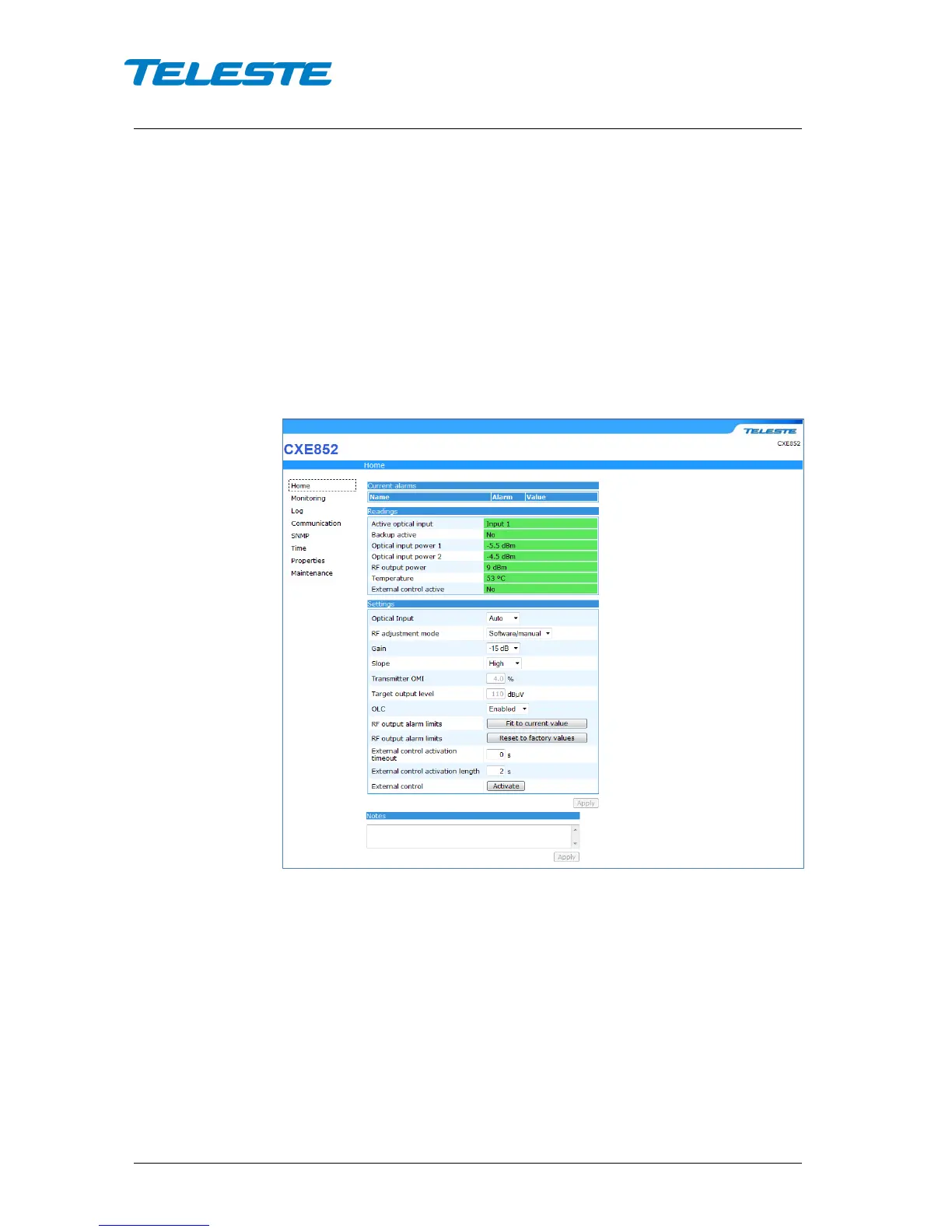
Home WebUI page
Figure 15. CXE852 Home page
The Home page displays unit's alarm list together with measurement data.
Current alarms
Each alarm in the alarm list on the bottom left corner is colour coded according
to its severity. The severities can be configured through "Monitoring" page.
Readings
The "Readings" displays all monitored parameters and their values.
Settings
The “Settings” page displays all the data and settings of the CXE85x. See
“Viewer pages / Settings viewer page” and “Viewer pages / communication


 To Next Page