User Manual CXE85X
59300464 Rev.005
9.12.2013 36(44)
Time WebUI page
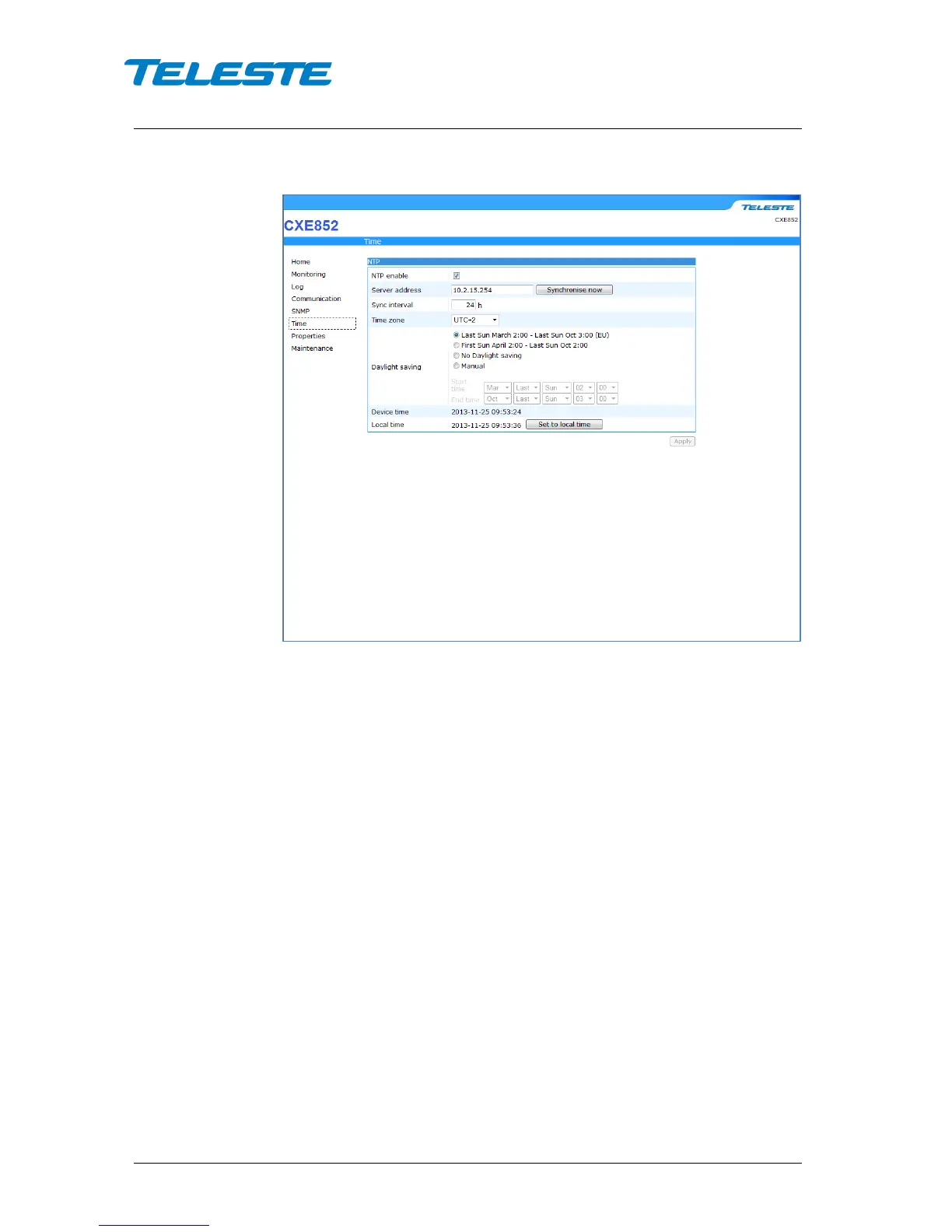
Figure 20. Time page
The CXE85x can use Network Time Protocol (NTP) to get the correct time
automatically from a NTP server across a network. Because the CXE85x uses
the time from its system clock for each log message it generates, the time must
be set correctly.
NTP enable:
Check the box to enable NTP settings. By default, this option is
disabled.
Server address: Specify the IP address of an NTP server from which the
CXE85x obtains its date and time settings.
Server enable: Enable NTP by selecting the check box. Use the “Synchronize
now button if you want to synchronize the device’s date and time with those of
NTP server.
Synchronize interval: Select an interval in seconds at which you want to adjust
the device’s time referring to NTP server.
Timezone: Set the time difference from Coordinated Universal Time (UTC) in
the area where the device is installed.
Device time: Displays the date and time of the device.
Local time: Displays the date and time of the connected PC. Use the “Set local
time” button to get the time from your PC connected to the CXE85x.


 To Next Page