User Manual CXE85X
59300464 Rev.005
9.12.2013 23(44)
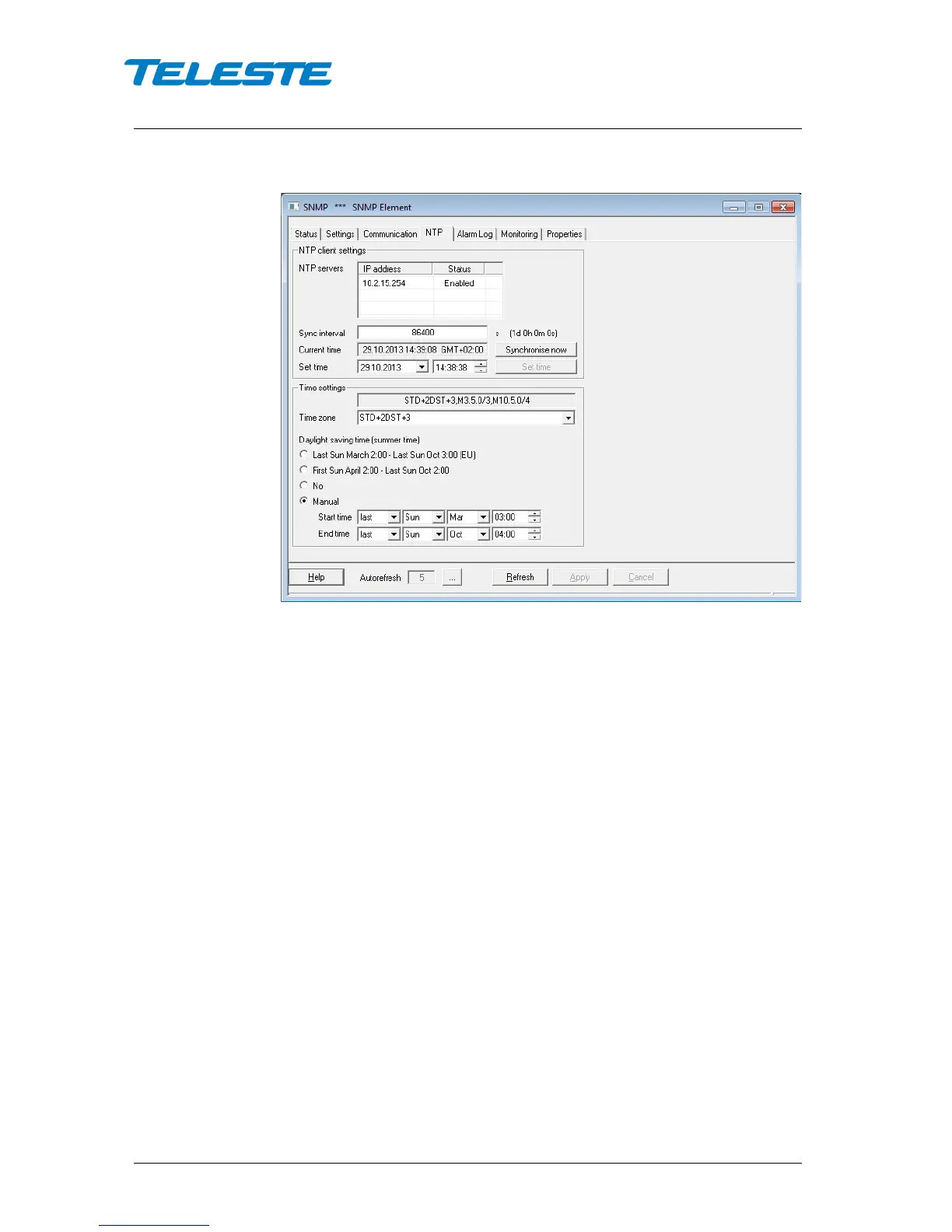
NTP viewer page
Figure 9. CXE85x NTP page
CXE85x can use Network Time Protocol (NTP) to get the correct time
automatically from a NTP server across a network. Because the CXE85x uses
the time from its system clock for each SNMP trap it generates, the time should
be set correctly.
NTP client settings
NTP servers: Specify the IP address of an NTP server from which the CXE85x
obtains its date and time settings.
Sync interval: Select an interval in seconds at which you want to adjust the
device’s time referring to NTP server.
Current time: Displays CXE85x’s current time. Use the “Synchronize now
button if you want to synchronize the device’s date and time with those of NTP
server.
Set time: If NTP server is not available the date and time can be defined
manually.
Time settings
Time zone: The appropriate time zone is selected to specify the offset from
UTC
.
Daylight saving: In EU, Daylight Savings Time (DST) begins on the last
Sunday of March and end the first Sunday of November. The EU uses the "last
Sun Mar - last Sun Oct". (Note: UTC stands for Coordinated Universal Time). If
you would like daylight saving time to be manually configured for time zone,
check the “Manual” radio button and set dates and times on which daylight
savings time will stop and start..


 To Next Page