User Manual CXE85X
59300464 Rev.005
9.12.2013 25(44)
Monitoring viewer page
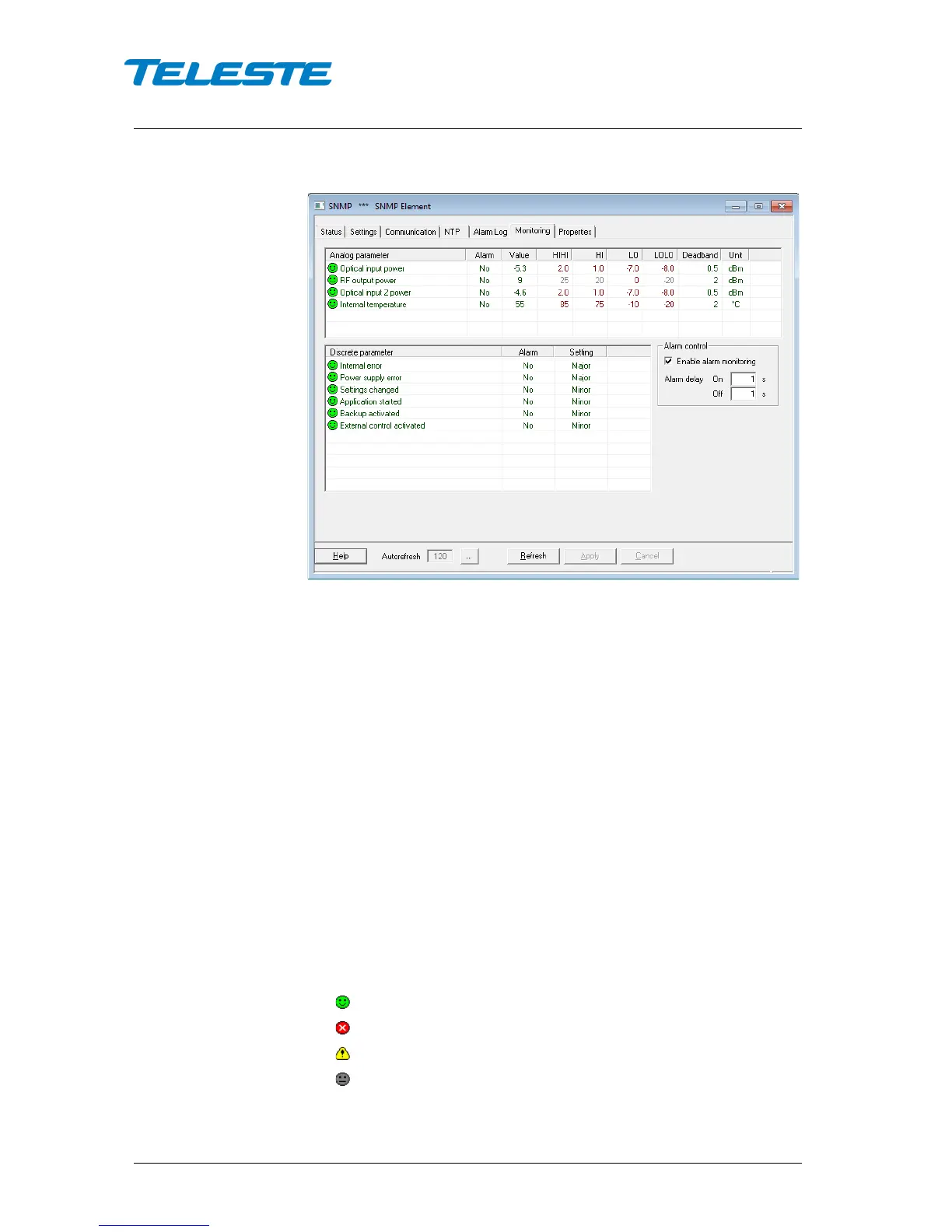
Figure 11. CXE85x Monitoring page
The "Monitoring" page displays all monitored parameters and their values as
well as alarm limits, statuses and severity settings.
See "Monitored parameters" chapter for descriptions of CXE85x alarms.
Analog parameters
Each monitored analog parameter of the unit is displayed in the upper half of
the frame with following information in the list:
Analog parameter: Name of the monitored parameter.
Alarm: Alarm status of the parameter: No / HIHI / HI / LO / LOLO
Value: Current measured value.
HIHI: High major alarm limit
HI: High minor alarm limit.
LO: Low minor alarm limit
LOLO: Low major alarm limit.
Deadband: Specifies how much the measured value has to be on the "safe"
side of alarm limit before turning off the alarm.
Unit: Unit of the measured parameter.
The colour of each list entry and the icon indicates alarm status:
- green for nominal value
- red for major alarm
- yellow for minor alarm
- grey for disabled alarm


 To Next Page